
Dashboards: SSH
The SSH The SSH (secure shell) protocol provides for secure connections between computers. It provides several options for authentication, including public key, and protects the communications with strong encryption. Dashboard presents three panels that summarize SSH attributes observed in captured client–server traffic, giving you a high-level view of SSH usage across your environment.
Main Menu → Dashboards → SSH
SSH Panel
Overall counts of Relationships by SSH version, in data point and doughnut chart graph formats, with post-quantum readiness indicators, and drilldown and filter data points.
-
Relationships (count)
-
PQC
Cryptographic algorithms designed to be secure against the potential capabilities of quantum computers, which could break traditional encryption methods. Relatiobnship(count) -
Servers (count)
-
Clients (count)
Over Time by Relationships or Traffic Volume Panel
A dropdown to choose between displaying:
-
Relationships: Area chart of
Tip: A relationship is a client communicating with a service on a server over a specific protocol/port during a connection. When available, the TLS TLS (Transport Layer Security) and its predecessor SSL (Secure Sockets Layer) are protocols for establishing authenticated and encrypted links between networked computers./SSH handshake details and certificate(s) used for that communication are recorded with the relationship. -
Traffic Volume: Area chart showing identified
The dashboard results can be filtered and the time frame updated using the Filter Bar (see Filtering).
Click the  icon to filter the dashboard further by that data point.
SSH Key Panel
Authentication relationship analysis via four doughnut charts with drilldown and filter data points:
-
Key Exchange type
-
Encryption type
-
Message Authentication type
-
Compression type
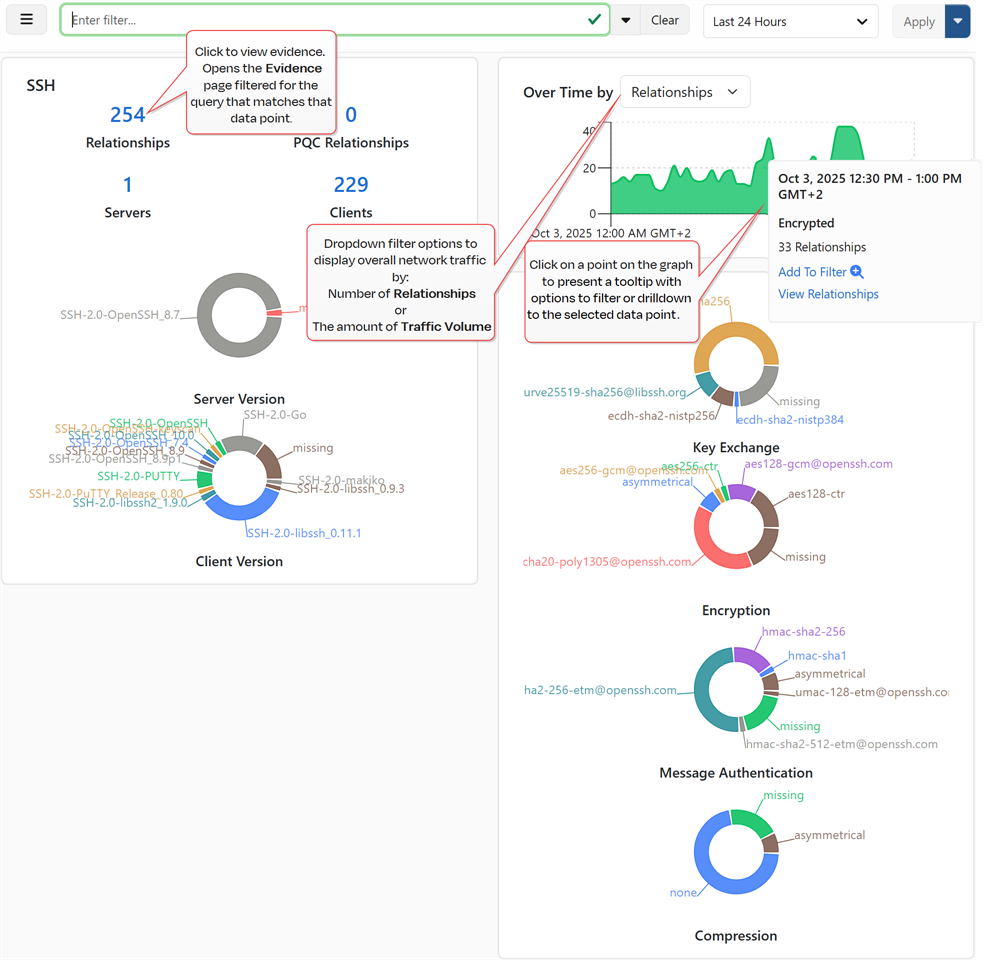
Figure 30: SSH Protocol Specific Dashboard
Was this page helpful? Provide Feedback