
SAML
CipherInsights supports SAML 2.0 with external identity providers (e.g., Okta, Azure AD, ADFS, Keycloak). Users authenticate at your IdP, and CipherInsights authorizes access by mapping SAML groups to product roles.
Map SAML group values from the assertion to CipherInsights roles. For each role, enter one or more group strings (comma-separated). On login, any matching group grants that role.
Admin Area → Access Control → SAML
Configure SAML
To configure SAML:
-
Browse to Admin Area → Access Control → SAML and complete the fields as per the table, below.
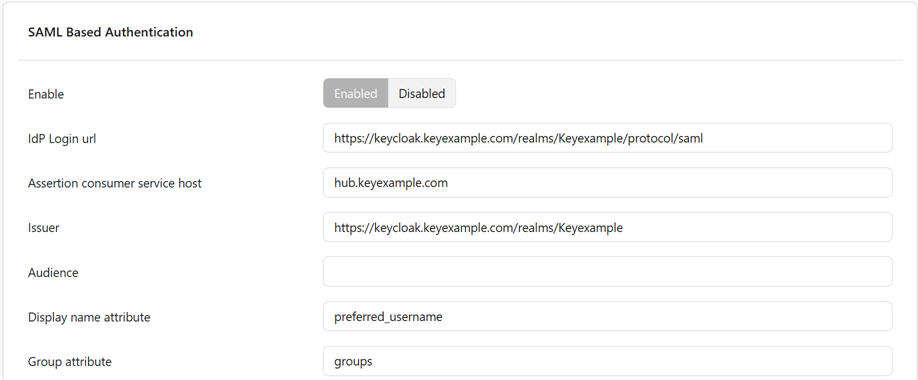
Figure 69: Configure SAML
- At the bottom of the form click Commit to save.
Table 6: SAML Configuration
| Section | Setting | Description | Default |
|---|---|---|---|
| General | Enable | Turn SAML sign-in on/off for the Analytics Hub portal. | Disabled |
| General | IdP Login url | The IdP’s Single Sign-On (SSO) endpoint (SAML 2.0, typically HTTP-Redirect binding). Your IdP provides this. Required. | |
| General | Assertion consumer service host |
Hostname used to build the ACS URL when Request ACS URL is enabled. Example ACS host: hub.keyexample.com
Becomes ACS URL (note HTTPS): https://hub.keyexample.com/saml/callback
Register this exact ACS URL in your IdP application. Although this field is optional here, it is required by many IdPs when Request ACS URL is enabled. |
|
| General | Issuer | The Service Provider (SP) Entity ID that CipherInsights sends in AuthnRequests. Some IdPs require this to match the application’s configured Entity ID. Optional—depends on the IdP. | |
| General | Audience | Expected AudienceRestriction value in incoming assertions (who the assertion is for). Usually the same as your SP Entity ID/Issuer. Set this if your IdP includes an Audience claim and requires a match. | |
| General | Display name attribute | Name of the SAML attribute that contains the user’s friendly display name (e.g., displayName, name, or a directory-specific claim URI). | displayName |
| General | Group attribute | Name of the SAML attribute that contains the user’s group list (strings). Ensure your IdP is configured to send groups in the assertion; these values are matched to roles. | Groups |
| General | Request ACS URL | When enabled, CipherInsights includes the AssertionConsumerServiceURL in AuthnRequests (SP-initiated SSO). Many IdPs require this and will compare it to the application’s configured ACS URL. | Disabled |
| General | Verify assertions signature | Require a digital signature on the Assertion element. Recommended. | Enabled |
| General | Verify top level signature | Require a digital signature on the Response element. Recommended. Some IdPs sign both the Assertion and Response; enabling both is safest if your IdP supports it. | Enabled |
| General | IdP certificate |
Paste the IdP’s public X.509 certificate (PEM) used to verify SAML signatures. Required. Note: PEM only; do not paste private keys. Update here before the IdP rotates certificates.
|
|
| Role to Group Mapping | Admin | Comma-separated list of groups to associate with the Administrator role (see Roles). | |
| Role to Group Mapping | Operator | Comma-separated list of groups to associate with the Operator role (see Roles). | |
| Role to Group Mapping | Unrestricted | Comma-separated list of groups to associate with the Unrestricted role (see Roles). | |
| Role to Group Mapping | User | Comma-separated list of groups to associate with the User role (see Roles). |
Was this page helpful? Provide Feedback