
This section describes the steps that need to be taken before a Keyfactor Command upgrade to complete the prerequisites, create any required supporting components, and gather the necessary information to complete the Keyfactor Command upgrade process.
The following are some key things to be aware of and preparation steps that need to be addressed to upgrade to version 26.2.1.
Release 26.2.1 or Later
-
Universal Orchestrator Pre-Upgrade Task
A change to orchestrator
 Keyfactor orchestrators perform a variety of functions, including managing certificate stores and SSH key stores. registration in this release introduced an issue that can prevent Universal Orchestrators earlier than 26.2 from running jobs after the upgrade. To avoid this issue, at least 24 hours before upgrading Keyfactor Command, update the Agents > General > Session Length (minutes) application setting to 10.The shorter session length makes orchestrators re-register frequently, which mitigates this issue. Orchestrators don't use the new session length until their current session expires, which can take up to 23 hours with the default setting. This issue will be resolved in a future release.
 -
Upgrade order for Universal Orchestrators
Upgrade Keyfactor Command before upgrading Universal Orchestrators to version 26.2 or later. This release introduces orchestrator pools, and Universal Orchestrator 26.2 depends on the corresponding Keyfactor Command changes. If Universal Orchestrator is upgraded first, it will not be able to communicate with Keyfactor Command.
After Keyfactor Command is upgraded, existing orchestrators are automatically placed in generated one-to-one pools. These pools preserve existing behavior for orchestrators that do not support high availability and cannot be managed directly. To support highly available pools with multiple orchestrators, upgrade the applicable Universal Orchestrator instances to version 26.2 or later.
-
EJBCA Certificate Template Names
Release 25.4 introduced a simplified naming convention for EJBCA certificate templates when the certificate profile and end entity profile names match. In this case, Keyfactor Command uses the end entity profile name only, instead of combining the end entity profile name and certificate profile name.
Earlier releases included a defect that prevented this naming convention from being applied correctly to certificates enrolled directly in EJBCA, outside of Keyfactor Command. In these cases, certificates could be associated with an incorrectly constructed template
A certificate template defines the policies and rules that a CA uses when a request for a certificate is received. name, such as CorpTemplateName100_CorpTemplateName100. Because templates are also created during periodic template import, this could result in duplicate templates, such as both CorpTemplateName100_CorpTemplateName100 and CorpTemplateName100.This issue is resolved in this release.
On upgrade, incorrect duplicate templates are removed where possible. If the shortened template and longer duplicate template no longer match, such as when one template’s settings have been edited, the duplicate template is not removed automatically. The duplicate template is also not removed if it is associated with alerts, workflows, or legacy reports. In these cases, a log message is written indicating that manual cleanup is required.
Existing certificates associated with the incorrect template name are automatically reassigned to the correct template, with the shortened name, during the next full CA
A certificate authority (CA) is an entity that issues digital certificates. Within Keyfactor Command, a CA may be a Microsoft CA or a Keyfactor gateway to a cloud-based or remote CA. synchronization.To avoid reintroducing the issue, upgrade any CA Connector Clients to version 26.2 or later.
Release 25.5 or Later
-
ASP.NET Version: Keyfactor Command and the Keyfactor CA Policy Module now both require .NET 10.0. Environments running earlier versions must upgrade to .NET 10.0 before upgrading Keyfactor Command or the Keyfactor CA Policy Module.
-
Workflow: This release introduces updates to workflow
A workflow is a series of steps necessary to complete a process. In Keyfactor Command, it refers to the workflow builder, which allows you to automate event-driven tasks such as when a certificate is requested, revoked or found in a certificate store. configuration and management. Workflow definitions now support multiple keys. Workflow step configuration is managed outside of workflow definition configuration, and tokens can be used to dynamically resolve approvers for steps that require signals. During upgrade, existing workflow definitions are automatically migrated to the new key model, with exactly one workflow key created for each existing workflow definition using the previously configured key value.
Release 25.4 or Later
-
Certificate Store Containers: Certificate store containers are now known as applications and are no longer tied to the type of the certificate store; certificate stores of different types may be associated with the same application.
-
Enrollment: The list of certificate templates for enrollment
Certificate enrollment refers to the process by which a user requests a digital certificate. The user must submit the request to a certificate authority (CA). is now refreshed from the CAs by a periodic task that runs every five minutes (see Keyfactor Command Service Automated Tasks). The results are cached locally on the SQL Server to reduce CA requests and improve performance. The cache lifetime is 180 minutes by default and can be adjusted through an application setting (see Application Settings: Enrollment Tab). After upgrade, enrollment remains unavailable until the cache is initially built. -
Special Text Tokens: Support for substitutable Active Directory–based special text tokens (for example, requester:mail or principal:displayname) has been restored in alerts. These tokens, previously removed in version 24.4 (see Release 24.4 or Later), are now available again for customers using Active Directory as their identity provider.
The restored tokens are:
- {requester:mail}
- {requester:givenname}
- {requester:sn}
- {requester:displayname}
- {principal:mail}
- {principal:givenname}
- {principal:sn}
- {principal:displayname}
Release 25.2 or Later
-
Post-Quantum Computing: On upgrade, certificate template records will be updated with fields to reflect ML-DSA algorithm support, but all fields will default to No support until a template synchronization is completed, at which point the data will be updated to reflect the accurate algorithm support from the CA.
Release 25.1.1 or Later
-
Enrollment Patterns: On upgrade, certificate templates configured for CSR
A CSR or certificate signing request is a block of encoded text that is submitted to a CA when enrolling for a certificate. When you generate a CSR within Keyfactor Command, the matching private key for it is stored in Keyfactor Command in encrypted format and will be married with the certificate once returned from the CA. or PFX A PFX file (personal information exchange format), also known as a PKCS #12 archive, is a single, password-protected certificate archive that contains both the public and matching private key and, optionally, the certificate chain. It is a common format for Windows servers. enrollment will automatically generate a Template Default enrollment pattern based on their configurations. Details for this are found in the 2025 First Quarterly Release - 25.1.1 Notes. Customers should review these patterns. -
Restrict Allowed Requesters Enabled: Templates with this setting and an Allowed Requesters list will have their enrollment patterns updated to include the security roles in the Associated Roles list, and Use AD Permissions will be turned off.
-
Restrict Allowed Requesters Disabled: Templates with this setting will have Use AD Permissions turned on if associated with a DCOM CA.
-
CA Enrollment Settings: The CA-level settings for Enable PFX Enrollment, Enable CSR Enrollment, and Restrict Allowed Requesters will be cleared except in the case of standalone CAs. If either Enable PFX Enrollment or Enable CSR Enrollment was previously turned on, the Use for Enrollment option will be turned on.
-
Containers under Kubernetes and Workflow:
The Use Custom PowerShell workflow step is not supported when running in containers under Kubernetes. Existing workflows containing this step will continue to function after migration, but the Use Custom PowerShell step will generate an error and not execute. The Set Variable Data step remains supported.
To prepare for migration, customers should review workflows to identify any use of the Use Custom PowerShell step and evaluate whether the Set Variable Data step could serve as a replacement. For assistance, visit the Keyfactor Support Portal(opens page in a new tab) to open a support case and request an upgrade readiness script.
-
Containers under Kubernetes and Legacy Alert Handlers:
PowerShell handlers are not supported in legacy alerts when running in containers under Kubernetes. Alerts containing a PowerShell handler will trigger after migration, but the PowerShell portion will generate an error and not execute.
Customers should review their alerts before migration to identify any use of PowerShell handlers and assess whether workflows with the Set Variable Data step could provide an alternative. Visit the Keyfactor Support Portal(opens page in a new tab) to open a support case and obtain an upgrade readiness script for assistance.
Release 24.4 or Later
- Containers under Kubernetes and Application-Level Encryption: Customers wishing to migrate from Keyfactor Command implementations on Windows under IIS to implementations in containers under Kubernetes who are using application-level encryption, will need to re-encrypt their Keyfactor Command databases using a raw AES key before migrating to an implementation in containers under Kubernetes. For more information, see Application-Level Encryption.
- Containers under Kubernetes and Legacy Alerts: Customers wishing to migrate from Keyfactor Command implementations on Windows under IIS to implementations in containers under Kubernetes who are using event handlers with the legacy alerting system (see Alerts), will need to migrate these alerts to workflows before migrating to an implementation in containers under Kubernetes. For more information, see Using Event Handlers.
- Standalone Database Upgrade Tool: Release 24.4 introduces a separate, command-line, database upgrade tool that can be used ahead of the Keyfactor Command software installation to bring the database up to the current version. This can be used to test database upgrades and resolve any issues before going forward with a full Keyfactor Command upgrade. For more information, see Using the Database Upgrade Tool.
- Local PAM Secrets: Keyfactor Command now offers the option to store secret data such as passwords in a Keyfactor Command local PAM PAM (Privileged Access Management): Controls privileged access by vaulting credentials, enforcing least-privilege/just-in-time access, rotating secrets, and auditing sessions. Across Keyfactor products, PAM protects diverse sensitive operations and secrets—for example certificate stores and CA credentials—via built-in or third-party providers; external integrations are delivered as custom PAM extensions (several published on Keyfactor’s public GitHub). database. Consider whether you want to migrate to using this local Keyfactor Command PAM solution for your secrets. Note that this option was introduced in release 12.3 and fully realized in release 24.4 with the availability of secret management through the Keyfactor Command Management Portal.
-
Special Text Tokens: Substitutable Active Directory–based special text tokens (for example, requester:mail or principal:displayname) are no longer supported in alerts. The base requester token remains available because it is not specific to Active Directory.
Alerts configured to use requester:mail or principal:mail for message delivery will fail unless updated to use an alternate email address. Customers currently relying on these tokens should plan an alternative delivery method.
The requester:mail token remains available for use in workflows, which can also query for additional data using PowerShell or REST API
An API is a set of functions to allow creation of applications. Keyfactor offers the Keyfactor API, which allows third-party software to integrate with the advanced certificate enrollment and management features of Keyfactor Command. calls as needed. While Expiration alerts can be delivered via workflow, the Issued, Denied, and Pending alert types do not currently support this option.The removed tokens are:
- {requester:mail}
- {requester:givenname}
- {requester:sn}
- {requester:displayname}
- {requester:field}
- {principal:mail}
- {principal:givenname}
- {principal:sn}
- {principal:displayname}
- {principal:field}
- {upn}
Release 12.0 or Later
- FIPS Compliance: Customers wishing to be FIPS-compliant should select Configure Encryption on the Database tab of the Keyfactor Command configuration wizard and then select Application and SQL and select an encryption certificate. For more information, see Application-Level Encryption.
- System Requirements: Keyfactor Command version 12.0 and later require ASP.NET Core version 8.0. For more information, see System Requirements.
Release 11.0 or Later
-
Classic API:
Important: The Classic API, also known as the CMS API or CMSAPI, was removed in Keyfactor Command version 11.0. Customers should migrate all uses of the Classic API to the Keyfactor API prior to upgrading to Keyfactor Command versions 11.0 or later. -
Identity Provider Migration: If you’re migrating from Active Directory to an OAuth identity provider in version 11.0 or later, be aware that it’s important to leave Basic Authentication and Windows Authentication turned off in IIS once you turn on the OAuth option in the Keyfactor Command configuration. Attempting to use OAuth with Basic Authentication and/or Windows Authentication turned on can result in unexpected access to Keyfactor Command by users with lingering Active Directory permissions in Keyfactor Command from before the upgrade.
Important: Before migrating an existing implementation from Active Directory to OAuth or vice versa, see Migrating to a New Identity Provider. -
Special Text Tokens: Select substitutable special text tokens provide the ability for parts of the Keyfactor Command system to look up data in Active Directory to use in alerts and workflows. Lookups for these locate the object in Active Directory identified by the user or computer account that requested the certificate from the CA and substitute the contents of the referenced attribute. For example, an alert might reference requester:displayname to look up the requester’s display name in Active Directory.
The substitutable special text tokens that begin requester: or principal: (but not the standalone requester token) are only supported when using Active Directory as an identity provider. They cannot be used with other identity providers since there is no Active Directory to query. Customers wishing to use similar functionality with a different identity provider will need to do API calls to query the identity provider, populate the data into a metadata
Metadata provides information about a piece of data. It is used to summarize basic information about data, which can make working with the data easier. In Keyfactor Command, the certificate metadata feature allows you to create custom metadata fields that allow you to tag certificates with tracking information about certificates. field, and use the metadata field when populating alert and workflow messages. -
Virtual Application Information: In Keyfactor Command version 11.0, the route information for each virtual application (the host name
The unique identifier that serves as name of a computer. It is sometimes presented as a fully qualified domain name (for example servername.keyexample.com) and sometimes just as a short name (for example servername)., web site name,
use ssl setting, and virtual directory name) was moved from being stored in the database to being stored in local files on the Keyfactor Command server (one appsettings.json file for each virtual application). On upgrade, the information is copied from the database to each local file. However, if you encounter any issues with the upgrade process, you may be required to re-enter this data. Be sure to make note of the values before beginning your upgrade.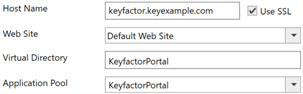
Figure 627: Configuration Wizard Route Information for the Keyfactor Portal
-
Certificate Stores: Be aware of the following certificate store changes in Keyfactor Command version 11.0 and later:
-
The following store types have been deprecated and will no longer be shipped with Keyfactor Command:
All F5 store types, AWS, NetScalerThese store types will not be created in new databases. Upon upgrade, each type will be removed if no stores or containers are defined for that type. For example, if an AWS store or container is defined but other types are not, the AWS type will remain while the other types will be removed.
-
The built-in functions for IIS and FTP certificate store management in the Keyfactor Universal Orchestrator
The Keyfactor Universal Orchestrator, one of Keyfactor's suite of orchestrators, is used to interact with servers and devices for certificate management, run SSL discovery and management tasks, and manage synchronization of certificate authorities in remote forests. With the addition of custom extensions, it can provide certificate management capabilities on a variety of platforms and devices (for example Amazon Web Services (AWS) resources, Citrix\NetScaler devices, F5 devices, IIS stores, JKS keystores, PEM stores, and PKCS #12 stores) and execute tasks outside the standard list of certificate management functions. It runs on either Windows or Linux servers or Linux containers. were deprecated in Keyfactor Command version 11.0.Customers should migrate all uses of IIS certificate store management to the Keyfactor Universal Orchestrator with the IIS custom extension publicly available at:
For more information, see Installing Certificate Store Management Extensions.
If you use the FTP certificate store type, upgrading Keyfactor Command to version 11 does not remove your existing FTP stores or related data. To manage FTP certificate stores after the upgrade, use an earlier version of the Keyfactor Universal Orchestrator that includes the FTP extension.
-
-
Job Status Notification Customizations: If you use a Keyfactor Command Service (timer service) job status notification customization to send notifications when an orchestrator job completes, you must migrate to job completion handlers before upgrading to version 11.0 or later (see Job Completion Handlers). These job status notification customizations are removed during the upgrade to version 11.0 and later and are no longer available or functional after the upgrade.
In versions of Keyfactor Command earlier than 11.0, job status notification customizations are defined in the <unity> section of the CMSTimerService.exe.config file, which is located in the following default path:
C:\Program Files\Keyfactor\Keyfactor Platform\ServiceA Keyfactor Command Service job status notification customization will look something like this:
<register type="CSS.CMS.Service.TimerService.Core.ITimerJobListener, CSS.CMS.Service.TimerService.Core" mapTo="CSS.CMS.Service.Jobs.Maintenance.Managers.AgentJobCompletionManager, CSS.CMS.Service.Jobs" name="AgentJobCompletion"> <property name="NotificationURL" value="http://example.keyxample.com/AgentNotify/api/Submit" /> </register> - Custom Scripts: When upgrading from a version of Keyfactor Command earlier than 11, the upgrade process searches the file location defined in Application settings > Console Tab > Extension Handler Path. All files found in that directory are added to the database using the following naming convention: foldername[_subfoldername]_filename. This naming convention makes it clear which location each script was imported from (for example, net6.0_Workflow_CustomPowershellExample). The upgrade process also identifies any categories configured for each script and adds that information to the database.
Release 10.4 or Later
-
SQL Server 2016 CU2 is no longer supported. Upgrade to SQL 2017, 2019, or 2022 with TLS
TLS (Transport Layer Security) and its predecessor SSL (Secure Sockets Layer) are protocols for establishing authenticated and encrypted links between networked computers. encryption turned on and compatibility level 130 or higher. For more information, see System Requirements.
Release 10.0 or Later
-
Keyfactor Command version 10.0 and later by default connects to SQL with an encrypted connection using an SSL certificate configured on your SQL server. Customers should acquire and install an SSL
TLS (Transport Layer Security) and its predecessor SSL (Secure Sockets Layer) are protocols for establishing authenticated and encrypted links between networked computers. certificate for the SQL server before upgrading to Keyfactor Command version 10.0 or later. For information about configuring TLS for SQL server, seeUsing SSL to Connect to SQL Server) and:If you would prefer not to use an encrypted channel for your connection to SQL, see Configurable SQL Connection Strings.
- All CA Gateways must be upgraded to AnyGateway The Keyfactor AnyGateway is a generic third-party CA gateway framework that allows existing CA gateways and custom CA integrations to share a common product architecture.
AnyGateway is available in two formats: a DCOM-based gateway and a REST-based gateway. The REST-based AnyGateway is the newer implementation and is recommended for new deployments. The DCOM-based AnyGateway is provided for compatibility with existing environments and is planned for eventual retirement. v22.1 to work with Keyfactor Command v10.0 or later.
- Upgrade to SQL Server 2016 CU2 or higher and adjust the database compatibility level if needed. For more information, see System Requirements.
- As of Keyfactor Command version 10.0, Windows Server 2016 is no longer supported. Customers should upgrade to Windows Server 2019 or higher before upgrading to Keyfactor Command version 10.0 or later.
-
If you have any saved certificate collections containing any of the following deprecated certificate search fields, these collections will need to be removed or updated to remove use of these fields that are no longer in version 10.0 and later:
- KeyfactorRequestId
- RequestResolutionDate
- CARequestId
These certificate search fields parsers have been removed to allow for native EJBCA support in Keyfactor Command as of version 10.0.
- If you have the CA Policy module version 7.0 installed on the same server as the Keyfactor Command Management Portal, you’ll need to upgrade the module to version 7.1 or later before running the Keyfactor Command version 10.0 or later upgrade.
Was this page helpful? Provide Feedback