
Reports → Definitions
The new Keyfactor Command reporting feature includes an interactive, widget-based design. It is a flexible and dynamic tool that allows you to configure reports to display important information using pre-defined widgets and user-populated parameters. Reports now come to life with a modern dashboard-style layout, making it easier than ever to spot trends and insights at a glance.
The reporting interface has three elements:
-
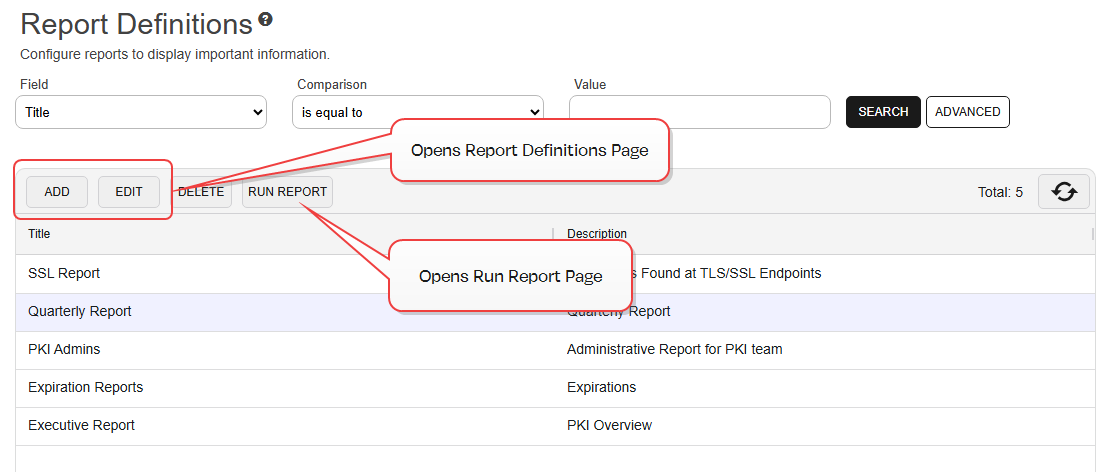
The Report Definitions page displays a searchable grid of existing reports. From here you can delete reports, run existing reports, or access the report configuration workspace (see Figure 84: Report Definitions Page).
-
The Reports Definitions workspace allows you to add, edit, delete, save, or run user-defined reports (see Reports Definitions Operations).
-
The Run Report page allows you to enter data for a report, generate it, and view the results (see Run Report).
 Available Widgets
A parameter or argument is a value that is passed into a function in an application. before generating the report (see Run Report). The values entered at run time apply to all widgets that use the same parameter. For example, if multiple widgets use the default certificate collection The certificate search function allows you to query the Keyfactor Command database for certificates from any available source based on any criteria of the certificates and save the results as a collection that will be available in other places in the Management Portal (for example expiration alerts and certain reports). parameter, they will all use the collection selected when the report is run. This behavior applies to all parameter types. If you need widgets of the same type to use different values, you can Customize Report Parameters.Widget Permissions
Permissions for certificates can be set at the system-wide or resource-specific level. The appropriate level depends on how the certificates are accessed. See Certificate Collection Permissions for more information.
Certificate template A certificate template defines the policies and rules that a CA uses when a request for a certificate is received. permissions are required to turn off the All Applicable Templates option and display the template selection grid when running a report. Without this permission, the option is unavailable and only All Applicable Templates can be used.
Available Widgets
| Title | Description | Parameters | Type | Drilldown and Filtering |
|---|---|---|---|---|
| Active Certificates by Signing Algorithm |
Displays active certificate counts by signing algorithm for a given collection as a (summary table or doughnut chart). Active certificates aren't expired, revoked, or already renewed and have a state of either Active (1), Certificate Authority (6), or Parent Certificate Authority (7). Unknown certificates can be optionally included. Find this on the Certificate Counts Tab |
|
This is a table or doughnut widget. 2 × 2 |
|
| Certificate Count By Issuer |
Displays the total count for all certificates in a collection per issuer in a doughnut chart. Find this on the Certificate Counts Tab. |
|
Doughnut chart widget 2 × 2 |
Hover over a Issuer (doughnut wedge) to see the Issuer information and count.
Drilldown on Issuer (doughnut wedge) opens the certificate search grid with the certificates in the collection per that issuer that make up that count. |
| Certificate Count per Requester |
Displays active certificate counts by requesters for a given collection as a summary table or bar graph. Find this on the Certificate Counts Tab. |
|
This is a summary table or bar graph widget. 1 × 1 |
Table Widget;
Bar Widget:
|
| Certificates by Signature Strength |
Displays certificate counts by SigningAlgorithm signature strength for a given collection as a (summary table or doughnut chart). Category Definitions:
Find this on the Certificate Counts Tab. |
Certificate Collection search select dropdown. |
This is a table or doughnut widget. 2 × 2 |
|
| Certificates Expiring in the Next 12 Weeks |
Displays the total count for all certificates in a collection that are expiring in the 12 weeks from the indicated start date, in a histogram. Find this on the Certificate Counts Tab. |
|
Histogram widget with bars showing counts at 1 week intervals from the start date. Count on the y-axis, date intervals on the x-axis. 3 × 3 |
|
| Certificates Expiring in the Next 36 Months |
Displays the total count for all CA certificates in a collection that are expiring in the 36 months from the indicated start date, in a histogram. Find this on the Certificate Counts Tab. |
|
Histogram widget with bars showing counts at 3 month intervals from the start date. Count on the y-axis, date intervals on the x-axis. 3 × 3 |
|
| Certificates Found at TLS/SSL Endpoints |
The count of latest certificates found at TLS/SSL endpoints within the specified date range and the specified agent pool. Find this on the SSL Tab. |
|
Count tile widget 1 × 1 |
Drilldown on count opens the certificate search grid with the certificates that make up that count. |
| Certificates Issued Per Template |
Displays the total count for all certificates in a collection that have been issued for each template for the timeline indicated, in a line plot. Find this on the Issuance Timelines Tab. |
|
Line plot widget showing dates for the period type and number selected on the x-axis and counts on the y-axis. 3 × 2 |
|
| Deprecated Signing Algorithms |
Displays the certificate counts grouped by deprecated signing algorithm for a given collection. Deprecated signing algorithms are SHA-1 & MD5 and below. Certificates may have SHA1 in different formats (for example; SHA1, SHA-1, SHA 1). Any certificates with these formats are grouped together (same for MD signing algorithms). Find this on the Certificate Counts Tab. |
Certificate Collection search select dropdown. |
This is a doughnut widget. 2 × 2 |
|
| Expired Certificates Within Date Range |
Displays the total count for all expired certificates from the provided date to the current date (evaluation date) in the provided collection in a count tile. Find this on the Certificate Counts Tab. |
|
Count tile widget 1 × 1 |
Drilldown on count opens the certificate search grid with the certificates in the collection that make up that count. |
| Expiring Certificates Within Date Range |
Displays the total count for all expiring certificates from the provided date range in the provided collection in a count tile. Note: If the current date falls within the date range provided, expired certificates will also be included in the count. Find this on the Certificate Counts Tab. |
|
Count tile widget 1 × 1 |
Drilldown on count opens the certificate search grid with the certificates in the collection and date range that make up that count. |
| Header Widget |
A tile that accepts text to allow users to add header information to a report. The text area input can be edited upon adding or editing a report definition but is static upon generating the report. 200 character limit. Accepts only one line of text (does not accept new lines). Find this on the Text Tab. |
None |
A text tile that displays the provided text. 4 × 1 |
|
| Revoked Certificates by Templates For CA(s) |
Displays the number of certificates revoked by indicated templates in the specified date range grouped by CA(s). If templates from different configuration tenants are returned that have the same display name, the configuration tenant is appended to the end of those templates to differentiate between them. Find this on the Certificate Counts Tab. |
|
Stacked bar widget 4 × 4
X-Axis = template names, sorted alphabetically Y-Axis = certificate counts, grouped by CA |
|
| Text Entry Widget |
A tile that accepts text to allow users to add critical or informative information to a report. The text area input can be edited upon adding or editing a report definition but is static upon generating the report. 700 character limit. The text tile supports new lines, and has scrollbar if text extends beyond the tile box size. Find this on the Text Tab. |
None |
A text tile that displays the provided text. 1 × 1 |
|
| Top Ten Issuers |
Displays the top ten certificate issuers and the counts of certificates per issuer. Find this on the Certificate Counts Tab. |
|
This is a grid widget with two columns: Issuer DN and Certificate Count. 2 × 2 |
Clicking on one row enables the View action button. When clicked, the certificate search page, pre-populated with a query which matches that row, opens a new browser window. |
| Total Active Certificates |
Displays the total count for all active certificates in the provided collection in a count tile. Active certificates aren't expired, revoked, or already renewed and have a state of either: Unknown (0), Active (1), Certificate Authority (6), or Parent Certificate Authority (7). Unknown certificates can be optionally included. Find this on the Certificate Counts Tab. |
|
Count tile widget 1 × 1 |
Drilldown on count opens the certificate search grid with the certificates in the collection that make up that count. |
Recreate Legacy Reports Using the New Report Widgets
Table 13: Legacy Reports and New Reports Widget Mapping
| Legacy Report | New Report Widget | Notes |
|---|---|---|
|
|
|
| PKI Status for Collection |
For the grid and drilldown:
For the PKI Overview:
|
|
| Monthly Executive Report | Certificate Count by Issuer | |
| Issued Certificates Per Certificate Authority |
Certificates Issued per Template |
|
| Certificates Found at TLS/SSL Endpoints | Certificates Found at TLS/SSL Endpoints | |
|
|
|
| Certificate Issuance Trends with Metadata | Certificate Count per Requester | |
| Certificate Count by User per Template | Certificate Count per Requester | |
| Certificates by Key Strength | Certificates by Signature Strength |
See dashboard widget Certificates With Weak Keys for similar information. |
| Full Extract Report |
Use certificate search grid (and Get CSV if desired) |
|
| Certificates in Collection |
Use the Collection Manager certificate search grid (and Get CSV if desired). |
|
|
Use SSH menu for some information. |
|
| Revoked Certificates in Certificate Stores |
Use Locations > Certificate Stores menu for some information. |
|
| Certificates by Type and Java Keystores | This report will not be added to the new reporting system as the built-in JKS store type is deprecated. | |
| Certificates by Revoker |
Use certificate search grid (and Get CSV if desired) |