
Custom event handlers are used by expiration and enrollment Certificate enrollment refers to the process by which a user requests a digital certificate. The user must submit the request to a certificate authority (CA). alerts (see Alerts) but not by Keyfactor Command workflows (see Workflow).
System Settings → Event Handler Registration
Registering a Custom Event Handler
The built-in event handlers are registered as part of the Keyfactor Command installation. You should only need to use this option if you have a custom event handler.
This option is only supported for Windows installations under IIS.
To register a custom event handler:
-
Navigate to the ExtensionLibrary folder on your server under the installed folder for Keyfactor Command. By default, this is:
C:\Program Files\Keyfactor\Keyfactor Platform\ExtensionLibrary -
Copy your custom event handler DLL (provided by Keyfactor if the file has been created by Keyfactor) into the ExtensionLibrary folder.
-
On the Event Handler Registration page, click Analyze Handler File.
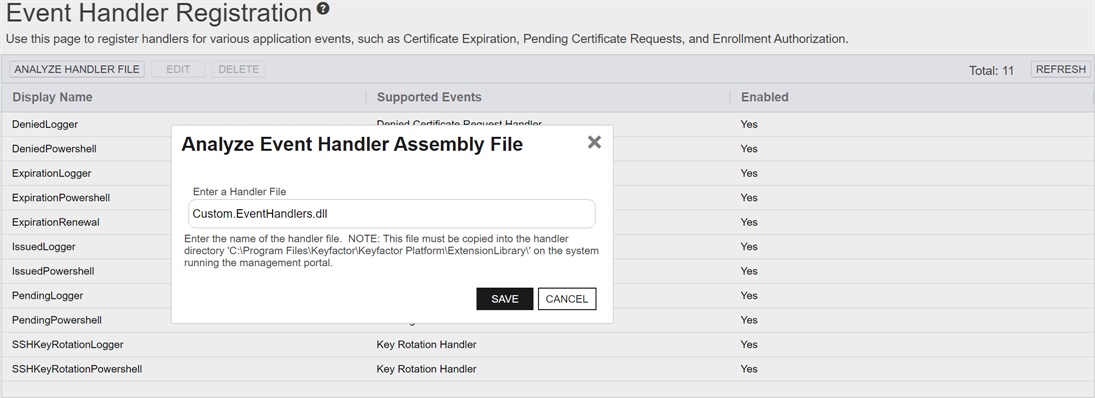
Figure 460: Register a Custom Event Handler
-
In the Analyze Event Handler Assembly File dialog, enter the file name for the event handler file for analysis and click Save.
Deleting an Event Handler
To delete an event handler, highlight the row in the grid and click Delete at the top of the grid.
Editing an Event Handler
To edit an event handler:
- Double-click the event handler or highlight the row in the grid and click Edit at the top of the grid.
- In the Event Handler Registration dialog, you can change the Display Name for the event handler, if desired. This name appears in the dropdowns in the expiration, pending request, issued certificate, and denied request alert configuration dialogs. You can also disable the event handler by unchecking the Enabled box. If you disable an event handler, it will not appear in the dropdowns in the alert configuration dialogs.
- Click Save.
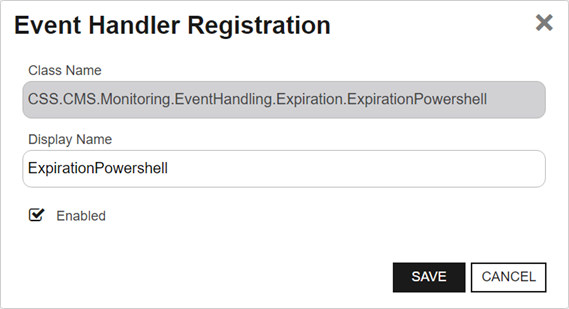
Figure 461: Event Handler Registration Editor
Was this page helpful? Provide Feedback