
The cornerstones of the Keyfactor Command Management Portal are the Certificate Search and the Certificate Details pages. The Certificate Details page, which can be accessed both from the Certificates Search and from the Certificate Stores pages, includes a comprehensive set of details about each certificate managed by Keyfactor Command.
Certificates → Certificate Search (highlight the desired certificate), or Locations → Certificate Stores (select a store and View Inventory)
The following action buttons are conveniently located at the top of the Certificate Details page for users with the appropriate permissions: Revoke (see Revoke), Download (see Download), Renew (see Renew/Reissue), and Change Owner (see Change Owner).
Use the breadcrumbs at the top of the page or the Back button to return to the previous page, or the certificates, or certificate stores, grid.
 Change Owner
The optional certificate owner is a security role defined in Keyfactor Command (see Security Roles and Claims).
Click Change Owner at the top of the Certificate Details dialog for the certificate to change or set the certificate owner.
When opening the Certificate Details from Certificate Search:
When opening the Certificate Details from Certificate Stores:
Expanded change owner functionality is not available when opening Certificate Details from Certificate Stores.
Permissions for certificates can be set at the system-wide or resource-specific level. The appropriate level depends on how the certificates are accessed. See Certificate Collection Permissions
The Change Certificate Owner dialog uses a search select dropdown. To narrow the list of results in a search select dropdown, begin typing in the input field. Matching results will appear as you type, and you can scroll to locate a record. The roles shown are filtered based on the acting user’s security configuration (see Certificates for more details).
The following permissions determine which roles
-
Expanded Change Owner Permission: A user with the Certificates > Expanded Change Owner permission can the certificate owner to any role within the permission sets they belong to. This permission overrides the Certificates > Collections > Change Owner permission (both Global and Collection level) if both are set.
Note: To set the certificate owner using the Expanded Change Owner permission, the user must also have Security > Read permission in the permission set that contains the role being assigned as the certificate owner. -
Collections > Change Owner Permission:
This permission allows a user to
- Global Level: The user can set or change the certificate owner for any certificate to a role they hold.
- Granular Level: The user can set or change the certificate owner only for certificates in certificate collections or certificate store applications they have access to—and only to a role they hold.
- Search Select Disabled: The certificate owner search select dropdown is unavailable if the acting user does not hold the current certificate owner role, either globally or at the collection level, or lacks Security > Read permission in the permission set that contains that role.
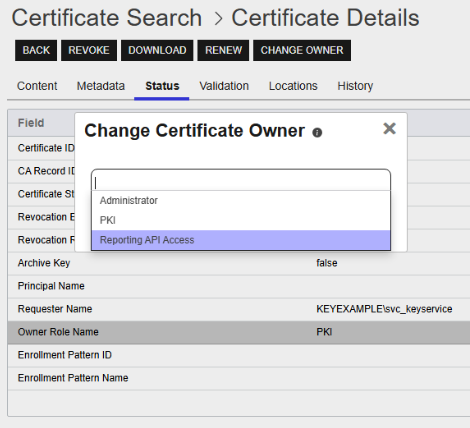
Figure 55: Certificate Details Change Owner
Content Tab
The Content tab shows the certificate attributes from the CA A certificate authority (CA) is an entity that issues digital certificates. Within Keyfactor Command, a CA may be a Microsoft CA or a Keyfactor gateway to a cloud-based or remote CA. (Active Directory in the case of a Microsoft CA). These fields are not editable. Some things to note for this tab:
-
The list of Subject Alternative Names (SANs) and Total SANs count are included on this tab.
-
The Extended Key Usage (EKU) field will show an OID
Object identifiers or OIDs are a standardized system for identifying any object, concept, or "thing" with a globally unambiguous persistent name. if a display name is not available for the value. -
For an ECC
Elliptical curve cryptography (ECC) is a public key encryption technique based on elliptic curve theory that can be used to create faster, smaller, and more efficient cryptographic keys. ECC generates keys through the properties of the elliptic curve equation instead of the traditional method of generation as the product of very large prime numbers. certificate, the Curve field appears on this tab containing the elliptic curve algorithm. -
Hybrid certificates
A certificate that uses a non-PQC (Post-Quantum Cryptography) primary key paired with an alternative key algorithm such as ML-DSA-44, ML-DSA-65, or ML-DSA-87 for enhanced security and quantum resistance. include the following additional fields on this tab:-
Alternative Private Key Is Accessible
This field will show Yes if the private key
Private keys are used in cryptography (symmetric and asymmetric) to encrypt or sign content. In asymmetric cryptography, they are used together in a key pair with a public key. The private or secret key is retained by the key's creator, making it highly secure. for the certificate is stored in the Keyfactor Command database or No if it is not. -
Alternative Key Algorithm
A string representing the alternative key type
The key type identifies the type of key to create when creating a symmetric or asymmetric key. It references the signing algorithm and often key size (for example AES-256, RSA-2048, Ed25519). (for example, ML-DSA-87 An even stronger variant of ML-DSA, offering a larger key size and enhanced security features for demanding cryptographic operations. Like the others in the ML-DSA family, it is designed for specific use cases that require high-performance cryptography.). -
Alternative Signing Usage
A string indicating the signing algorithm used by the CA to generate the alternative signature.
-
-
Is CA Certificate
Indicates whether the certificate is a CA certificate.
-
Lifespan (In Days)
The total number of days between the certificate's issue date and expiration date. This value represents the certificate's full lifespan, not its remaining validity.
-
Maximum Number of Intermediate Certificates
For CA certificates, the maximum number of subordinate CA certificates permitted below the certificate in a certification path. Displayed only when the certificate's Basic Constraints extension includes a Path Length Constraint.
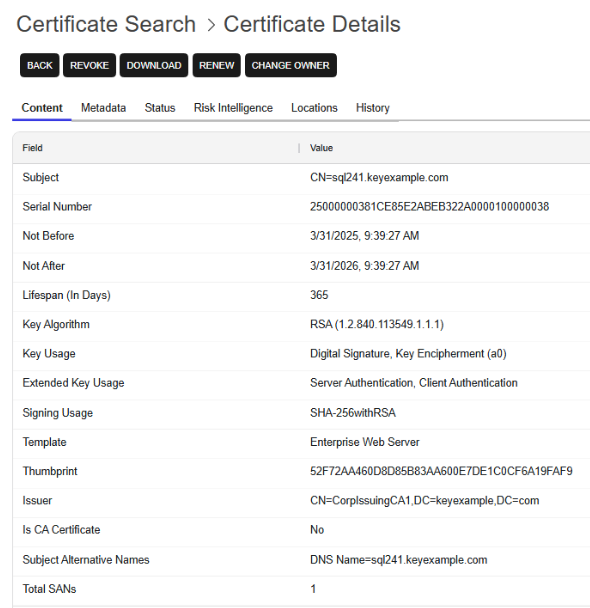
Figure 56: Certificate Details: Content Tab
Double-click a row on the Content tab to open a details dialog showing just the information for that row.
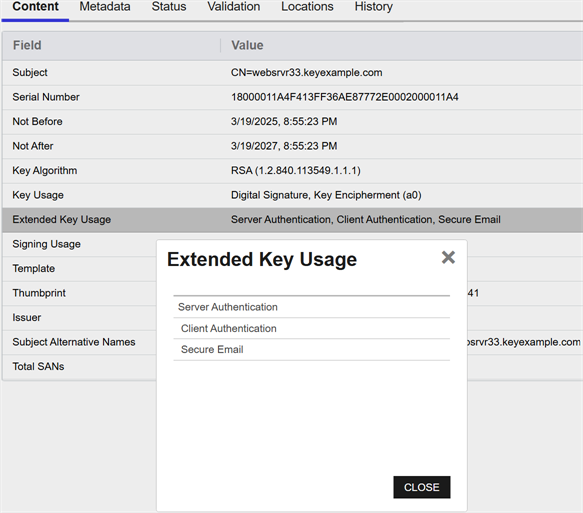
Figure 57: Content Tab: Field Details
Metadata Tab
The Metadata Metadata provides information about a piece of data. It is used to summarize basic information about data, which can make working with the data easier. In Keyfactor Command, the certificate metadata feature allows you to create custom metadata fields that allow you to tag certificates with tracking information about certificates. tab displays all metadata fields created for your Keyfactor Command implementation and shows any data in fields that have been populated with values specific to the certificate. Depending on the metadata type, these fields appear as text boxes, radio buttons, drop-downs, date fields, tables, or large text fields.
For users with edit permissions, on date fields a small popup calendar will appear that allows selection of a date. You may edit values for any metadata fields to update the data. You may also update multiple certificates' metadata with the same data by selecting multiple certificates from the certificates grid. Required fields will be marked with *Required next to the field label. See Certificate Metadata for information on this functionality.
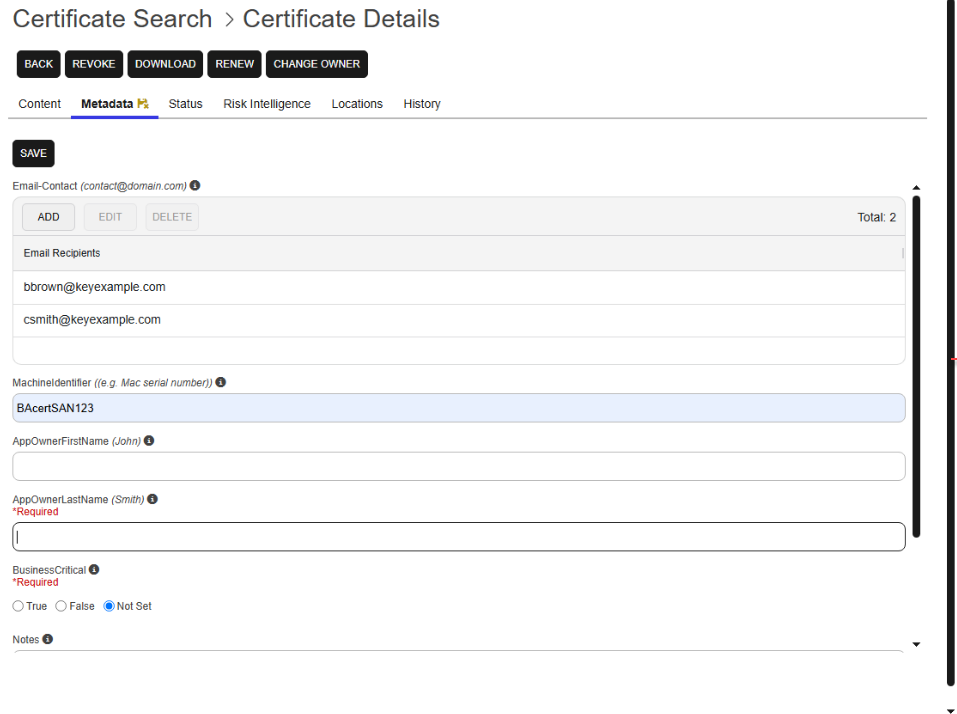
Figure 58: Certificate Details: Metadata Tab
The email metadata type displays a table with the list of email addresses associated with the certificates. Email action options of Add, Edit, and Delete are included.
Email metadata fields support multiple email addresses. Enter multiple addresses separated by commas or semicolons. While editing, the addresses appear as a single entry. After saving, each email address is displayed on a separate row.
Status Tab
The status tab displays some additional information about the certificate (see Table 11: Status Tab Descriptions).
The fields on this tab cannot be edited.
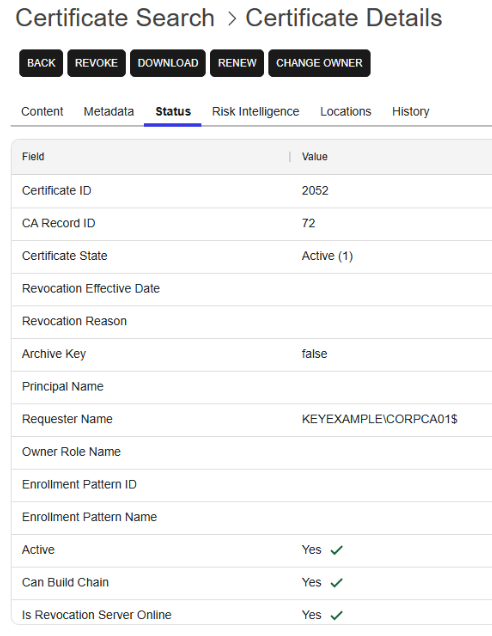
Figure 59: Certificate Details: Status Tab
Table 11: Status Tab Descriptions
| Field | Description |
|---|---|
| Certificate ID |
The Keyfactor Command reference ID for the certificate, which can be useful when referring to the certificate using API methods. Tip: Certificate Id and Keyfactor Id both refer to the same value—the Keyfactor Command–assigned reference ID for a certificate. You may see either name in different parts of the Management Portal or Keyfactor API because Certificate Id was the original term, and Keyfactor Id is its newer replacement. The updated name helps avoid confusion with a different value—the certificate’s identifier on the issuing CA—which is now called the CA Record ID.
|
| CA Record ID | The ID of the certificate in the CA (this has replaced CARequestID). |
| Certificate State |
The state of the certificate:
|
| Revocation Effective Date | If the certificate is revoked, the date it was revoked will be displayed here. |
| Revocation Reason |
If the certificate is revoked, the reason will be displayed here. This is shown as a numeric value, which will be one of:
See Revoke for more information about revoking certificates. |
| Archive Key |
If True, the certificate has a private key archived on the Microsoft CA to support CA key recovery. This flag is not an indicator for whether the certificate has a private key stored in Keyfactor Command. Tip: CA-level key recovery is supported for Microsoft CAs (either directly or with a CA Connector Client) to allow recovery of private keys for certificates enrolled outside of Keyfactor Command. CA-level key archiving is not supported for enrollments done through Keyfactor Command. CA-level key recovery is not supported for Microsoft CAs when using Keyfactor Command installed in containers under Kubernetes or for EJBCA CAs. For enrollments done through Keyfactor Command for either Microsoft or EJBCA CAs, use Keyfactor Command private key retention (see Private Key Retention).
|
| Principal Name | The user principal name (UPN) contained in the subject alternative name (SAN) field of the certificate, if present (for example, username@keyexample.com). |
| Requester Name | The name of the requester—in DOMAIN\User format for requests in environments using Active Directory authentication. |
| Owner Role Name |
The security role, if any, that has been assigned as the owner of the certificate. A certificate owner may be assigned to a certificate in any of these ways:
|
| Enrollment Pattern ID | The ID of the enrollment pattern used to generate the certificate. |
| Enrollment Pattern Name | The name of the enrollment pattern used to generate the certificate. |
| Active | Shows whether the certificate is not yet valid, currently valid, or expired based on its validity dates. |
| Can Build Chain | Shows whether Keyfactor Command can construct a complete certificate chain for the certificate. Values are Yes or No. |
| Is Revocation Server Online |
Indicates whether Keyfactor Command can reach an OCSP responder or hosted CRL associated with the certificate. Keyfactor Command checks the OCSP responder first and, if that check fails, checks the CRL. Values are Yes or No. |
Validation Tab
The Validation tab has been removed as of Keyfactor Command version 25.4. It has been replaced for hosted customers, with proper licensing, with the Risk Intelligence Dashboard. Data from the former Validation tab has been consolidated on the Certificate Details Status Tab tab.
Locations Tab
If you have added the certificate to one or more certificate store locations, a number will appear in the Count column on the corresponding Location Type row. Users with limited permissions will only see locations for certificate stores to which they have been granted permissions either globally or via certificate store applications (see Application Permissions). Click the count number for more details regarding this certificate's location. See Add to a Certificate Store for more information. The Total Cert Store Locations appears at the end of the list. Clicking on the total will open a dialog with the list of locations with the columns: Store Path, Store Machine, Alias, IPAddress, Port, and Agent Pool which will be populated depending on the details of the individual stores.
TLS (Transport Layer Security) and its predecessor SSL (Secure Sockets Layer) are protocols for establishing authenticated and encrypted links between networked computers. network name is searchable with certificate search and also appears in the location details grid of the certificate details, if the certificate was found during an SSL scan.
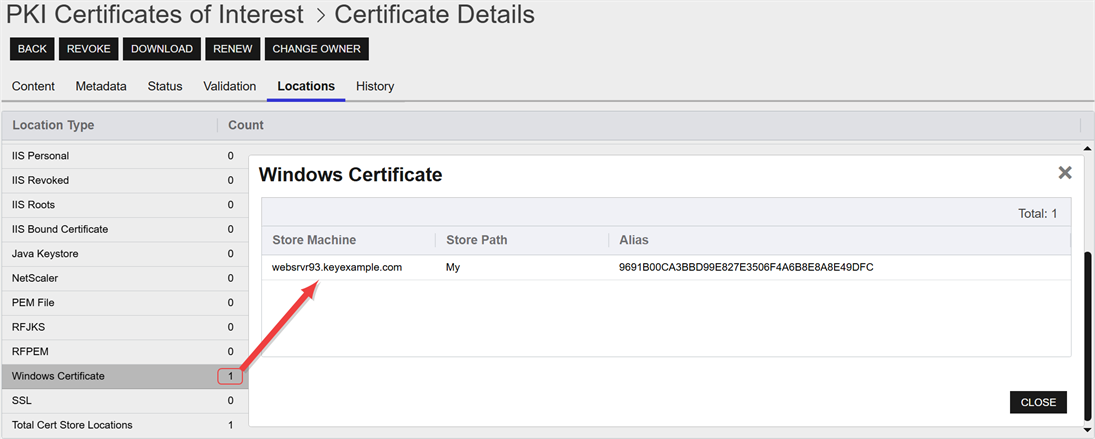
Figure 60: Location Details
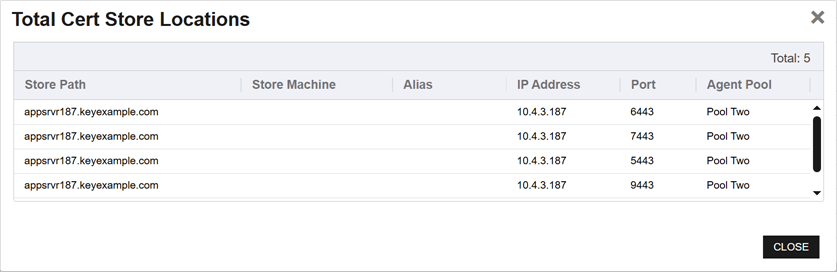
Figure 61: Total Certificate Store Location Details
History Tab
History about a certificate is recorded in the Keyfactor Command database for the following types of activities (see also Audit Log):
- Initial Import: A history entry is made on import via CA synchronization, SSL synchronization, certificate store synchronization or manual import.
- Certificate Enrollment Certificate enrollment refers to the process by which a user requests a digital certificate. The user must submit the request to a certificate authority (CA).: A history entry is made when a PFX A PFX file (personal information exchange format), also known as a PKCS #12 archive, is a single, password-protected certificate archive that contains both the public and matching private key and, optionally, the certificate chain. It is a common format for Windows servers. or CSR A CSR or certificate signing request is a block of encoded text that is submitted to a CA when enrolling for a certificate. When you generate a CSR within Keyfactor Command, the matching private key for it is stored in Keyfactor Command in encrypted format and will be married with the certificate once returned from the CA. enrollment is completed through the Keyfactor Command Management Portal. The source of the request (PFX or CSR) is indicated.
- Revocation: A history entry is made each time a certificate is revoked, so if a certificate is revoked multiple times, there will be multiple history entries.
- Key Recovery: A history entry is made each time the key for a certificate is recovered, so if the key for a given certificate is recovered multiple times, there will be multiple history entries. This type of record is generated when the private key for a certificate is downloaded from the Keyfactor Command database or when a private key is recovered from a CA using the CA's key recovery mechanism.
- Certificate Store Additions and Removals: A history entry is made each time a certificate is added to a certificate store or removed from a certificate store. These entries reference the specific certificate store type and whether the operation was an addition (Add ([store type])) or removal (Remove ([store type])) and include details in the certificate history comments.
- Certificate Renewals: A history entry is made each time a certificate is renewed—or reissued. The certificate renewal history record appears on both the old certificate (renewed from) and the new renewed certificate.
- Certificate Store Inventory Discoveries: A history entry is made each time an inventory of a certificate store notices that a certificate that was in a certificate store no longer is or that a new certificate has appeared in the certificate store. These entries are referenced as Certificate Appeared ([store type]) and Certificate Disappeared ([store type]) with details in the certificate history comments.
- SSL Endpoint An endpoint is a URL that enables the API to gain access to resources on a server. Inventory Discoveries: A history entry is made each time an inventory of an SSL endpoint notices that a certificate that was at an endpoint no longer is or that a new certificate has appeared at an endpoint during a monitoring task. These entries are referenced as Certificate Appeared (SSL Sync) and Certificate Disappeared (SSL Sync) with details in the certificate history comments.
- Metadata Updated: A history entry is made each time a metadata field is updated for the certificate. The changed data will be recorded in the Comment field.
-
Change Certificate Owner: When updating, adding or removing the certificate owner, the user's Expanded Change Owner permission is also considered.
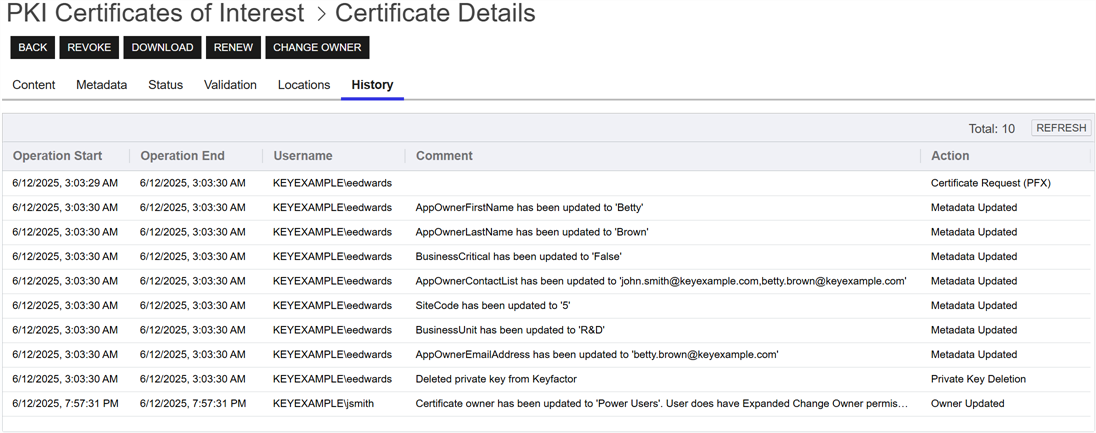
Figure 62: Certificate Operation: Certificate History Tab
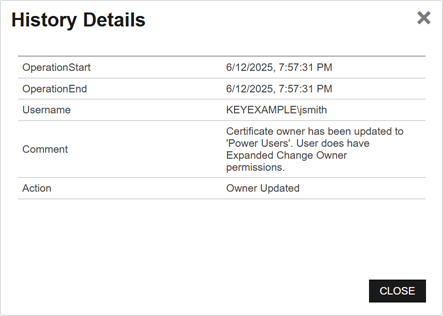
Figure 63: Certificate Operation: Certificate History Detail
Was this page helpful? Provide Feedback