
Permissions on certificate stores and their applications are controlled at two levels—system-wide and on a certificate store application-by-application basis. When designing a certificate store permission scheme, you may use entirely system-wide permissions or you may use a combination of system-wide permissions and application permissions. Both system-wide and application permissions are configured through Security Roles (see Security Role Operations).
System-wide certificate store permissions are controlled with the Certificate Stores role permissions on the Global Permissions tab of the Security Role Information dialog.
 PAM (Privileged Access Management): Controls privileged access by vaulting credentials, enforcing least-privilege/just-in-time access, rotating secrets, and auditing sessions. Across Keyfactor products, PAM protects diverse sensitive operations and secrets—for example certificate stores and CA credentials—via built-in or third-party providers; external integrations are delivered as custom PAM extensions (several published on Keyfactor’s public GitHub). and certificate collection The certificate search function allows you to query the Keyfactor Command database for certificates from any available source based on any criteria of the certificates and save the results as a collection that will be available in other places in the Management Portal (for example expiration alerts and certain reports). permissions, application permissions are not explicitly listed under global permissions. Instead, they are entirely embedded within certificate store permissions and are not separately highlighted in the certificate store permissions section.
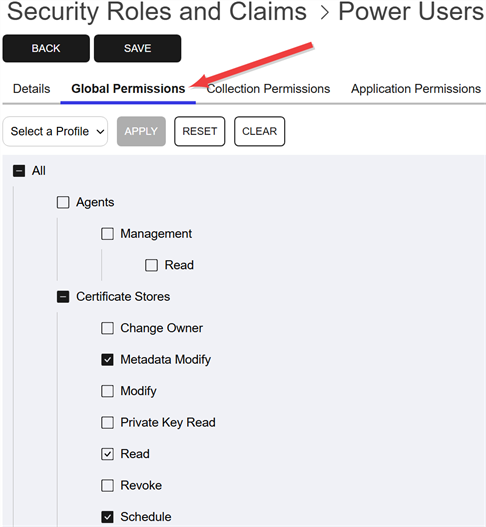
Figure 431: Certificate Stores: Global Permissions
Application-by-application permissions are set on the Application Permissions tab of the Role Information dialog for each application by name using the same set of permissions.
Any applications that do not have application-by-application permissions applied fall back to the system-wide permissions, if any system-wide permissions have been set for that role.
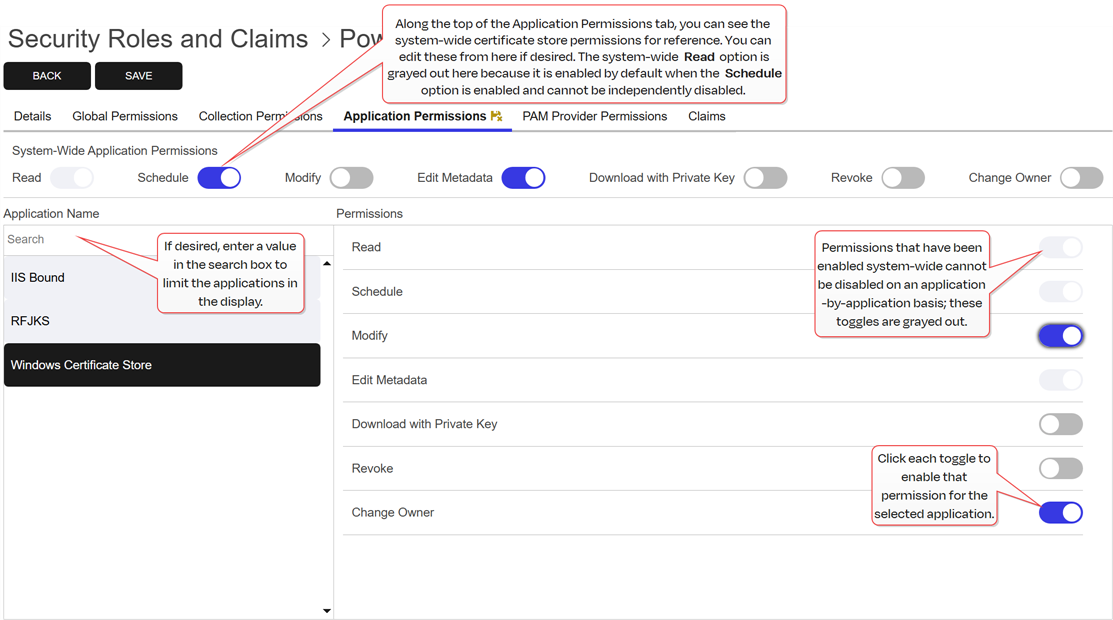
Figure 432: Certificate Store Management - Application Permissions
Application permissions work in conjunction with many other security permissions to control access to certificate store related functionality.
For more information about configuring application-level permissions, see Application Permissions Tab.
Was this page helpful? Provide Feedback