GET Workflow Instances My
The GET //Instances/My operation retrieves the list of initiated workflows created by the user making the request—enrolling for a certificate, for example, or revoking a certificate. Query parameters support filtering using defined criteria, control over pagination by specifying the page number and return limit, and customization of sorting based on specified fields and order. On success, the operation returns HTTP 200 OK with details about the workflow instances.
Note: If a workflow instance is initiated for a workflow definition that has more than one step requiring input (signals), a user can only provide that input (for example, approve or deny a require approval request) at the step in the workflow instance where the workflow instance was suspended pending input. The user cannot jump ahead and provide input for future steps in the workflow that have not yet occurred.
Tip: The following permissions (see
Security Roles and Claims) are required to use this feature:
/workflows/instances/read/
OR
/workflows/instances/read/mine/
Table 1181: GET Workflow Instances My Input Parameters
| QueryString |
Query |
A string containing a query to limit the results (for example, field1 -eq value1 AND field2 -gt value2). The default is to return all records. Fields available for querying through the API for the most part match those that appear in the Keyfactor Command Management Portal search dropdowns for the same feature. For querying guidelines, refer to: Searching Workflows Created by Me. The query fields supported for this operation are:
- DefinitionId (workflow definition ID)
- Id (workflow instance GUID)
- InitiatingUserName (DOMAIN\\username)
- LastModified
- ReferenceId (workflow instance integer ID)
- StartDate
- Status
- Title
- WorkflowType
|
| PageReturned |
Query |
An integer that specifies how many multiples of the returnLimit to skip and offset by before returning results, to enable paging. The default is 1. |
| ReturnLimit |
Query |
An integer that specifies how many results to return per page. The default is 50. Very large values can result in long processing time. |
| SortField |
Query |
A string containing the property by which the results should be sorted. Fields available for sorting through the API include:
-
Id
-
LastModified
-
ReferenceId
Available sort fields are affected by the query provided in QueryString. The default sort field is SQLrecordID.
|
| SortAscending |
Query |
An integer that sets the sort order on the returned results. A value of 0 sorts results in ascending order while a value of 1 sorts results in descending order. The default is ascending. |
Table 1182: GET Workflow Instances My Response Data
| Id |
A string indicating the Keyfactor Command reference GUID of the workflow instance.
|
| Status |
A string indicating the current status of the workflow instance. The possible statuses are:
- CanceledForRestart
- Complete
- Failed
- Rejected
- Running
-
Waiting for Approval
|
| Current Step ID |
A string indicating the Keyfactor Command reference GUID of the workflow instance step. |
| Status Message |
A string indicating the current status message for the workflow instance. Possible status messages vary and may include:
- Access is denied
- Awaiting # more approvals from approval roles.
-
Either the credentials are invalid, or the CA on [CA host name] is not running
-
Issued
-
Issued. The private key was successfully retained.
-
Post-process Failed: [Message indicating reason for failure most often from the CA]
-
Pre-process failed: [Message indicating details of the failure]
-
Revoked
-
Step ‘Keyfactor-Enroll’ failed: [Message indicating details of the failure]
-
Step ‘Keyfactor-Revoke’ failed:[Message indicating details of the failure]
-
Step [custom step name] failed: [Message indicating details of the failure]
-
Taken Under Submission. The certificate template requires manager approval, and is marked as pending.
-
Workflow rejected by user with Id #.
|
| Definition |
An object containing the workflow definition.  Show workflow definition details. Show workflow definition details.
| Id |
A string indicating the Keyfactor Command reference GUID of the workflow definition.
|
| Display Name |
A string indicating the display name defined for the workflow definition. |
| Version |
An integer indicating the version number of the workflow definition. |
| Workflow Type |
A string indicating the type of workflow definition. The currently supported types are:
-
CertificateEnteredCollection
Initiates a workflow instance when a certificate is identified that newly meets the query criteria of a certificate collection. For example, when a certificate discovered on an SSL scan becomes part of the Weak Keys collection, an email message can be generated notifying the PKI administrators that a new certificate with a weak key has been discovered.
The workflow is initiated by two automated tasks that Keyfactor Command runs periodically. The first runs against your collections to identify certificates that newly meet the query criteria of each certificate collection. Certificates are added to a temporary table from which workflows of this type draw. Certificates are added for all collections regardless of whether they have active workflows. The second reads the temporary table and generates workflow instances for any active workflows of this type. The temporary table is cleared each time the first task runs.
Each of these tasks runs every 10 minutes by default and the schedules for them are not end-user configurable.
If the task has run to create the temporary table of certificates that newly meet the query criteria of the specified certificate collection but a workflow has not yet run for the given collection—perhaps it is disabled or has not yet been created—there is a window of time (until the temporary table is cleared) during which if a workflow is created or enabled for the certificate collection, the user creating or enabling the workflow will receive a warning message indicating that the workflow will run multiple times and asking the user for confirmation to continue. The user must enter RUN followed by the number of workflow instances that will be initiated to continue.
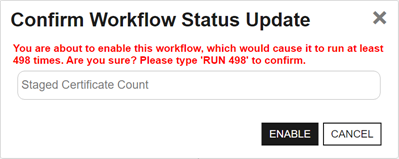
Figure 527: Warning on Save for Certificate Entered or Left Collection Workflow
-
CertificateLeftCollection
Initiates a workflow instance when a certificate is identified that no longer meet the query criteria of the specified certificate collection. For example, when a certificate in the Web Server Certificates collection disappears, a REST request can be made to open a support ticket request to investigate the removal of a web server certificate.
The workflow is initiated by two automated tasks that Keyfactor Command runs periodically. The first runs against your collections to identify certificates that no longer meet the query criteria of each certificate collection. Certificates are added to a temporary table from which workflows of this type draw. Certificates are added for all collections regardless of whether they have active workflows. The second reads the temporary table and generates workflow instances for any active workflows of this type. The temporary table is cleared each time the first task runs.
Each of these tasks runs every 10 minutes by default and the schedules for them are not end-user configurable.
If the task has run to create the temporary table of certificates that no longer meet the query criteria of the specified certificate collection but a workflow has not yet run for the given collection—perhaps it is disabled or has not yet been created—there is a window of time (until the temporary table is cleared) during which if a workflow is created or enabled for the certificate collection, the user creating or enabling the workflow will receive a warning message indicating that the workflow will run multiple times and asking the user for confirmation to continue. The user must enter RUN followed by the number of workflow instances that will be initiated to continue.
-
CertificateEnteredStore
Initiates a workflow instance when a certificate has been added to or has entered a certificate store for the specified certificate store type. For example, when a certificate appears in a trusted certificate store, a REST request can be made to check the support ticketing system for a change request, and the workflow can then generate an email message notifying the PKI administrators that a new certificate has appeared in a trusted store if a change request is not found.
The workflow is initiated by two automated tasks that Keyfactor Command runs periodically. The first runs against your certificate store types to identify certificates that have been added to or have entered a certificate store for the specified certificate store type. Certificates are added to a temporary table from which workflows of this type draw. The second reads the temporary table and generates workflow instances for any active workflows of this type. The temporary table is cleared each time the first task runs. Included in the workflow information are the certificate ID, certificate store ID, and certificate store container ID. If the certificate store is not associated with an application, the value will be -1.
Each of these tasks runs every 10 minutes by default and the schedules for them are not end-user configurable.
-
CertificateLeftStore
Initiates a workflow instance when a certificate has been removed from or has left a certificate store for the specified certificate store type. For example, when a certificate on your F5 device disappears, a REST request can be made to open a support ticket request to investigate the removal of a certificate from the device.
The workflow is initiated by two automated tasks that Keyfactor Command runs periodically. The first runs against your certificate store types to identify certificates that have been removed from or have left a certificate store for the specified certificate store type. Certificates are added to a temporary table from which workflows of this type draw. The second reads the temporary table and generates workflow instances for any active workflows of this type. The temporary table is cleared each time the first task runs. Included in the workflow information are the certificate ID, certificate store ID, and certificate store container ID. If the certificate store is not associated with an application, the value will be -1.
Each of these tasks runs every 10 minutes by default and the schedules for them are not end-user configurable.
-
Enrollment (Including Renewals)
The workflow is initiated by enrollment for a new or renewed certificate. Steps during the workflow can be used to do things such as require manager approval for the enrollment or manipulate the subject and/or SANs for the certificate request.
Note: An enrollment workflow is considered complete when the certificate reaches a state of Active (issued), Failed (denied approval in workflow or error at the CA level), Pending, or Waiting for External Validation. The workflow does not wait for external approvals before completing.
-
Expiration
The workflow is initiated by an expiration alert. Steps during the workflow can be used to do things such as send an email notification regarding expiring certificates, run a PowerShell script to write notifications to the event log, or automate renewal of certificates.
-
Key Rotation
The workflow is initiated by an SSH key rotation alert. Steps during the workflow can be used to do things such as send an email notification regarding SSH keys that are approaching their stale date or run a PowerShell script to write notifications to the event log.
-
Revocation
The workflow is initiated by revoking a certificate. Steps during the workflow can be configured to do things such as modify the revocation comment entered when the certificate is revoked, append an additional comment, and store the resulting extended comment in a metadata field.
-
Revocation Monitoring
The workflow is initiated by a revocation monitoring alert. Steps during the workflow can be used to do things such as send an email notification regarding CRLs that are expiring or OCSP endpoints that are unreachable or run a PowerShell script to write notifications to the event log.
|
|
| Current Step Display Name |
A string indicating the display name defined for the workflow instance step. |
| Current Step Unique Name |
A string indicating the unique name defined for the workflow instance step. This value is unique among the steps in a particular workflow definition. It is intended to be used as a user-friendly reference ID. |
| Title |
A string indicating a description for the action taking place in the step, made up of the InitiatingUserName (either DOMAIN\\username or Timer Service) followed by an indication of the type of action and a specific message about the action. For example:
"KEYEXAMPLE\\jsmith is enrolling for a certificate with CN=appsrvr14.keyexample.com."
Or
"KEYEXAMPLE\\jsmith is revoking certificate with CN=appsrvr12.keyexample.com."
|
| Last Modified |
A string indicating the date and time on which the initiated instance was last updated. The instance is updated each time a step in the workflow is completed, when signals are received for a step that accepts signals (for example, a requires approval step), or when an instance is stopped or restarted. |
| Start Date |
A string indicating the date and time when the instance was initiated. |
| Reference Id |
A integer indicating the Keyfactor Command reference ID for the workflow instance. |
Tip: See the
Keyfactor API Reference and Utility, which allows you to call API operations and view results. It is primarily intended for validation, testing, and workflow development, and also serves as an interactive supplement to this API documentation. You can access it from the help menu (

) in the
Management Portal.
