
System Settings → Security Roles & Claims
There are several elements that make up Keyfactor Command Security infrastructure. To define your security design you will use these elements in combinations that meet your needs. You can limit user menu access through global permissions, and user certificate access through collection The certificate search function allows you to query the Keyfactor Command database for certificates from any available source based on any criteria of the certificates and save the results as a collection that will be available in other places in the Management Portal (for example expiration alerts and certain reports). and certificate stores permissions.
-
Security Roles—Management Portal and Keyfactor API
An API is a set of functions to allow creation of applications. Keyfactor offers the Keyfactor API, which allows third-party software to integrate with the advanced certificate enrollment and management features of Keyfactor Command. Access ControlDefine the naming convention and structure of your security design by creating a name and description for your roles. These roles will then hold the definition of your security design based on the menu access, certificate collection access or certificate store access as applied to them. The roles will then be applied to users or groups to complete the security set-up. These roles are used to:
- Grant access to the Management Portal and Keyfactor API, by selecting area access permissions for a role—for example, at what level of permission the user/group can access certificates functionality on the Keyfactor Command Management Portal. See Security Role Permissions and Security Role Operations.
- Grant certificate collection access by selecting role permissions per collection—at which level of permission the user/group can access collection functionality and/or which collections they can access. See Certificate Collection Permissions.
- Grant certificate store container access by selecting role permissions per container—at which level of permission the user/groups can access certificate store functionality, and/or which stores they can access. See Application Permissions.
-
Security Claims (formerly Identities)—Management Portal and Keyfactor API authentication.
Assign combinations of Roles to users or groups to apply your security design to your users. See Security Claim Operations.
Cache entries expire after a fixed interval from when they are cached. Security role cache entries expire after 10 minutes. Claim and identity cache entries expire after 5 minutes.
Cache entries are also affected by the Security Roles Cache Cleanup Interval application setting (see Application Settings: Console Tab).
Security Roles
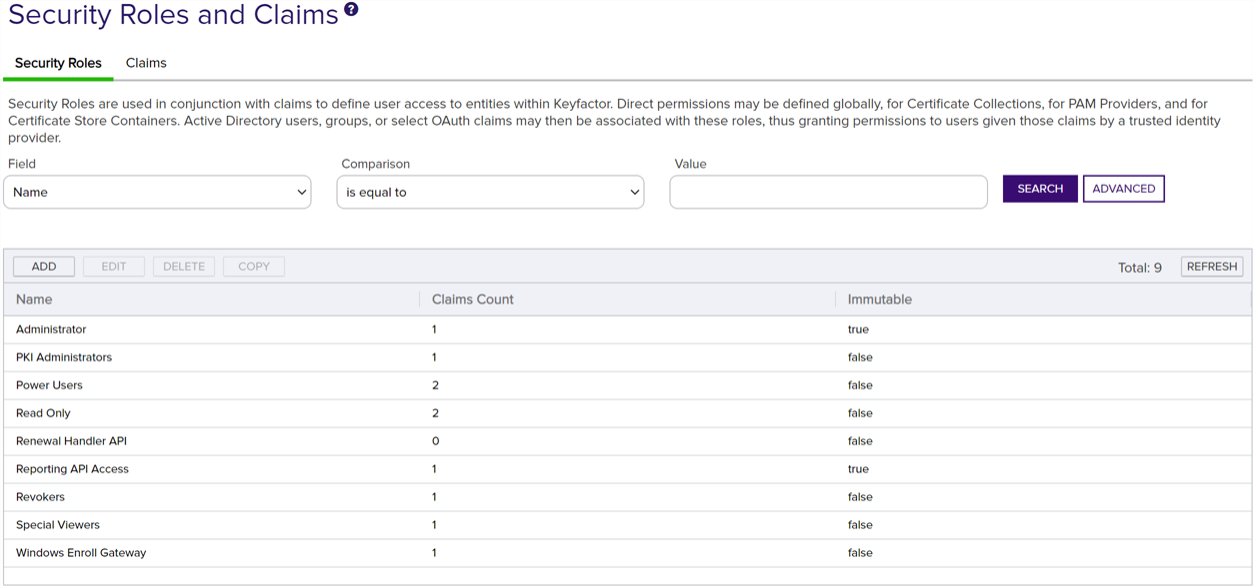
Figure 425: Security Roles
During the Keyfactor Command installation and configuration process, the security role Administrator is created. The Administrator role grants full permissions to the Management Portal and cannot be deleted and canonly be edited to add user claims. If all users of the Management Portal should have full access to all features within the portal, this one role may be sufficient for your needs. However, if you would like to grant access to other users or limit the functionality available to those users, you need to add one or more new security roles for this purpose.
A Reporting API Access role is automatically created during installation to support the dashboard and reporting access required by the Logi Analytics Platform. The service account user associated with the IIS application pools on the Keyfactor Command Management Portal server (where Logi is installed) is automatically created as an identity and associated with this role.
Security Claims
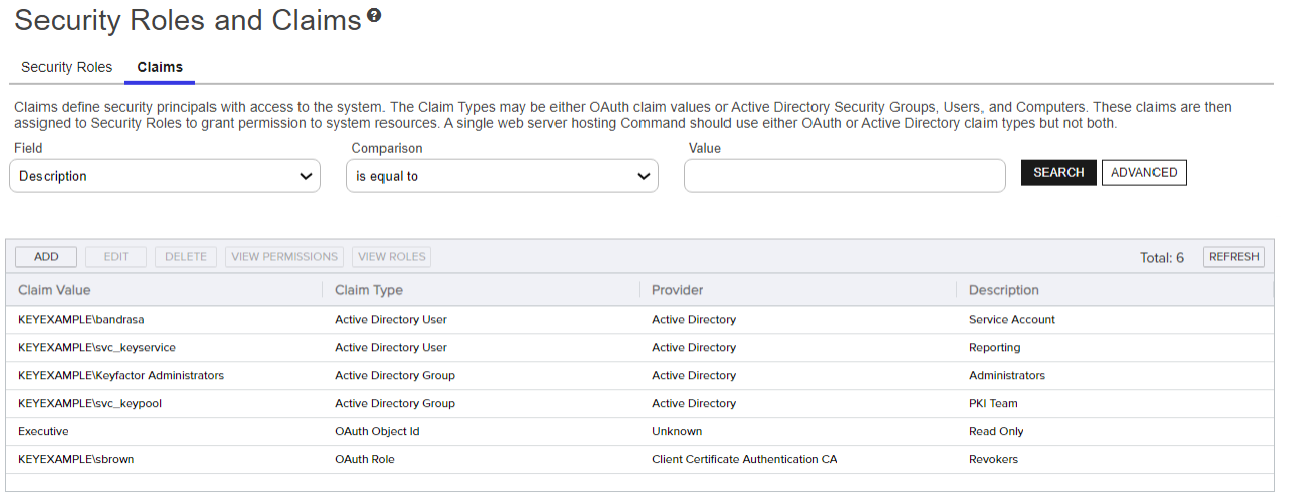
Figure 426: Security Claims
Claims are created in Keyfactor Command using users or groups.
If you would like to grant access to other users but limit the functionality available to those users, you need to add one or more new security claims for this purpose and link them to one or more appropriate security roles. See Security Claim Operations.
 ) next to the
 You can also find Help in the Navigator The Navigator is the Keyfactor Command left-hand (newer versions) or top (older versions) navigation menu. Certificate collections and reports can be configured to be added to the menu using user-defined Show in Navigator settings.. From here you can choose to open either the Keyfactor Software & Documentation Portal at the home page or the Keyfactor API Endpoint Utility.
Keyfactor provides two sets of documentation: the On-Premises Documentation Suite and the Managed Services Documentation Suite. Which documentation set is accessed is determined by the Application Settings: On-Prem Documentation setting (see Application Settings: Console Tab).