
Beginning with Red Hat Enterprise Linux (RHEL) 6 (SSSD package version 1.6), the case_sensitive option was added to the list of supported parameters in the /etc/sssd/sssd.conf file for a given provider.
When case_sensitive is set to false, SSSD returns usernames in all lowercase characters, regardless of how the username is cased in Active Directory.
When set to Preserving, SSSD returns the username using the same casing defined in Active Directory.
The case_sensitive setting affects how usernames must be entered when creating an SSH The SSH (secure shell) protocol provides for secure connections between computers. It provides several options for authentication, including public key, and protects the communications with strong encryption. logon inKeyfactor Command (see Add or Edit Access for an SSH Logon). The username must be entered exactly as it is returned by SSSD.
If case_sensitive is set to:
-
Preserving: The username appears as it does in Active Directory.
-
false: The username is returned in lowercase to maintain POSIX compliance, and must be entered in lowercase in Keyfactor Command.
Using Preserving may provide a more intuitive experience for administrators who expect usernames to match Active Directory exactly.
Other SSSD configuration settings may affect how a username is resolved and returned. These behaviors are not controlled by Keyfactor Command.
To determine the exact username format returned by SSSD in your environment, run:
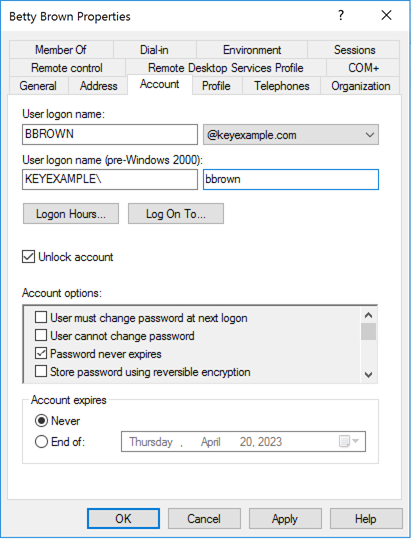
Figure 490: Active Directory Account Properties
The results for the above user with the setting as false would be: bbrown@keyexample.com

The result for the above user with the setting as Preserving would be: BBROWN@keyexample.com

The Bash Orchestrator, one of Keyfactor's suite of orchestrators, is used to discover and manage SSH keys across an enterprise.. Changing it can cause a mismatch between how Keyfactor Command and SSSD resolve the username and home directory.If a mismatch occurs, logon operations will fail until the inconsistency is corrected.
Example
User BBROWN@keyexample.com has a home directory:
SSSD resolves the account as:
Because the casing differs, the home directory does not match what SSSD expects.
Resolution
To correct this issue:
Update the logon’s home directory in Active Directory, or
Remove the home directory from the Linux server and re-create the logon through Keyfactor Command.
If the domain name defined in the SSSD configuration file changes, SSSD may also resolve the account name or home directory differently. In that case, remove the logon from Keyfactor Command, delete the associated home directory on the Linux server, and then re-add the logon.