
Orchestrator Keyfactor orchestrators perform a variety of functions, including managing certificate stores and SSH key stores. pools are used to group one or more orchestrators for load balancing, scalability, and high-availability. Jobs created by Keyfactor Command—such as discovery, synchronization, or enrollment Certificate enrollment refers to the process by which a user requests a digital certificate. The user must submit the request to a certificate authority (CA). tasks—are routed to a pool based on its configured capabilities.
Each orchestrator pool is configured with a set of capabilities that define the types of jobs it can accept. Orchestrators can be added to a pool regardless of the capabilities they individually declare. However, only jobs supported by both the pool’s configured capabilities and the combined capabilities of its member orchestrators will be executed.
TLS (Transport Layer Security) and its predecessor SSL (Secure Sockets Layer) are protocols for establishing authenticated and encrypted links between networked computers. scanning, orchestrator-managed CA A certificate authority (CA) is an entity that issues digital certificates. Within Keyfactor Command, a CA may be a Microsoft CA or a Keyfactor gateway to a cloud-based or remote CA. synchronization, and SSH The SSH (secure shell) protocol provides for secure connections between computers. It provides several options for authentication, including public key, and protects the communications with strong encryption. key management. However, you can still create orchestrator pools for these orchestrators to support automatic registration and approval. This can be useful when you have many orchestrators or use short-lived orchestrators. Orchestrator pools created for this purpose would define no capabilities.An orchestrator can belong to only one pool at a time. This ensures clear job routing and prevents contention between pools.
From this page, you can create and manage orchestrator pools, configure pool settings and capabilities, and assign orchestrators to pools.
Orchestrators → Management → Orchestrator Pool Management Tab
Searching Orchestrator Pool Management
This page supports the standard query format described in Using Search in the Management Portal and includes its own set of query parsers specific to this operation. Use the following parsers to filter and refine results for this page.
-
Capability
Capability matches the specified value and comparison. Supported capabilities include any legacy types still in use in your environment and any custom types you may have created. For example:
- AWS (built-in, deprecated Amazon Web Services)
- AWS-ACM-v3 (extension, Amazon Web Services)
- CitrixAdc (extension, Citrix Netscaler)
- F5 (built-in, deprecated F5)
- F5-WS-REST (extension, F5)
- F5-SL-REST (extension, F5)
- F5-CA-REST (extension, F5)
- FTP (built-in, deprecated FTP)
- IIS (built-in, deprecated IIS roots/personal/revoked)
- IISU (extension, Windows Certificate Store)
- JKS A Java KeyStore (JKS) is a file containing security certificates with matching private keys. They are often used by Java-based applications for authentication and encryption. (built-in, deprecated Java KeyStore)
- LOGS (built-in, log retrieval)
- PEM A PEM format certificate file is a Base64-encoded certificate. Since it's presented in ASCII, you can open it in any text editor. PEM certificates always begin and end with entries like ---- BEGIN CERTIFICATE---- and ----END CERTIFICATE----. PEM certificates can contain a single certificate or a full certificate chain and may contain a private key. In general, extensions of .cer and .crt are certificate files with no private key, .key is a separate private key file, and .pem is both a certificate and private key. (built-in, deprecated PEM file)
- RFDER (extension, Remote File)
- RFJKS (extension, Remote File)
- RFKDB (extension, Remote File)
- RFORA (extension, Remote File)
- RFPEM (extension, Remote File)
- RFPkcs12 (extension, Remote File)
- WinCert (extension, Windows Certificate Store)
- WinSQL (extension, Windows Certificate Store)
-
Id
Complete matches with the Keyfactor Command reference GUID for the orchestrator pool.
-
Name
Complete or partial matches with the orchestrator pool name.
Add or Modify on Orchestrator Pool
When adding or editing an orchestrator pool, you define the pool’s core settings, configure its capabilities, and optionally assign orchestrators that will participate in job execution.
To add a new orchestrator pool or edit an existing one:
- On the Orchestrator Pool Management tab, choose Add from the toolbar to create a new orchestrator pool, or select an existing orchestrator pool and double-click or choose Edit from the toolbar or right-click menu.
- When the orchestrator pool opens for editing, you will see multiple tabs. Follow the instructions for each tab provided below to enter the necessary data.
- Click Save to save the changes to the orchestrator pool record.
Orchestrator Pool: Details Tab
The information on the Details tab includes:
-
Id
A system-generated, unique identifier for the orchestrator pool. This value is only visible when editing an existing orchestrator pool and cannot be modified.
-
Name
A unique, user-defined name for the orchestrator pool. The name is used to identify the pool when assigning orchestrators and routing jobs.
-
Description
A description that provides additional context about the purpose or usage of the orchestrator pool.
-
Allow Auto-Registration
Controls whether orchestrators are allowed to automatically register into this pool.
The default is off.
When turned on, orchestrators that meet the configured requirements can join the pool without manual approval.
Important: Auto-registration is successful only when all the following conditions are met:The orchestrator must be version 26.2 or later.
The orchestrator installation must specify the pool ID that the orchestrator will join. Configure this using the following parameters:
- Windows: -AutoRegistrationPoolId
- Linux: --auto-registration-pool-id
- Container: autoRegistrationPoolId
The identity presented by the orchestrator must satisfy at least one claim configured for the pool. Allowed claims are defined
Allow Auto-Registration must be turned on for the orchestrator pool. This setting is configured
-
Registration Interval (minutes)
Specifies how frequently orchestrators in the pool register with Keyfactor Command to request new work and report job status.
This setting replaces the legacy heartbeat interval.
The default is 5.
-
Job Timeout (minutes)
The maximum amount of time a job is allowed to run before it is considered timed out. The default is 15.
When a job exceeds the Job Timeout configured for its orchestrator pool, it is marked as failed and returned to the pool. The job is rescheduled after the configured Retry Pause Interval and may be picked up by the same or a different orchestrator. This process continues until the maximum retry count is reached (see the Number of times a job will retry before reporting failure setting on Application Settings: Agents Tab).
-
Retry Pause Interval (minutes)
Specifies how long Keyfactor Command waits before rescheduling a job that completed with a retryable status.
This prevents retryable jobs from being immediately reassigned.
The default is 5.
-
Remove Transient Orchestrators
Controls whether orchestrators are automatically removed from the pool if they have not registered with Keyfactor Command within the configured Last Seen Threshold.
The default is off.
-
Last Seen Threshold (minutes)
Defines how long an orchestrator can go without registering before it is automatically removed from the pool.
This value must be greater than the Registration Interval.
A value of 0 disables automatic removal.
The default is 30.
-
Session Job Limit
Limits the number of jobs that Keyfactor Command assigns to an orchestrator during a single registration cycle.
The default is 10.
When management jobs are added to a job batch, Keyfactor Command may also include existing inventory jobs for the affected certificate stores. Inventory jobs are added only if they are already scheduled. Keyfactor Command does not create new inventory jobs to accompany management jobs. Only one inventory job is included per store, even when multiple management jobs apply to the same store. The final job batch does not exceed the Session Job Limit. If necessary, Keyfactor Command removes lower-priority jobs from the batch to make space for required inventory jobs.
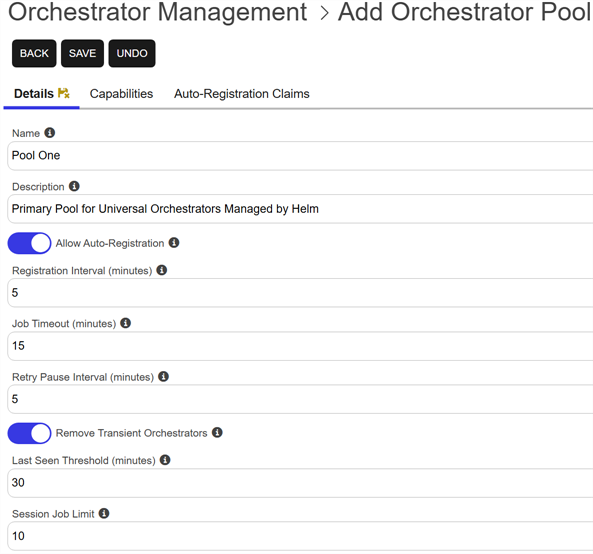
Figure 355: Add an Orchestrator Pool: Details Tab
Orchestrator Pool: Capabilities Tab
On the Capabilities tab, add one or more capabilities that the orchestrator pool supports. Both certificate store and custom job capabilities are available.
The capabilities assigned to the pool determine which jobs can be routed to it. Orchestrators can be added to a pool regardless of the capabilities they individually declare. However, jobs executed by the pool are limited to those supported by both the pool and at least one orchestrator in the pool.
PAM (Privileged Access Management): Controls privileged access by vaulting credentials, enforcing least-privilege/just-in-time access, rotating secrets, and auditing sessions. Across Keyfactor products, PAM protects diverse sensitive operations and secrets—for example certificate stores and CA credentials—via built-in or third-party providers; external integrations are delivered as custom PAM extensions (several published on Keyfactor’s public GitHub). providers, ensure that all orchestrators in a pool are configured with the required PAM extensions and supporting files. Jobs assigned to a pool can be executed by any eligible orchestrator in that pool. If some orchestrators support a remote PAM provider and others do not, job execution results may vary depending on which orchestrator receives the job. To avoid inconsistent behavior, either configure all orchestrators in the pool identically or separate orchestrators with different PAM capabilities into different pools.To include a capability in the pool, in the Capabilities search select, locate the desired capability and click Add. To narrow the list of results in a search select dropdown, begin typing in the input field. Matching results will appear as you type, and you can scroll to locate a record.
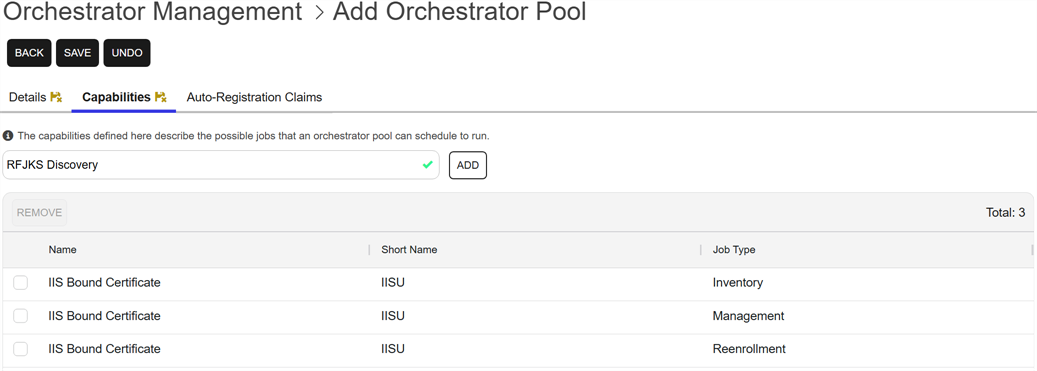
Figure 356: Add Capabilities to a Pool
Orchestrator Pool: Claims Tab
The Claims section defines the identity claims that are permitted to auto-register orchestrators into the pool.
Each claim includes an identity provider, a claim type, and an expected value. During auto-registration, Keyfactor Command compares these claims to those presented by the orchestrator’s credentials. Auto-registration succeeds only if at least one configured claim matches the orchestrator’s identity.
Claims configured on an orchestrator pool are used only for auto-registration. Orchestrators that are manually approved or assigned to a pool are not evaluated against these claims.
To Add a claim in the pool:
- On the Claims tab click Add.
-
In the Add Auto-Registration Claim dialog, enter the following information:
-
Provider
Select the identity provider that will issue the claim in the search select.
-
Claim Type
Enter the name of the claim to evaluate, as issued by the selected identity provider. This value must match the claim type included in the identity presented by the orchestrator (for example, a subject, client identifier, or group claim).
-
Claim Value
Enter the expected value of the specified claim type. Auto-registration succeeds only if the orchestrator presents a claim with a matching value.
-
Description
Enter a description to help identify the purpose of the claim or the orchestrators it is intended to allow.
-
- Click Save to save the claim.
Edit allows you to modify the provider, claim type, claim value, or description for an existing claim. Changes take effect immediately and apply to future orchestrator auto-registration attempts.
Remove removes the selected claim from the pool.
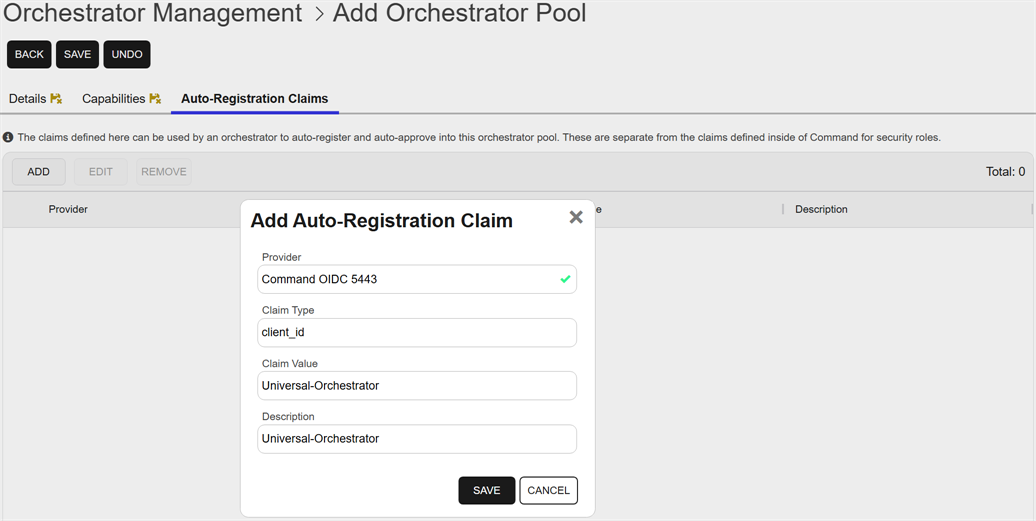
Figure 357: Add a Claim to a Pool
Orchestrator Pool: Orchestrators Tab
On the Orchestrators tab, manage the orchestrators assigned to the pool. From this tab, you can manually add or remove orchestrators.
An orchestrator is valid for addition to a pool if:
- The orchestrator supports high availability.
- The orchestrator is approved.
- The orchestrator is not already assigned to another orchestrator pool.
Orchestrators may also be added automatically through auto-registration when they meet the auto-registration requirements (see Orchestrator Pool: Details Tab).
The Orchestrators tab is not visible when adding a new pool.
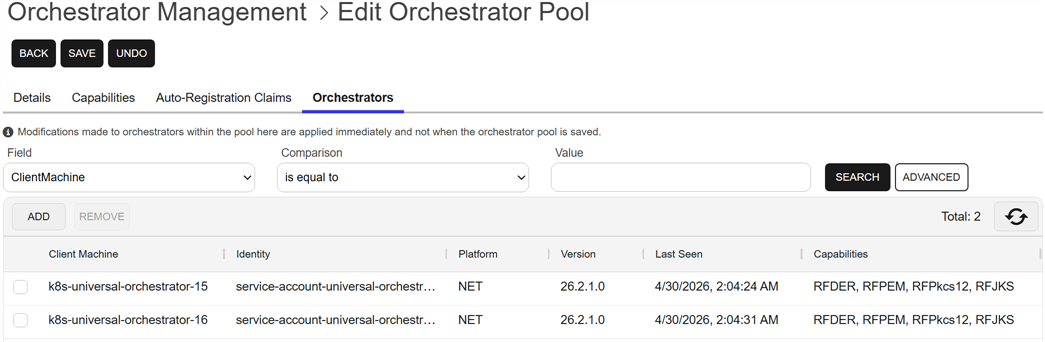
Figure 358: Manage Orchestrators for a Pool
View an Orchestrator Pool
Users without modify permissions to orchestrator management will see a View option instead of an Edit option on the Orchestrator Pool Management tab to allow them to see a read-only view of the pool configuration details.
To view details for an orchestrator pool, double-click an orchestrator pool or select the pool and choose View from the toolbar or right-click menu.
The fields are the same as those described for adding or editing an orchestrator pool (see Add or Modify on Orchestrator Pool), but none of the fields are editable when using the View option.
Delete an Orchestrator Pool
The Delete action removes an orchestrator pool from Keyfactor Command.
An orchestrator pool can be deleted only when no jobs are assigned to it, no certificate stores are associated with it, and no orchestrators are currently assigned to the pool.
To delete an orchestrator pool, select the orchestrator pool and choose Delete from the toolbar or right-click menu.
You will be prompted to confirm that you want to delete this orchestrator pool.