
Excluded Certificates are certificates that have been deleted from the database and excluded from all Keyfactor Command functionality. These certificates will be skipped during a CA A certificate authority (CA) is an entity that issues digital certificates. Within Keyfactor Command, a CA may be a Microsoft CA or a Keyfactor gateway to a cloud-based or remote CA. synchronization or manual import. Users with appropriate permissions (see Certificates permissions) can use the certificate search to view exclude certificates and delete certificates with exclusion (see Delete And Exclude). Use this page to monitor or re-include such certificates.
System Settings → Excluded Certificates
TLS (Transport Layer Security) and its predecessor SSL (Secure Sockets Layer) are protocols for establishing authenticated and encrypted links between networked computers. scan or in a certificate store configured for inventory. This ensures that certificates that are still used in the environment are still tracked. A query parser, IsExcluded, is included on the certificate search grid and returns certificates that exist in both the certificate inventory and the exclusion list.
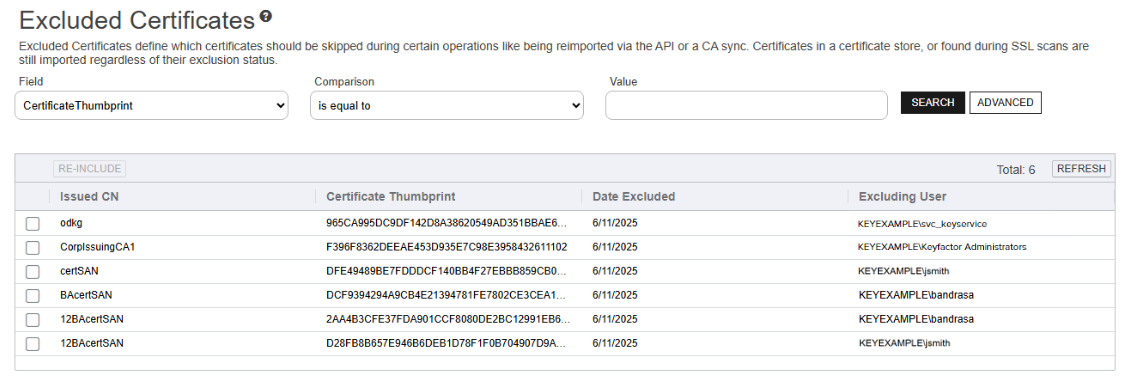
Figure 477: Excluded Certificates Grid
The table can be sorted by each of the columns: Issued CN, Thumbprint, Date Excluded.
Searching Excluded Certificates
This page supports the standard query format described in Using Search in the Management Portal and includes its own set of query parsers specific to this operation. Use the following parsers to filter and refine results for this page.
-
Certificate Thumbprint
Complete or partial matches with the certificate thumbprint value.
-
Date Excluded
The certificate was excluded from Keyfactor Command before, after, or on the specified date.
Supports the %TODAY% token (see Special Token Values).
-
Excluding User
Complete or partial matches with the user who excluded the certificate from Keyfactor Command.
-
Issued CN
Complete or partial matches with the certificate common name
A common name (CN) is the component of a distinguished name (DN) that represents the primary name of the object. The value varies depending on the type of object. For a user object, this would be the user's name (for example CN=John Smith). For SSL certificates, the CN is typically the fully qualified domain name (FQDN) of the host where the SSL certificate will reside (for example servername.keyexample.com or www.keyexample.com)..
Re-Including Excluded Certificates
Use the Re-Include action button at the top of the grid to remove one or more selected certificates from the excluded certificates table, thus allowing them to return to the Keyfactor Command database on the next CA synchronization or manual import. If a certificate is re-included, associated data (for example, metadata Metadata provides information about a piece of data. It is used to summarize basic information about data, which can make working with the data easier. In Keyfactor Command, the certificate metadata feature allows you to create custom metadata fields that allow you to tag certificates with tracking information about certificates.) will not be re-included when it is imported on the next CA synchronization.
Note: Collection The certificate search function allows you to query the Keyfactor Command database for certificates from any available source based on any criteria of the certificates and save the results as a collection that will be available in other places in the Management Portal (for example expiration alerts and certain reports).-level delete and exclude is not sufficient for access to this feature.