
 Keyfactor orchestrators perform a variety of functions, including managing certificate stores and SSH key stores.s, orchestrator blueprints are supported only in versions earlier than 26.2.
Orchestrator blueprints allow you to capture, apply, and manage predefined orchestrator configurations. Blueprints store a snapshot of certificate stores and scheduled jobs that can be applied to other orchestrators to standardize configuration and simplify large-scale orchestrator deployment.
Blueprint A Blueprint in Keyfactor Command is a snapshot of the certificate stores and scheduled jobs on one orchestrator, which can be used to create matching certificate stores and jobs on another orchestrator with just a few clicks. operations are performed from two locations:
-
The Orchestrator Management page, where you generate and apply blueprints
-
The Orchestrator Blueprints page, where you view and delete existing blueprints
Orchestrators → Blueprints
Apply Blueprints
An orchestrator blueprint captures a snapshot of certificate stores and scheduled jobs from an orchestrator at the time the blueprint is created and applies that configuration to other orchestrators.
Applying a blueprint is a one-time operation. After the blueprint is applied, there is no ongoing relationship between the blueprint and the orchestrator. Subsequent changes to the blueprint or to the source orchestrator do not affect orchestrators to which the blueprint has already been applied. Deleting a blueprint also has no effect on orchestrators that were previously configured using it.
Blueprints can be used with any certificate store type for which Blueprint Allowed is turned on in General Settings. Compatibility depends on the capabilities of the target orchestrator and the selected certificate store types.
Blueprints are applied to an orchestrator from the Orchestrator Management page (see Generate and Apply Blueprints).
Modify Blueprints
Blueprints can’t be edited. To modify a blueprint, modify the certificate stores and scheduled jobs on the orchestrator from which the blueprint was taken and capture a new blueprint (see Generate and Apply Blueprints). This will replace the existing blueprint. An orchestrator can only have one blueprint at a time.
Delete Blueprints
To delete a blueprint:
- On the Orchestrator Blueprints page, select an orchestrator blueprint and choose Delete from the toolbar or right-click menu.
- On the Confirm Operation alert, click OK to confirm or Cancel to cancel the operation.
View Blueprint Details
To view the details of a blueprint:
- On the Orchestrator Blueprints page, select an orchestrator blueprint and double-click or choose View from the toolbar or right-click menu.
- On the Confirm Operation alert, click OK to confirm or Cancel to cancel the operation.
On the Certificate Stores tab you can see the certificate store paths and types that have been associated with the blueprint. On the Scheduled Jobs tab you can see the scheduled jobs for these certificate stores. These most often are inventory jobs, though it is possible to blueprint an orchestrator with other types of active jobs (for example, discovery).
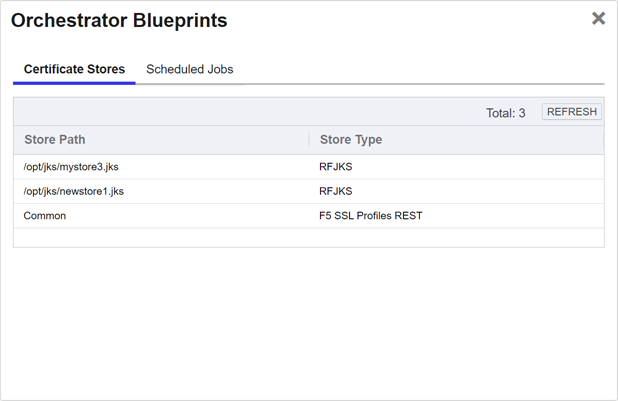
Figure 361: Orchestrator Blueprint Details: Certificate Stores Tab
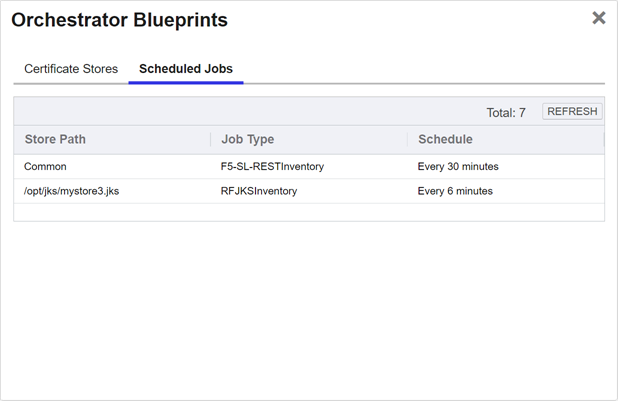
Figure 362: Orchestrator Blueprint Details: Scheduled Jobs Tab
 ) next to the
 You can also find Help in the Navigator The Navigator is the Keyfactor Command left-hand (newer versions) or top (older versions) navigation menu. Certificate collections and reports can be configured to be added to the menu using user-defined Show in Navigator settings.. From here you can choose to open either the Keyfactor Software & Documentation Portal at the home page or the Keyfactor API Endpoint Utility.
Keyfactor provides two sets of documentation: the On-Premises Documentation Suite and the Managed Services Documentation Suite. Which documentation set is accessed is determined by the Application Settings: On-Prem Documentation setting (see Application Settings: Console Tab).