
Keyfactor Command needs to trust the chain certificates for all the CAs you will reference within Keyfactor Command for all operations to complete successfully. In many Windows install environments, root and intermediate trusts for domain-joined Microsoft CAs are pushed out automatically. If this is not true in your Windows environment, or if you are using Kubernetes or non-domain-joined CAs (for example, EJBCA), you must configure these chain trusts manually.
- Trust Bundles: Keyfactor Command first attempts to build the chain using only the root certificates contained in configured trust bundles (see Trust Bundles).
- AIA Retrieval: If the chain cannot be build using trust bundles, Keyfactor Command attempts to retrieve issuer certificates using the AIA
 The authority information access (AIA) is included in a certificate--if configured--and identifies a location from which the chain certificates for that certificate may be retrieved. (Authority Information Access The authority information access (AIA) is included in a certificate--if configured--and identifies a location from which the chain certificates for that certificate may be retrieved.) extension, if present. Only HTTP and HTTPS AIA URLs are supported, and the certificates must be accessible from the Keyfactor Command server.
 - Trusted Certificate Stores (Windows only): If the above methods fail, Keyfactor Command attempts to complete the chain using certificates in the server’s local machine Trusted Root Certification Authorities and Intermediate Certification Authorities stores.
Windows Installations Under IIS
The certificate for each root CA A certificate authority (CA) is an entity that issues digital certificates. Within Keyfactor Command, a CA may be a Microsoft CA or a Keyfactor gateway to a cloud-based or remote CA. must be installed in the Trusted Root Certification Authorities store under Local Computer on the Keyfactor Command server. If your public key infrastructure A public key infrastructure (PKI) is a set of roles, policies, and procedures needed to create, manage, distribute, use, store and revoke digital certificates and manage public-key encryption. (PKI A public key infrastructure (PKI) is a set of roles, policies, and procedures needed to create, manage, distribute, use, store and revoke digital certificates and manage public-key encryption.) also has issuing CAs, the issuing CA certificates must be installed in the Intermediate Certification Authorities store under Local Computer on the Keyfactor Command server.
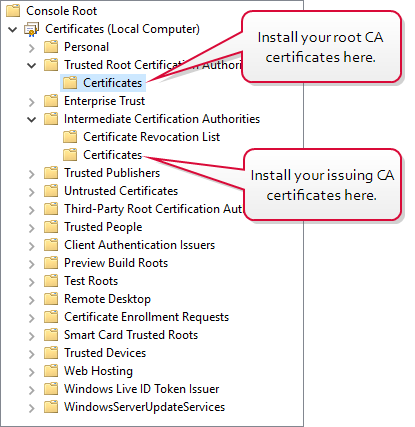
Figure 733: Install CA Chain Certificates on the Keyfactor Command Server
Container Installations Under Kubernetes
The CA root and issuing certificates for all CAs in the environment that will have any relationship with Keyfactor Command need to be gathered and added to the root trust store on your Kubernetes server. Certificates in this category includes:
-
CAs that will synchronize certificates into Keyfactor Command.
-
CAs that will be used to enroll for certificates through Keyfactor Command.
-
CAs that issued the TLS
TLS (Transport Layer Security) and its predecessor SSL (Secure Sockets Layer) are protocols for establishing authenticated and encrypted links between networked computers. certificates that will secure communications to the SQL server, Keyfactor Command server, identity provider, and any proxy servers or firewalls in the communication path. -
If you will be using a CA Connector
The Keyfactor CA Connector is installed in the customer environment to provide a connection between a CA and Keyfactor Command when a direct connection is not possible. It is supported on both Windows and Linux and has versions for Microsoft (Windows only) or EJBCA CAs. Client, the CA that issued the TLS certificate used to secure communications to the RabbitMQ instance, if applicable. -
Root CAs that the above CAs chain to.
Many publicly rooted certificates will already be trusted, so if your TLS certificates have been issued by external vendors (for example, DigiCert, Entrust), chain certificates for these may not be needed.
These all need to be copied into the root trust store on your Kubernetes server before the root trust ConfigMap is created. Methods for doing this vary depending on the Linux implementation. Beware of ending up with Windows line endings in the trusted root store, as this can create root trust issues inside the containers.