
Configure Logging
The Keyfactor SCEP provides extensive logging for visibility and troubleshooting.
Understanding Log Files
Log files by default are generated using the following layout:
-
Timestamp: The date and time the log was generated, in ISO 8601 extended format.
Example: 2026-02-16 17:02:30.2222 -
Logger Name: The fully qualified class or namespace where the log message originated. Useful for filtering or tracing specific components.
Example: CSS.SCEP.Server.ChallengeServer -
Log Level: Indicates the severity of the message—ranging from Trace and Debug (low-level detail) to Info, Warn, Error, and Fatal (critical failures).
-
Message: The main content of the log entry. This may include descriptive text, data values, or stack traces in the case of errors.
Example:
Checking template security on KeyfactorSCEPEnrollment for KEYEXAMPLE\jsmith
The above references as found in a full log entry would look like:
Modifying Logging Configuration
By default, the Keyfactor SCEP server places its log files in the C:\CMS\logs directory, generates logs at the Info logging level and stores logs for two days before deleting them.
If you wish to change these defaults:
- On the Keyfactor SCEP server where you wish to adjust logging, open a text editor (e.g. Notepad) using the Run as administrator option.
-
In the text editor, browse to open the NLog.config file for the SCEP server. The file is located in the following directory:
C:\Program Files\Common Files\Keyfactor\Keyfactor SCEP Server -
Your Nlog.config file may have a slightly different layout than shown here, but it will contain the four fields highlighted in the below figure. The fields you may wish to edit are:
-
The path and file name of the active Keyfactor SCEP server log file.
fileName="C:\CMS\logs\SCEP_Log.txt"If you choose to change the path for storage of the log files, you will need to create the new directory (e.g. D:\CMSLogs) and grant the service account under which the Keyfactor SCEP server application pool runs full control permissions on this directory. -
The path and file name of previous days' Keyfactor SCEP server log files.
archiveFileName="C:\CMS\logs\SCEP_Log_Archive_{#}.txt"The Keyfactor SCEP server rotates log files daily and names the previous files using this naming convention.
-
The number of archive files to retain before deletion.
maxArchiveFiles="2" -
The level of log detail that should be generated.
name="*" minlevel="Info"The default Info level logs error and some informational data but at a minimal level to avoid generating large log files. For troubleshooting, it may be desirable to set the logging level to Debug or Trace. Available log levels (in order of increasing verbosity) are:
-
OFF: Turns off logging.
-
FATAL: Logs severe errors that cause early termination.
-
ERROR: Logs severe errors and other runtime errors or unexpected conditions that do not cause early termination.
-
WARN: Logs warnings such as deprecated API usage, poor API usage, and other undesirable or unexpected runtime conditions.
-
INFO: Logs all the above, plus general runtime events such as startup and shutdown.
-
DEBUG: Logs all the above, plus detailed information about system behavior and execution flow.
-
TRACE: Logs all available information. This level can result in significant log volume.
-
-
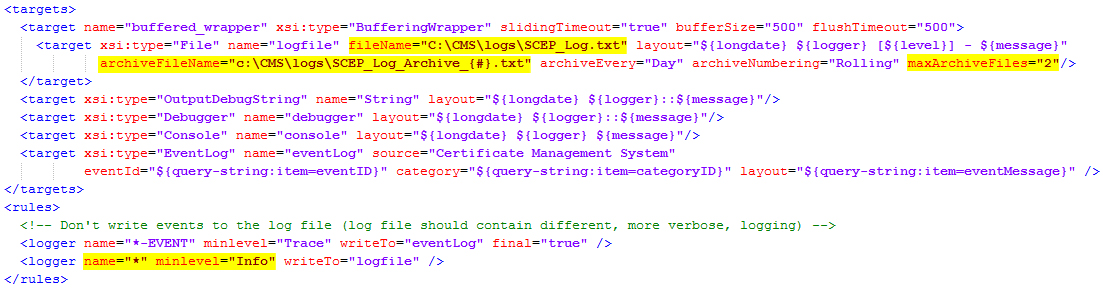
Figure 11: NLog.config File
Was this page helpful? Provide Feedback