
The Keyfactor Command Reference Guide provides detailed instructions for using the Management Portal to manage and automate PKI A public key infrastructure (PKI) is a set of roles, policies, and procedures needed to create, manage, distribute, use, store and revoke digital certificates and manage public-key encryption. and digital certificates at scale. The Management Portal serves as the command center for Keyfactor Command, offering real-time visibility into certificate inventories, automated workflows, and policy-driven controls that reduce security risks and prevent certificate-related outages.
Through the Management Portal, you can monitor PKI health, search and manage certificates, configure workflows and notifications, and enforce security policies across your organization. The guide covers both essential usage and advanced configuration, helping teams efficiently operate and tailor Keyfactor Command to meet their security and compliance needs. Content is organized by topic in alignment with the Navigator The Navigator is the Keyfactor Command left-hand (newer versions) or top (older versions) navigation menu. Certificate collections and reports can be configured to be added to the menu using user-defined Show in Navigator settings., with additional sections for System Settings, Operations, and the Appendix.
Management Portal Overview
The image below highlights key areas of the Management Portal interface.
Interface at a glance:
- Home: Click the logo to return to the dashboard.
- Navigator Toggle: Expand or collapse the left navigation panel; when collapsed, only icons appear.
- Active User: Displays your username.
- System Alerts: Bell icon; view recent System Alerts.
- Product Version: Shows the current Keyfactor Command software version.
- Logout: Ends your Management Portal session (see Logging Out).
For more information, see also Using the Management Portal.
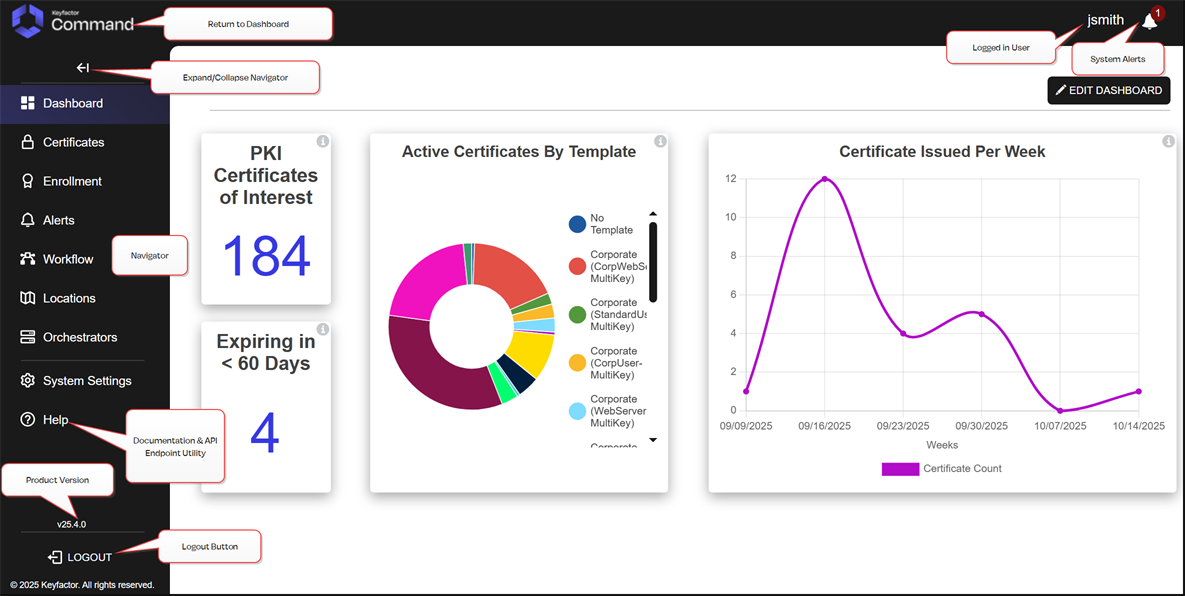
Figure 7: Management Portal Layout
Was this page helpful? Provide Feedback