
Complete these steps only if your Keyfactor Command license includes the Keyfactor CA A certificate authority (CA) is an entity that issues digital certificates. Within Keyfactor Command, a CA may be a Microsoft CA or a Keyfactor gateway to a cloud-based or remote CA. Policy Module and you plan to use one or more policy handlers. Before installing the policy handlers, review the available options to determine whether they address a requirement in your environment.
The available policy handlers are:
-
RFC 2818 Policy Handler
Applies template
A certificate template defines the policies and rules that a CA uses when a request for a certificate is received.-level SAN The subject alternative name (SAN) is an extension to the X.509 specification that allows you to specify additional values when enrolling for a digital certificate. A variety of SAN formats are supported, with DNS name being the most common. handling by automatically adding a DNS The Domain Name System is a service that translates names into IP addresses. SAN that matches the certificate CN A common name (CN) is the component of a distinguished name (DN) that represents the primary name of the object. The value varies depending on the type of object. For a user object, this would be the user's name (for example CN=John Smith). For SSL certificates, the CN is typically the fully qualified domain name (FQDN) of the host where the SSL certificate will reside (for example servername.keyexample.com or www.keyexample.com). for requests using selected Microsoft certificate templates.See Install the Keyfactor RFC 2818 Policy Handler for installation instructions.
-
SAN Attribute Policy Handler
Allows CSR
A CSR or certificate signing request is a block of encoded text that is submitted to a CA when enrolling for a certificate. When you generate a CSR within Keyfactor Command, the matching private key for it is stored in Keyfactor Command in encrypted format and will be married with the certificate once returned from the CA. enrollment Certificate enrollment refers to the process by which a user requests a digital certificate. The user must submit the request to a certificate authority (CA). requests to submit SANs outside the CSR for inclusion in the issued certificate. The submitted SANs replace any SANs included in the CSR. This behavior is similar to the Microsoft CA EDITF_ATTRIBUTESUBJECTALTNAME2 flag, but the SAN Attribute Policy Handler provides template-level control without activating the flag for the entire CA.See Install the Keyfactor SAN Attribute Policy Handler for installation instructions.
Important: By default, Microsoft CAs do not allow CSR enrollment requests to include SANs outside the CSR. To support requests with additional SANs, you must either install and configure the SAN Attribute Policy Handler on the CA or turn on the Microsoft CA EDITF_ATTRIBUTESUBJECTALTNAME2 flag.Both options introduce security risk and should be used only when required. The SAN Attribute Policy Handler helps reduce this risk by allowing SAN addition only for selected templates, instead of activating the behavior for the entire CA.
When using the SAN Attribute Policy Handler, Keyfactor recommends the following safeguards:
- Use the handler only with templates that require CA manager approval, so a manager reviews the request and the added SANs before the certificate is issued.
- Use the handler with the Whitelist Policy Handler to allow requests for the selected templates only from the Keyfactor Command server.
- Configure server-level monitoring to alert on changes to the CA configuration. For example, environments that use Microsoft System Center Operations Manager can configure alerts for changes related to CAs configured with the SAN Attribute Policy Handler.
-
Whitelist Policy Handler
Enforces template-level enrollment restrictions by allowing certificate requests for selected Microsoft certificate templates only from specified computers. Use this handler to limit where requests for protected templates can originate, such as requiring enrollment through the Keyfactor Command server.
See Install the Keyfactor Whitelist Policy Handler for installation instructions.
Note: The following Windows update affects how certificate requests are built when sent to a Microsoft CA and may cause enrollments done outside Keyfactor Command against a Microsoft CA configured with the Whitelist Policy Handler to fail.
When multiple policy handlers are installed on the same CA, their processing order can affect the final certificate request:
-
Whitelist Policy Handler: Can appear anywhere in the handler list. Its behavior is not affected by other handlers.
-
SAN Attribute Policy Handler and RFC 2818 Policy Handler: Place the SAN Attribute Policy Handler above the RFC 2818 Policy Handler so it runs first.
This order is required because the SAN Attribute Policy Handler removes existing SANs from the request and replaces them with SANs submitted outside the CSR, such as SANs entered in the optional SAN section on the CSR page in the Keyfactor Command Management Portal. If the RFC 2818 Policy Handler runs first, the SAN Attribute Policy Handler can remove the DNS SAN added by that handler.
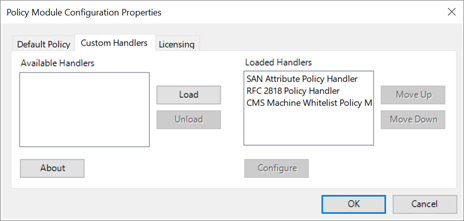
Figure 604: Keyfactor CA Policy Module Policy Module Handler Ordering
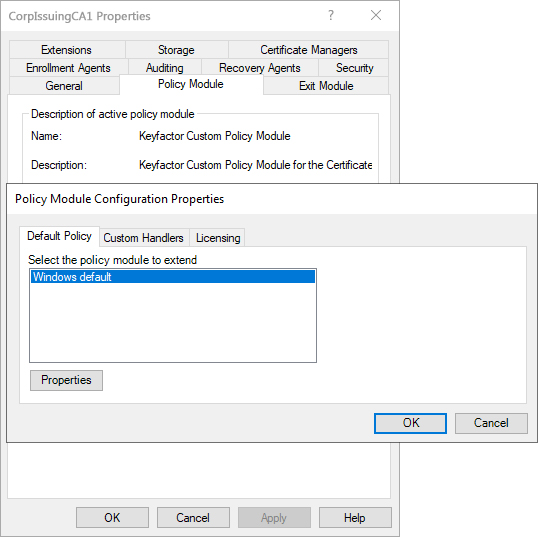
When the Keyfactor CA Policy Module is used, the policy module listed on the Default Policy tab of the Policy Module Configuration Properties dialog is run first when a request reaches the CA. This default policy might be the standard Windows default, as shown Figure 605: Default Policy Module, or it might be another non-built-in policy module, such as the Microsoft FIM CM Policy Module. After the default policy module runs, the Loaded Handlers on the Custom Handlers tab of the Policy Module Configuration Properties dialog are run in the order listed (top to bottom). After all the handlers have been run, the result (approved, denied, or marked as pending) is returned to the CA for processing.
 The logical name of a certificate authority (CA) is the human-readable name assigned to the CA when it is created. This name is used to uniquely identify the CA within its management system and in Keyfactor Command configuration settings.
For some CA types, such as Microsoft CAs, the logical name is combined with the CA host name to form a fully qualified identifier (for example, ca1.keyexample.com\Corp Issuing CA One) that may be used in command-line tools and configuration references. The exact format and usage of the logical name can vary by CA type. of the local CA):
The logical name of a certificate authority (CA) is the human-readable name assigned to the CA when it is created. This name is used to uniquely identify the CA within its management system and in Keyfactor Command configuration settings.
For some CA types, such as Microsoft CAs, the logical name is combined with the CA host name to form a fully qualified identifier (for example, ca1.keyexample.com\Corp Issuing CA One) that may be used in command-line tools and configuration references. The exact format and usage of the logical name can vary by CA type. of the local CA):
Was this page helpful? Provide Feedback