
Below are common issues with their corresponding resolution or investigation techniques. Additional details about your installation can also be found in the Windows Services settings on your server and in the AnyCAGateway REST log files.
Configuration Files
To view the saved configuration and encrypted installation data:
-
Navigate to the location of the AnyCAGateway REST configuration folder, by default at:
C:\Program Files\Keyfactor\Keyfactor AnyCA Gateway\AnyGatewayREST\configuration -
Open the folder to view the saved configuration and encrypted installation data, including:
-
The configuration data for the gateway. This information is editable.
appsettings.json -
The configuration data for any shared assemblies.
sharedAssemblies.json -
The database connection string, which has been encrypted.
SQLSecret.json -
The root CA
 A certificate authority (CA) is an entity that issues digital certificates. Within Keyfactor Command, a CA may be a Microsoft CA or a Keyfactor gateway to a cloud-based or remote CA. certificate referenced by the -AuthCAFilePath parameter A parameter or argument is a value that is passed into a function in an application. on install. The file name will vary depending on the name of the file provided. This file only exists for implementations using client certificate authentication.[RootCA].crt
 -
The logging configuration file. See Logs for more information.
nlog.config
-
Logs
When troubleshooting, both the AnyCA Gateway logs and the Keyfactor Command logs can be helpful resources.
Understanding Log Files
Log files by default are generated using the following layout:
-
Timestamp: The date and time the log was generated, in format.
Example: -
Correlation ID: A system-generated GUID that identifies all log messages from a single request. It typically appears immediately after the timestamp.
The correlation ID appears at all logging levels.
-
Logger Name: The fully qualified class or namespace where the log message originated. Useful for filtering or tracing specific components.
Example: -
Log Level: Indicates the severity of the message—ranging from Trace and Debug (low-level detail) to Info, Warn, Error, and Fatal (critical failures).
-
Message: The main content of the log entry. This may include descriptive text, data values, or stack traces in the case of errors.
Example:
Request finished HTTP/2 GET https://websrvr33.keyexample.com/AnyGatewayREST/IdentityProviders - 200 1830 application/json;+charset=utf-8 17.7307msTip: Some messages, such as this one, indicate the processing time of the request in the message (17.7307ms).
The above references as found in a full log entry would look like:
Installations on Windows
Keyfactor Command Logs:
-
By default, Keyfactor Command installed on Windows under IIS outputs logging information to both the Windows event log and the local file system, places file system log files in the C:\Keyfactor\logs directory, generates file system logs at the Info logging level, and stores the primary file system logs for two days before deleting them.
-
The Command_Service_Log.txt and Command_API
An API is a set of functions to allow creation of applications. Keyfactor offers the Keyfactor API, which allows third-party software to integrate with the advanced certificate enrollment and management features of Keyfactor Command._Log.txt may be helpful for troubleshooting CA sync errors between Keyfactor Command and the AnyCA Gateway.
AnyCAGateway REST Logs:
By default, the AnyCAGateway REST installed on Windows generates logs at the Info logging level, stores logs for two days before deleting them, and places its log files in the following directory:
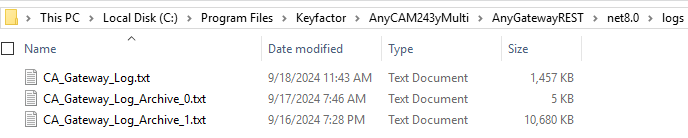
Figure 816: AnyCAGateway REST Available Logs
If you want to change these defaults:
- On the AnyCAGateway REST server where you want to adjust logging, open a text editor (for example, Notepad) using the Run as administrator option.
-
In the text editor, browse to open the Nlog.config file on the configuration directory under the directory in which you installed the AnyCAGateway REST. By default, this is the following directory:
C:\Program Files\Keyfactor\Keyfactor AnyCA Gateway\AnyGatewayREST\Configuration - Your Nlog.config file may have a slightly different layout than shown here, but the fields you may want to edit are:
The logDirectory variable:
name="logDirectory" value="logs/"Example new value:
name="logDirectory" value="D:\GatewayLogs\logs/"Important: If you choose to change the path for storage of the log files, you will may need to create the new directory (for example, D:\GatewayLogs) and grant the service account under which the CA gateway service runs full control permissions on this directory, depending on what service account the gateway as running as. If the gateway is running as Network Service, it should have sufficient permissions to create the directory and switch the location to a local directory without this.The path and file name of the active CA gateway log file:
fileName="${logDirectory}/CA_Gateway_Log.txt"The path and file name of previous days' CA gateway log files:
archiveFileName="${logDirectory}/CA_Gateway_Log_Archive_{#}.txt"The CA gateway rotates log files daily and names the previous files using this naming convention.
The number of archive files to retain before deletion:
maxArchiveFiles="2"The level of log detail that should be generated:
name="*" minlevel="Info"The default Info level logs error and some informational data but at a minimal level to avoid generating large log files. For troubleshooting, it may be desirable to set the logging level to Debug or Trace. Available log levels (in order of increasing verbosity) are:
OFF: Turns off logging.
FATAL: Logs severe errors that cause early termination.
ERROR: Logs severe errors and other runtime errors or unexpected conditions that do not cause early termination.
WARN: Logs warnings such as deprecated API usage, poor API usage, and other undesirable or unexpected runtime conditions.
INFO: Logs all the above, plus general runtime events such as startup and shutdown.
DEBUG: Logs all the above, plus detailed information about system behavior and execution flow.
TRACE: Logs all available information. This level can result in significant log volume.
<nlog autoReload="true"
internalLogFile="logs/NLog.txt"
internalLogLevel="Error"
throwExceptions="false"
throwConfigExceptions="false"
xmlns="http://www.nlog-project.org/schemas/NLog.xsd"
xmlns:xsi="http://www.w3.org/2001/XMLSchema-instance">
<extensions>
<add assembly="NLog.WindowsEventLog"/>
</extensions>
<variable name="logDirectory" value="logs/"/>
<targets>
<target name="buffered_wrapper" xsi:type="BufferingWrapper" slidingTimeout="true" bufferSize="500" flushTimeout="500">
<target xsi:type="File" name="logfile" fileName="${logDirectory}/CA_Gateway_Log.txt" layout="${longdate} ${logger} [${level}] - ${message}"
archiveFileName="${logDirectory}/CA_Gateway_Log_Archive_{#}.txt" archiveEvery="Day" archiveNumbering="Rolling" maxArchiveFiles="2"/>
</target>
<target xsi:type="EventLog" name="eventLog" source="CA Gateway"
eventId="${event-properties:item=eventID}" category="${event-properties:item=categoryID}" layout="${event-properties:item=eventMessage}" />
</targets>
<rules>
<logger name="*-EVENT" minLevel="Info" writeTo="eventLog" final="true" />
<!-- Don't write events to the log file (log file should contain different, more verbose, logging) -->
<logger name="*" minlevel="Info" writeTo="logfile">
<filters defaultAction="Neutral">
<!-- Don't log raw data dumps -->
<when condition="level = LogLevel.Trace and length('${message}') > 1000" action="Ignore" />
<!-- These classes write extremely verbose logging that is generally not needed in the course of regular troubleshooting -->
<when condition="starts-with('${logger}', 'CertTransBlobEncoder') and level < LogLevel.Info" action="Ignore" />
<when condition="starts-with('${logger}', 'CertificateRequestDecode') and level < LogLevel.Info" action="Ignore" />
<when condition="ends-with('${logger}', 'EntrustCertificateRecord') and level < LogLevel.Info" action="Ignore" />
<when condition="starts-with('${logger}', 'Microsoft.') and level < LogLevel.Info" action="Ignore" />
</filters>
</logger>
</rules>
</nlog>
Figure 817: NLog.config File for the AnyCAGateway REST
Installations in Containers under Kubernetes
By default, the AnyCAGateway REST installed in containers under Kubernetes outputs logging information to the standard Kubernetes logging system and generates file system logs at the Info logging level. The logging level can be configured in the custom values file with the workloadDefaults > logLevel parameter. For a complete list of the parameters, see Values File Settings for Containers Under Kubernetes. The supported log levels are:
-
OFF: No logging
-
FATAL: Log severe errors that cause early termination
-
ERROR: Log severe errors and other runtime errors or unexpected conditions that may not cause early termination
-
WARN: Log errors and use of deprecated APIs, poor use of APIs, almost errors, and other runtime situations that are undesirable or unexpected but not necessarily wrong
-
INFO: Log all the above plus runtime events (startup/shutdown)
-
DEBUG: Log all the above plus detailed information on the flow through the system
-
TRACE: Maximum log information—this option can generate large log files
The maximum size and number of logs to retain are controlled with the following Kubernetes configuration settings:
-
containerLogMaxWorkers
-
containerLogMonitorInterval
For more information, see:
https://kubernetes.io/docs/concepts/cluster-administration/logging/#log-rotation
Log customizations can be added using a custom nlog.config file to add, for example, log filters or reference third-party libraries or other files that support log aggregation.
For container installations under Kubernetes, custom NLog configuration can be added with either a config map or a persistent volume. If you’re just adding filters, a config map is the simpler route, though with a persistent volume subsequent changes to the nlog.config file will be loaded dynamically and will not require a restart or upgrade of the containers. If you need to include libraries or other files for log aggregation, you’ll need a persistent volume.
NLog Customization with a Config Map
To add NLog customization with a ConfigMap:
-
Create an nlogconfig.yaml file with contents similar with the following:
Important: When editing the file, be sure to preserve the indenting exactly as shown. YAML requires a very specific file layout to function. If the indenting (multiples of two spaces) or layout is incorrect, you will receive an error when trying to install.apiVersion: v1 data: nlog.config: | <?xml version="1.0" encoding="utf-8" ?> <nlog xmlns="http://www.nlog-project.org/schemas/NLog.xsd" xmlns:xsi="http://www.w3.org/2001/XMLSchema-instance" autoReload="true"> <extensions> <add assembly="NLog.Extensions.Logging" /> </extensions> <targets> <target xsi:type="AsyncWrapper" name ="ConsoleAsync"> <target xsi:type="Console" name="console" layout="${longdate} ${uppercase:${activityId}} ${logger} [${level}] - ${message}"/> </target> </targets> <rules> <logger name="*" minlevel="Debug" writeTo="ConsoleAsync"> <filters defaultAction="Log"> <when condition="starts-with('${logger}', 'CertTransBlobEncoder') and level < LogLevel.Info" action="Ignore" /> <when condition="starts-with('${logger}', 'CertificateRequestDecode') and level < LogLevel.Info" action="Ignore" /> <when condition="ends-with('${logger}', 'EntrustCertificateRecord') and level < LogLevel.Info" action="Ignore" /> </filters> </logger> </rules> </nlog> kind: ConfigMap metadata: name: nlog.configCustomize the filters and logging level to meet your needs. The example filters shown above
Note: If you load a custom nlog.config file, the logging level set with the workloadDefaults > logLevel parameter will be ignored in favor of the logging level set in the nlog.config file. -
Create a ConfigMap containing the NLog configuration based on the yaml file you created. For example:
sudo kubectl apply --filename /opt/kyf_gateway/nlogconfig.yaml --namespace keyfactor-gateway -
Edit your values file to add an additionalEnvironmentVariables section, if one does not already exist, with a reference to the path to your custom NLog.config file in the container and a volume and volumeMount for the ConfigMap of the NLog.config. For example, the following values file section shows the example root trusts volume (
The NLogPoller__Enabled and NLogPoller__PollingInterval settings are only needed if you plan to update your nlog.config file while it’s in use and want to reload the changes automatically (without restarting the container). These turn on periodic checks for updates to the nlog.config file to allow for dynamic updates of the configuration. This option is turned off by default. The polling interval sets the number of seconds between checks for updates. The default is 10 seconds.
additionalEnvironmentVariables:
  - name: NLogConfigFile
    value: /app/Configuration/custom-nlog/nlog.config
  - name: NLogPoller__Enabled
    value: "true"
  - name: NLogPoller__PollingInterval
    value: "15"

volumes:
  - name: root-cas
    configMap:
      name: ca-roots
      items:
        - key: ca-certificates.crt
          path: ca-certificates.crt
  - name: nlog
    configMap:
      name: nlog.config
      items:
        - key: nlog.config
          path: nlog.config

volumeMounts:
  - name: root-cas
    mountPath: /etc/pki/tls/certs/ca-bundle.crt   # Common CA bundle path for gateway containers
    subPath: ca-certificates.crt    # Source path for your CA bundle may vary  - name: nlog
    mountPath: /app/Configuration/custom-nlog
    readOnly: false
-
Load the new values, referencing the deployment name, Namespace, your customized values file, the Helm chart, and version. For example:
sudo helm upgrade Helm_Deployment_Name --namespace keyfactor-gateway --values values-local.yaml oci://repo.keyfactor.com/charts/command/anygateway-rest --version 1.0.1
NLog Customization with a Persistent Volume
To add NLog customization with a PersistentVolume:
-
On your Kubernetes server, create an nlog.config file containing any customized filter rules you want to apply and the configuration for any log aggregation solution you want to use. For example, the following filters
<?xml version="1.0" encoding="utf-8" ?> <nlog xmlns="http://www.nlog-project.org/schemas/NLog.xsd" xmlns:xsi="http://www.w3.org/2001/XMLSchema-instance" autoReload="true"> <extensions> <add assembly="NLog.Extensions.Logging" /> <add assemblyFile="/app/Configuration/Loki/NLog.Loki.dll" /> </extensions> <targets> <target xsi:type="AsyncWrapper" name ="ConsoleAsync"> <target xsi:type="Console" name="console" layout="${longdate} ${uppercase:${activityId}} ${logger} [${level}] - ${message}"/> </target> <target xsi:type="loki" name="loki" endpoint="${environment:LOKI_ENDPOINT_URL}" tenant="nlog-forwarding"> <layout xsi:type="JsonLayout" includeEventProperties="true"> <attribute name="level" layout="${level} "/> <attribute name="source" layout="${logger}" /> <attribute name="message" layout="${message}" /> <attribute name="exception" encode="false"> <layout xsi:type="JsonLayout"> <attribute name="type" layout="${exception:format=type}" /> <attribute name="message" layout="${exception:format=message}" /> <attribute name="stacktrace" layout="${exception:format=tostring}" /> </layout> </attribute> </layout> <label name="level" layout="${level:lowercase=true}" /> <label name="server" layout="${hostname:lowercase=true}" /> <label name="app" layout="gateway" /> <label name="helm" layout="${environment:HELM_NAME}" /> </target> </targets> <rules> <logger name="*" minlevel="Trace" writeTo="loki"> <filters defaultAction="Log"> <when condition="starts-with('${logger}', 'CertTransBlobEncoder') and level < LogLevel.Info" action="Ignore" /> <when condition="starts-with('${logger}', 'CertificateRequestDecode') and level < LogLevel.Info" action="Ignore" /> <when condition="ends-with('${logger}', 'EntrustCertificateRecord') and level < LogLevel.Info" action="Ignore" /> </filters> </logger> <logger name="*" minlevel="Info" writeTo="ConsoleAsync"> <filters defaultAction="Log"> <when condition="starts-with('${logger}', 'CertTransBlobEncoder') and level < LogLevel.Info" action="Ignore" /> <when condition="starts-with('${logger}', 'CertificateRequestDecode') and level < LogLevel.Info" action="Ignore" /> <when condition="ends-with('${logger}', 'EntrustCertificateRecord') and level < LogLevel.Info" action="Ignore" /> </filters> </logger> </rules> </nlog>You don’t necessarily need to set any filters at the nlog.config level if you’re using a log aggregation solution, but the option is available. The example nlog.config file contains two logger name sections—one directing log messages to Loki and the other continuing to write log messages to the default Kubernetes standard out. Separate filters can be configured for these. The HELM_NAME and LOKI_ENDPOINT
An endpoint is a URL that enables the API to gain access to resources on a server._URL are environment variables referenced from your Helm values.yaml file.Note: If you load a custom nlog.config file, the logging level set with the workloadDefaults > logLevel parameter will be ignored in favor of the logging level set in the nlog.config file. -
Create a PersistentVolume in Kubernetes to contain your nlog.config file, the libraries it references, and any supporting files. The steps for this will vary depending on your Kubernetes implementation and the intended storage location used by your PersistentVolume.
Tip: You can create a PersistentVolume in the local file system for testing purposes as follows:Create a directory that your PersistentVolume will reference and which will contain the files to be mounted via the persistent volume. For example:
mkdir /opt/files/Create a YAML file to define the PersistentVolume similar to the following:
apiVersion: v1 kind: PersistentVolume metadata: name:
Create the PersistentVolume based on the yaml file you created. For example:
sudo kubectl apply --filename=/opt/files/PersistentVolumes are cluster-scoped resources, meaning they are not associated with a specific Namespace.
Create a YAML file to define a PersistentVolumeClaim associated with the PersistentVolume similar to the following:
apiVersion: v1 kind: PersistentVolumeClaim metadata: name:
Create the PersistentVolumeClaim based on the yaml file you created. For example:
sudo kubectl apply --filename=/opt/files/Unlike PersistentVolumes, PersistentVolumeClaims are associated with a specific Namespace.
Place the files that should be mounted in the container into the directory you specified in the file system. For example:
/opt/files/nlog/nlog.configNote: Plugins and extensions may contain additional files not shown here.
Important: This operation should not be used for a production PersistentVolume. -
Edit your values file to add an additionalEnvironmentVariables section, if one does not already exist, with a reference to the path to your custom NLog.config file in the container and your HELM_NAME and LOKI_ENDPOINT_URL values. Add a volume and volumeMount for the PersistentVolume containing the nlog.config file, any required libraries, and any supporting files. For example, the following values file section shows the example root trusts volume (see Install AnyCAGateway REST in Containers Under Kubernetes) and the NLog.config.
- Your PersistentVolume claim name should match the claimName referenced here.
- The HELM_NAME value is a reference name you can use from within Grafana to query logs.
- The LOKI_ENDPOINT_URL should be set to the HTTP push endpoint for Loki without any path (server name or IP and port only).
- The NLogPoller__Enabled and NLogPoller__PollingInterval settings are only required if you want to automatically reload your nlog.config file while it is in use, without restarting the container, and if your PersistentVolume is located on a network file system (such as an Azure file share). These settings turn on periodic checks for updates to the nlog.config file, allowing dynamic configuration updates. This feature is turned off by default. The polling interval specifies the time, in seconds, between checks for updates, with a default of 10 seconds. Local PersistentVolumes do not require these settings, as they are updated dynamically.
additionalEnvironmentVariables:
  - name: NLogConfigFile
    value: /app/Configuration/Loki/nlog.config
  - name: HELM_NAME
    value: Gateway
  - name: LOKI_ENDPOINT_URL
    value: http://appsrvr185-loki.keyexample.com:32000
  - name: NLogPoller__Enabled
    value: "true"
  - name: NLogPoller__PollingInterval
    value: "15"

volumes:
  - name: root-cas
    configMap:
      name: ca-roots
      items:
        - key: ca-certificates.crt
          path: ca-certificates.crt
  - name: nlog-custom-volume
    persistentVolumeClaim:
      claimName: nlog-custom-pvc
volumeMounts:
  - name: root-cas
    mountPath: /etc/pki/tls/certs/ca-bundle.crt   # Common CA bundle path for gateway containers
    subPath: ca-certificates.crt    # Source path for your CA bundle may vary  - name: nlog-custom-volume
    mountPath: /app/Configuration/Loki
-
Load the new values, referencing the deployment name, Namespace, your customized values file, the Helm chart, and version. For example:
sudo helm upgrade Helm_Deployment_Name --namespace keyfactor-gateway --values values-local.yaml oci://repo.keyfactor.com/charts/command/anygateway-rest --version 1.0.1
The app label is defined in the nlog.config file. The server name is made up of the Helm deployment name, the application, and some additional IDs. The above query requests the app where the value is gateway, formats the returned results in a manner similar to expected nlog output, excludes messages tagged -EVENT, and includes only messages for the portal application for the Helm deployment restgateway1. Given a Helm deployment name of restgateway1, possible server tags would start with:
- restgateway1-anygateway-rest-portal
- restgateway1-anygateway-rest-dbmanagement (this container is short-lived)
- The version of AnyCAGateway REST being installed.
- Any loaded CA plugin, with the version of plugin implementation.
- The database connection string. If a password is part of the connection string, it will be masked out.
If the default CA plugin is in use, the service will log a message and warn the user to configure a plugin (see Configure AnyCAGateway REST Plugins).
2023-08-30 12:15:13.4538 Keyfactor.AnyGatewayCore.NoOpAnyCAPlugin [Warn] - The current AnyCAPlugin is a placeholder. Please configure a AnyCAPlugin in the manifest.json.
2023-08-30 12:15:13.4538 Keyfactor.AnyGatewayREST.Filters.APIExceptionFilter [Error] - Keyfactor encountered an error processing the request. Please view the server log for more detail. (Error Code: 0x80004001)
2023-08-30 12:15:13.4538 Keyfactor.AnyGatewayREST.Filters.APIExceptionFilter [Error] - The method or operation is not implemented.
-
If no CA is found with the logical name The logical name of a certificate authority (CA) is the human-readable name assigned to the CA when it is created. This name is used to uniquely identify the CA within its management system and in Keyfactor Command configuration settings.
For some CA types, such as Microsoft CAs, the logical name is combined with the CA host name to form a fully qualified identifier (for example, ca1.keyexample.com\Corp Issuing CA One) that may be used in command-line tools and configuration references. The exact format and usage of the logical name can vary by CA type., a Debug level message is logged that states as much.
- Any exceptions that arise during the synchronization but which are not handled as part of the synchronization's error handling are logged.
Errors and Error Messages
The following sections describe common errors that may occur when using the AnyCAGateway REST and steps to help resolve them.
CA Plugin Not Configured
-
Description
Errors occur when attempting to add a certificate authority
A certificate authority (CA) is an entity that issues digital certificates. Within Keyfactor Command, a CA may be a Microsoft CA or a Keyfactor gateway to a cloud-based or remote CA. (CA) or perform CA-related operations. The AnyCAGateway REST portal remains accessible, but log entries indicating plugin configuration issues may be generated. -
Likely Cause
No third-party CA plugin is configured. The gateway is running with the placeholder CA plugin.
-
Resolution
Install and configure a third-party CA plugin by placing the required plugin files, including the plugin DLL files and manifest.json, are present in the Extensions directory. For more information, see Configure AnyCAGateway REST Plugins.
Example log messages:
2025-08-30 12:15:13.4538 Keyfactor.AnyGatewayCore.NoOpAnyCAPlugin [Warn] - The current AnyCAPlugin is a placeholder. Please configure a AnyCAPlugin in the manifest.json.
2025-08-30 12:15:13.4538 Keyfactor.AnyGatewayREST.Filters.APIExceptionFilter [Error] - Keyfactor encountered an error processing the request. Please view the server log for more detail. (Error Code: 0x80004001)
2025-08-30 12:15:13.4538 Keyfactor.AnyGatewayREST.Filters.APIExceptionFilter [Error] - The method or operation is not implemented.
Revocation Check Errors when using Client Certificate Authentication
-
Description
Authentication fails when client certificate authentication is used.
-
Likely Causes
-
Certificate distribution points (CDPs) are not reachable.
-
CDPs are not configured correctly on the client authentication certificate.
-
-
Resolution
-
Review and correct the CDP configuration for the certificate.
-
If necessary, turn off revocation checking during installation by setting CheckClientCertCRL to False in the appsettings.json file and restarting the gateway service.
-
OAuth Authentication Failing
-
Description
OAuth authentication attempts fail when accessing the portal or API.
-
Resolution
Review the gateway logs and compare the token claims recorded for each authentication attempt. Identify and correct any discrepancies between expected and actual claims.
CA Not Available for Enrollment
-
Description
A configured CA does not appear as available for enrollment
Certificate enrollment refers to the process by which a user requests a digital certificate. The user must submit the request to a certificate authority (CA).. -
Likely Cause
The CA is not configured for enrollment.
-
Resolution
Ensure that the Use for Enrollment option is turned on for the CA in Keyfactor Command.
Template or Enrollment Pattern Not Available for Enrollment
-
Description
A certificate template
A certificate template defines the policies and rules that a CA uses when a request for a certificate is received. or enrollment pattern does not appear as available for enrollment. -
Likely Cause
Required permissions or roles are not configured.
-
Resolution
In Keyfactor Command:
-
Ensure Use AD Permissions is turned off for the enrollment pattern.
-
Ensure one or more roles are assigned in Associated Roles on the Basic Information tab.
-
403.16 Error When Using Client Certificate Authentication
-
Description
A 403.16 error occurs during authentication using a client certificate.
-
Likely Causes
-
The client certificate chain is not trusted by the gateway server.
-
An intermediate certificate is incorrectly placed in the Trusted Root Certificate Authorities store.
-
-
Resolution
- Verify that the client authentication certificate chain is trusted by the AnyCAGateway REST server.
- Open the Certificates (Local Computer) MMC on the gateway server.
- Navigate to Trusted Root Certificate Authorities.
- Identify any certificates where the Issued To value does not match the Issued By value.
- Remove any such certificates and retry authentication.
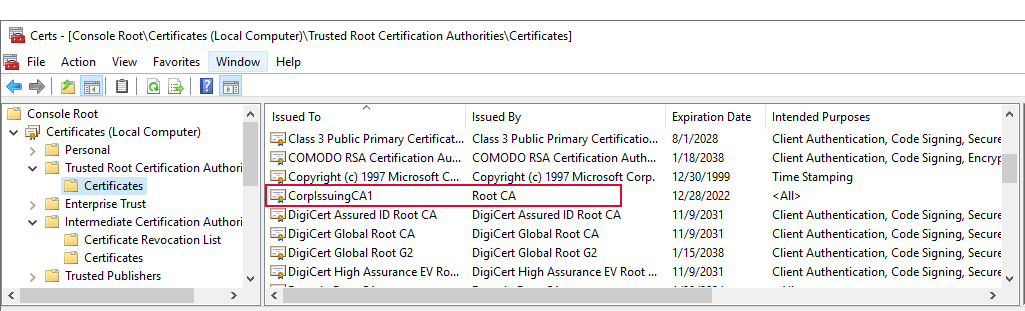
Figure 818: Certificate Incorrectly in the Trusted Root Certificate Store
Services
Open Windows Services on the AnyCAGateway REST and scroll down to locate the Keyfactor AnyCAGateway Servce (Name). The value in parentheses will be (Default) unless you supplied a different value in the -ServiceSuffix parameter (see Install AnyCAGateway REST on Windows under IIS). If the service has not started, start the service.

You can also track the path to the gateway installation on the services properties dialog.
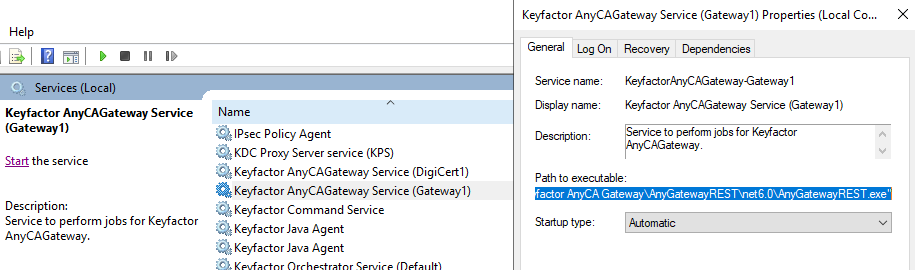
Figure 820: Path to Executable
Was this page helpful? Provide Feedback