
The AnyCAGateway REST is hosted using IIS by default. In a standard installation, the gateway is installed under the Default Web Site using the AnyGatewayREST virtual directory and application pool.
The gateway files are installed to the following location by default:
If you plan to use a different IIS site, virtual directory, application pool, or installation path, create the required IIS configuration before installation and specify the corresponding values in the installation script parameters.
To configure the AnyCAGateway REST IIS site:
-
Install IIS. The AnyCAGateway REST requires only the default IIS features for operation and requires neither Windows Integrated nor Basic authentication. The correct PowerShell command to install the necessary roles and features is:
CopyInstall-WindowsFeature Web-Server, Web-Asp-Net45, Web-Default-Doc, Web-Dir-Browsing, Web-Http-Errors, Web-Static-Content, Web-Http-Logging, Web-Stat-Compression, Web-Filtering, Web-Net-Ext45, Web-ISAPI-Ext, Web-ISAPI-Filter, Web-Mgmt-Console - Create a web site if you're not going to use the Default Web Site.
- Configure an HTTPS Binding on the site. Use an SSL
 TLS (Transport Layer Security) and its predecessor SSL (Secure Sockets Layer) are protocols for establishing authenticated and encrypted links between networked computers. certificate for the machine you are on or issue one to use if you have not already done so (see AnyCAGateway REST TLS (SSL) Certificate).
 - Give database permissions to the user running the application pool on the your SQL server.
Additional Setup for Servers that Support TLS 1.3
On Windows servers that support TLS 1.3, when using client certificate authentication, TLS 1.3 over TCP must not be used for the IIS site hosting the AnyCAGateway REST application. TLS 1.3 is supported for OAuth authentication.
To configure the IIS site:
- Open Internet Information Services (IIS) Manager.
- Select the IIS site hosting the AnyCAGateway REST application.
- Open Bindings.
- Select the https binding and click Edit.
- Select the Disable TLS 1.3 over TCP checkbox.
- Click OK to save the binding configuration.
After updating the binding, restart the IIS site if required.
If this option is not present, TLS 1.3 over TCP is not active on the server, and no additional configuration is required.
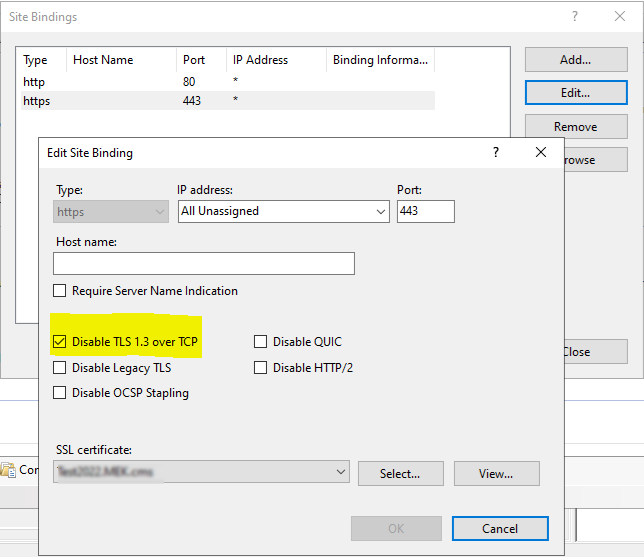
Figure 792: Turn Off TLS 1.3 over TCP
Was this page helpful? Provide Feedback