
Identity providers in the AnyCAGateway REST are used to provide a method for authenticating access to the gateway portal and API An API is a set of functions to allow creation of applications. Keyfactor offers the Keyfactor API, which allows third-party software to integrate with the advanced certificate enrollment and management features of Keyfactor Command. using OAuth authentication. During installation, one identity provider is created to provide initial access to the AnyCAGateway REST portal, if Oauth authentication is used. This identity provider does not typically need to be updated, but can be edited on this page. Additional identity providers can be added here to support migration to a new identity provider or to support users from multiple identity providers.
Identity providers cannot be deleted.
To create an identity provider or modify an existing one:
- In the AnyCAGateway REST portal, select the Identity Providers tab.
- Click Add to add a new identity provider or click Edit from the top of the grid to modify an existing provider.
-
On the Add/Editing Identity Provider page, fill in each tab of the dialog with the information desired for the selected identity provider.
-
On the Details tab, select a Provider Type in the dropdown. Most identity providers can be supported with the Generic type. For Auth0, select the Auth0 type.
Enter a short name for the provider in the Authentication Scheme and a longer name in the Display Name. The Provider Type and Authentication Scheme cannot be modified on an edit.
Important: The value in the Authentication Scheme field must match the provider name referenced in redirect URLsThe Authentication Enable toggle appears only when editing an existing identity provider. Newly added identity providers are active by default. Existing identity providers can be turned off, if desired. An identity provider configured as the default login provider cannot be turned off. When an identity provider is turned off, users cannot authenticate to the AnyCAGateway REST portal or API using it.
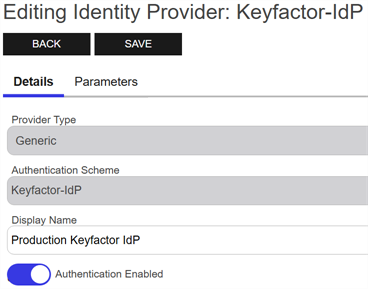
Figure 810: Edit Details for an Identity Provider
-
On the Parameters tab, select each parameter
A parameter or argument is a value that is passed into a function in an application. to configure and click Edit to open the Edit <Parameter Name> Parameter dialog, the contents of which will vary depending on the parameter selected. For information about the specific parameters, see Table 1279: Identity Provider Parameters.Note: The following parameters cannot be modified when editing an existing identity provider:Authority
AuthorizationEndpoint
TokenEndpoint
UserInfoEndpoint
JSONWebKeySetUri
Click Import Discovery Document to enter the discovery URL of the identity provider and automatically populate the Authority, AuthorizationEndpoint, TokenEndpoint, JSONWebKeySetUri, and UserInfoEndpoint fields. Click Fetch to retrieve the information and Save to save it to the identity provider form.
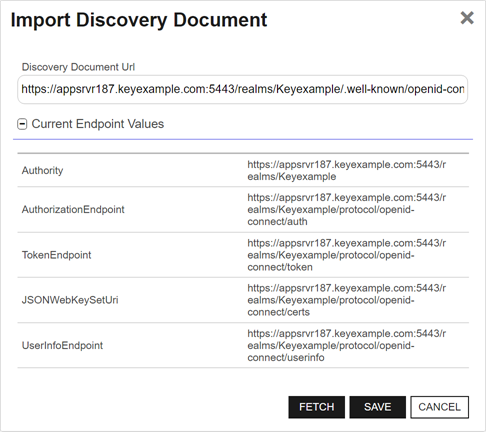
Figure 811: Import Discovery Document for an Identity Provider
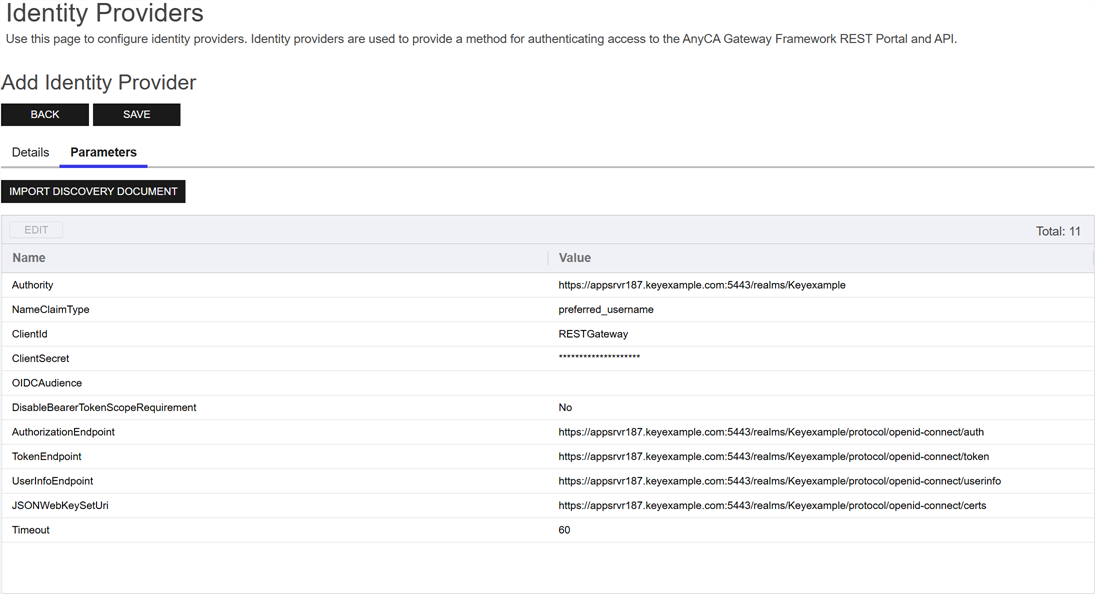
Figure 812: Add Parameters for an Identity Provider
-
- Click Save to save the identity provider.
Table 1279: Identity Provider Parameters
| Name | Example |
Description |
|---|---|---|
| Auth0 API URL |
The unique identifier defined in Auth0 or a similar identity provider for the API. This parameter only appears if Auth0 is selected as the type and is required in that case. |
|
| Authority | https:// keyidp-server .keyexample.com /realms /Keyfactor |
The issuer/authority endpoint URL of the identity provider. For Keycloak, this is included among the information that can be found on the OpenID Endpoint Configuration page, a link to which can be found on the Realm Settings page (seeConfiguring Keycloak and Collecting Data for the Keyfactor Command Installation). This information is automatically returned by the Discovery Document Endpoint Fetch step. Review it to confirm that it appears correct. This parameter is required. Tip: When you add or update an identity provider, the provider’s discovery document is validated based on this authority URL. The discovery document is also validated periodically in the background. The following are validated:
If any of these validation tests fail, any identity provider changes in process will not be saved and an error will be displayed or logged. |
| Authorization Endpoint | https:// keyidp-server .keyexample.com /realms /Keyfactor /protocol /openid-connect /auth |
The authorization endpoint URL for the identity provider. For Keycloak, this is included among the information that can be found on the OpenID Endpoint Configuration page, a link to which can be found on the Realm Settings page (seeConfiguring Keycloak and Collecting Data for the Keyfactor Command Installation). This information is automatically returned by the Discovery Document Endpoint Fetch step. Review it to confirm that it appears correct. This parameter is required. |
| Client Id | Gateway- OIDC- Client |
The ID of the client you created in the identity provider to provide the primary authentication from the gateway to the identity provider. For Keycloak, seeConfiguring Keycloak and Collecting Data for the Keyfactor Command Installation. This parameter is required. |
| Client Secret |
The client secret of the client you created in the identity provider to provide the primary authentication from the gateway to the identity provider. A Keyfactor secret is a user-defined username or password that is encrypted and stored securely in the database. For Keycloak, seeConfiguring Keycloak and Collecting Data for the Keyfactor Command Installation. This parameter is required. |
|
| Disable Bearer Token Scope Requirement |
A Boolean that turns off checking for a client scope of keyfactor-anyca-gateway configured in the identity provider for this Authentication Scheme (True or False). Tip: Set this to True (yes) if your identity provider does not provide a scope. Some identity providers do not offer the option to include a scope value (for example, Azure Active Directory). Other identity providers offer this option but do not include the scope by default (for example, Keycloak).
Important: If you configure the DisableBearerTokenScopeRequirement option to False (no), you must either configure the client you’re using to connect from Keyfactor Command to the gateway to always include the scope keyfactor-anyca-gateway in the token or you must configure the keyfactor-anyca-gateway scope on the authentication methods tab when configuring the CA record in Keyfactor Command. Your OAuth identity provider needs to be configured to recognize keyfactor-anyca-gateway as a scope.
|
|
| JSON Web Key Set Uri | https:// keyidp-server .keyexample.com /realms /Keyfactor /protocol /openid-connect /certs |
The JWKS (JSON Web Key Set) URL for the identity provider. ForKeycloak, this is included among the information that can be found on the OpenID Endpoint Configuration page, a link to which can be found on the Realm Settings page (seeConfiguring Keycloak and Collecting Data for the Keyfactor Command Installation). This information is automatically returned by the Discovery Document Endpoint Fetch step. Review it to confirm that it appears correct. This parameter is required. |
| preferred_ username |
A type of user claim for the identity provider containing a friendly name for the user. For Keycloak this should be: preferred_ username
For Okta, this might be preferred_names (for example, john.smith@keyexample.com) or just name (for example, John Smith). For Auth0 this might be name (for example, johnsmith@keyexample.com). This parameter is required. Tip: The value in this field is used to populate the username in the AnyCAGateway REST portal header.
|
|
| OIDC Audience |
The audience value for tokens issued from the identity provider. Claims are rejected unless they include the audience defined by this parameter, provided that a value has been specified. Only one audience may be specified. This parameter applies to OpenID Connect tokens only. This parameter is optional. |
|
| SignOut URL | https:// auth0-instance .us.auth0.com /oidc/logout |
The signout URL for the identity provider. This parameter only appears if Auth0 is selected as the type and is required in that case. |
| Timeout | 60 | The number of seconds a request to the OAuth identity provider is allowed to process before timing out with an error. |
| Token Endpoint | https:// keyidp-server .keyexample.com /realms /Keyfactor /protocol /openid-connect /token |
The token endpoint URL for the identity provider. For Keycloak, this is included among the information that can be found on the OpenID Endpoint Configuration page, a link to which can be found on the Realm Settings page (seeConfiguring Keycloak and Collecting Data for the Keyfactor Command Installation). This information is automatically returned by the Discovery Document Endpoint Fetch step. Review it to confirm that it appears correct. This parameter is required. |
| User Info Endpoint | https:// keyidp-server .keyexample.com /realms /Keyfactor /protocol /openid-connect /certs |
The user info endpoint URL for the identity provider. For Keycloak, this is included among the information that can be found on the OpenID Endpoint Configuration page, a link to which can be found on the Realm Settings page (seeConfiguring Keycloak and Collecting Data for the Keyfactor Command Installation). This information is automatically returned by the Discovery Document Endpoint Fetch step. Review it to confirm that it appears correct. |
Was this page helpful? Provide Feedback