
On the Servers tab of the Server Manager page you enter records for all the SSH The SSH (secure shell) protocol provides for secure connections between computers. It provides several options for authentication, including public key, and protects the communications with strong encryption. servers in the environment that will be inventoried or managed with the Keyfactor Bash Orchestrator The Bash Orchestrator, one of Keyfactor's suite of orchestrators, is used to discover and manage SSH keys across an enterprise.. Each SSH server added here must have either the orchestrator Keyfactor orchestrators perform a variety of functions, including managing certificate stores and SSH key stores. installed on it or have had the remote install script for the orchestrator run on it, which sets up the machine for remote control by the orchestrator. For more information about the orchestrator, see Bash Orchestrator.
SSH → Server Manager → Servers Tab
You must create at least one server group before you can add SSH servers into the Keyfactor Command Management Portal (see SSH Server Group Operations).
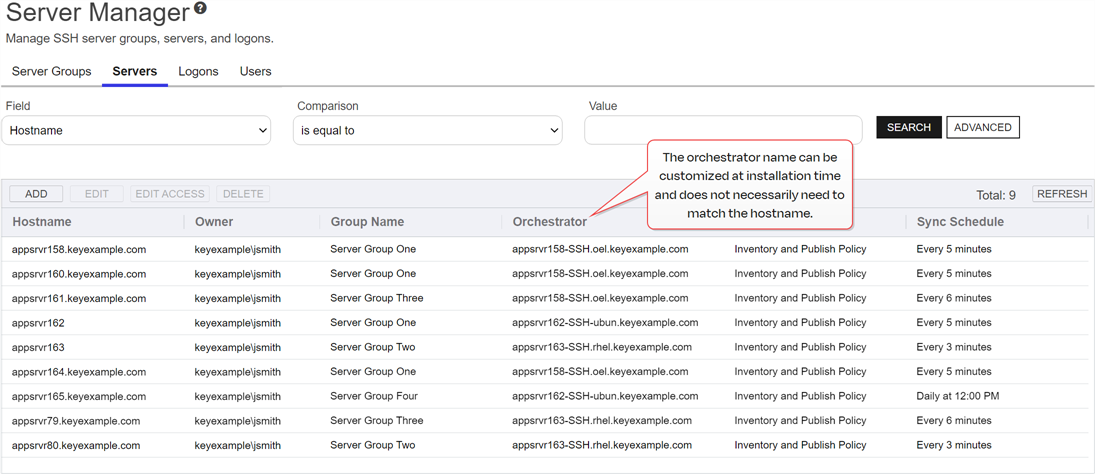
Figure 392: SSH Servers Grid
Add or Edit an SSH Server
Before adding a new SSH server, be sure that you have added at least one server group (see Add or Edit a Server Group) and that your Keyfactor Bash Orchestrator has been registered and approved in Keyfactor Command (see Orchestrator Management).
To add a new SSH server or modify an existing one:
-
On the Servers tab, click Add or Edit.
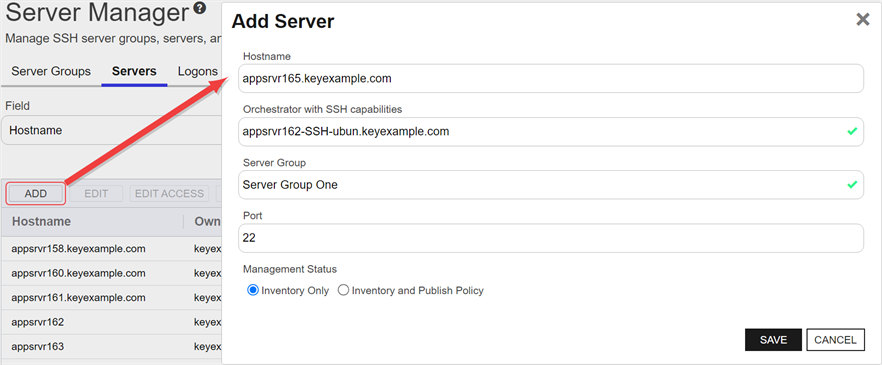
Figure 393: Add an SSH Server
-
In the Add Server dialog on the Basic tab, enter the DNS
The Domain Name System is a service that translates names into IP addresses. hostname The unique identifier that serves as name of a computer. It is sometimes presented as a fully qualified domain name (e.g. servername.keyexample.com) and sometimes just as a short name (e.g. servername). for the server in the Hostname field. This can be either the FQDN or a short name. An IP address may be used if desired. This field is required.Note: The following values are not supported in the Hostname field:- 127.0.0.1
- localhost
- ::1
Note: This field cannot be modified on an edit. -
In the Orchestrator dropdown, select an approved orchestrator. This field is required.
Note: This field cannot be modified on an edit. -
In the Server Group dropdown, select an existing server group. This field is required.
Note: This field cannot be modified on an edit. - In the Port field, either select the default SSH port of 22 or enter a custom port if an alternative port is used for SSH in your environment.
-
Select either the Inventory Only radio button or the Inventory and Publish Policy radio button (see SSH).
Tip: If the server group you selected above is configured in inventory and publish policy mode (with the Enforce Publish Policy box checked), you will not be able to save the server in inventory only mode. - Click Save to save the new server.
Edit Access to an SSH Server
Using the Edit Access function you create mappings between Keyfactor Command user accounts associated with SSH keys and Linux logons in order to publish the SSH public keys to the Linux servers (see SSH). You can also remove the mappings from here, which causes the SSH public keys to be removed from the Linux servers.
Before adding a logon to user mapping, be sure that you have switched the server to which you will add your mapping (or its server group) to inventory and publish policy mode (see Server Manager) so that the key for the user will be published to the server. If the server is in inventory only mode and you add a mapping for it in Keyfactor Command, the mapping will appear in Keyfactor Command only and the key for the user will not be published out to the server.
To edit the access for a server, create a mapping between a Linux logon and a Keyfactor Command user, and publish the user's key to the SSH server:
- In the Servers grid, locate the server that you wish to publish an SSH key to by mapping a Keyfactor Command user to a Linux logon on that server.
-
Right-click the server and choose Edit Access from the right-click menu or highlight the row in the servers grid and click Edit Access at the top of the grid.
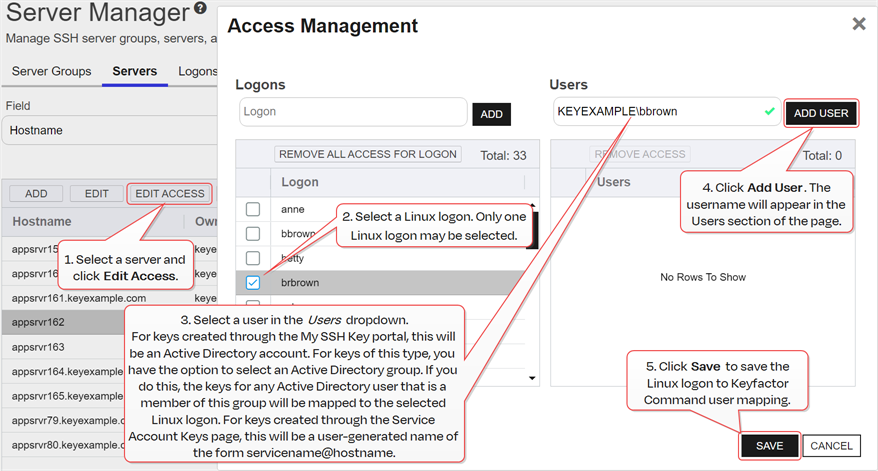
Figure 394: Edit Access for an SSH Server: Add Access
-
On the Access Management page, select an existing Logon on the left side of the page. If you wish to add a new logon, enter the new logon name in the Logon field at the top of the left side of the page and click Add Logon. The new logon appears at the bottom of the Logon list. Click the Logon list title to sort the list, if desired. Select the new logon. Only one logon may be selected.
Tip: If you have enabled SSSD support for your Keyfactor Bash Orchestrator and are adding a domain user, specify the user in username@domain format. For example bbrown@keyexample.com (or, depending on SSSD configuration, such as the case-sensitivity setting; BBROWN@keyexample.com). Note that the logon may be modified by the SSSD configuration file in ways in which Keyfactor Command cannot know about. Refer to SSH-SSSD Case Sensitivity Flag for guidance on what to enter based on how the SSSD case sensitivity flag is configured. -
In the Users dropdown at the top of the right side of the page, select a user or service account to associate the logon with. Only Keyfactor users that have keys stored in Keyfactor Command, that have been designated as server group owners, or AD users or groups that have been previously entered for association with a logon will appear in the dropdown. If desired, you may enter an Active Directory user or group name in this field. Using an Active Directory group to create Linux logon to Keyfactor user mappings will cause the keys stored in Keyfactor Command for any Active Directory users that are members of this group to be mapped to the selected Linux logon and published to the server on which the Linux logon exists. Any Active Directory users that are members of this group but who do not have keys stored in Keyfactor Command will not be mapped to the selected Linux logon. Click Add User.
Tip: For keys created through the My SSH Key portal (see My SSH Key Operations), a Keyfactor user is an Active Directory user account. For keys created through the Service Account Keys page (see Service Account Key Operations), a Keyfactor user is a user-generated service account name of the form servicename@hostname. - Repeat step 6 for any other user or service accounts that you wish to map to this logon on this server.
- Click Save.
To remove a mapping of a Linux logon to a Keyfactor Command user for a server, removing the public key In asymmetric cryptography, public keys are used together in a key pair with a private key. The private key is retained by the key's creator while the public key is widely distributed to any user or target needing to interact with the holder of the private key. from the Linux logon's authorized_keys file:
- In the Servers grid, locate the server that you wish to remove an SSH key from by unmapping a Keyfactor Command user from a Linux logon on that server.
-
Right-click the server and choose Edit Access from the right-click menu or highlight the row in the servers grid and click Edit Access at the top of the grid.
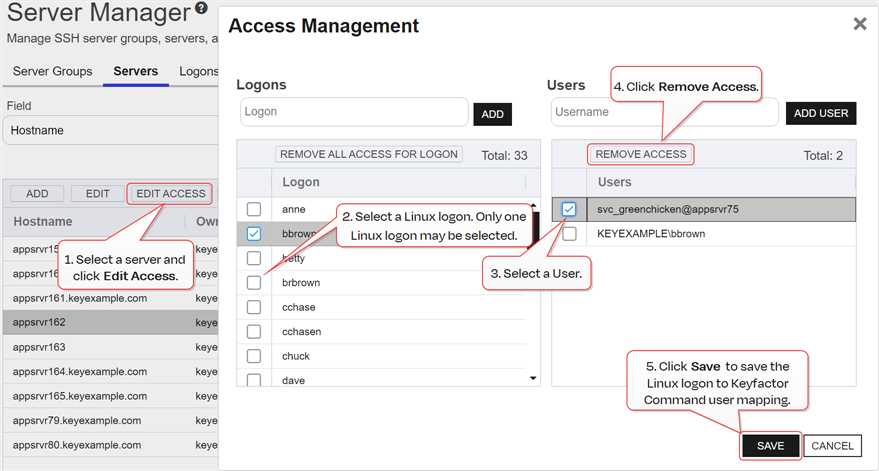
Figure 395: Edit Access for an SSH Server: Remove Access
- On the Access Management page, select a Logon on the left side of the page. Only one logon may be selected.
-
In the Users section on the right side of the page, select a user or service account to unmap from the logon. Click Remove Access under Users. The Linux logon to Keyfactor user mapping for the selected user will be removed and the user's SSH key will be removed from the authorized_keys files of the Linux logon on the selected server.
Tip: Clicking Remove All Access for Logon on the Logons side of the page removes all Linux logon to Keyfactor user mappings for the selected logon on the selected server with one click without the need to select the users on the Users side of the page.This option does not delete the logon from any servers (see Add or Edit Access for an SSH Logon).
- Repeat step 6 for any other user or service accounts that you wish to unmap from this logon on this server.
- Click Save.
Delete an SSH Server
To delete a server, highlight the row in the servers grid and click Delete at the top of the grid or right-click the server in the grid and choose Delete from the right-click menu.
 ) next to the page title to open the Keyfactor Software & Documentation Portal to this section. You will receive a prompt indicating:
You can also find Help in the Navigator The Navigator is the Keyfactor Command left-hand (newer versions) or top (older versions) navigation menu. Certificate collections and reports can be configured to be added to the menu using user-defined Show in Navigator settings.. From here you can choose to open either the Keyfactor Software & Documentation Portal at the home page or the Keyfactor API Endpoint Utility.
Keyfactor provides two sets of documentation: the On-Premises Documentation Suite and the Managed Services Documentation Suite. Which documentation set is accessed is determined by the Application Settings: On-Prem Documentation setting (see Application Settings: Console Tab).
Was this page helpful? Provide Feedback