
To edit one of the orchestrator Keyfactor orchestrators perform a variety of functions, including managing certificate stores and SSH key stores. job types:
- In the Management Portal, browse to Orchestrators > Auto-Registration.
-
On the Orchestrator Auto-Registration Settings page, highlight the row in the grid of the job you want to edit and click Edit at the top of the grid or right-click the job in the grid and choose Edit from the right-click menu.
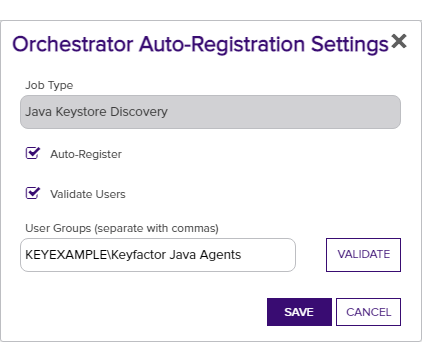
Figure 270: Orchestrator Auto-Registration Edit
- In the Orchestrator Auto-Registration Settings dialog, check the Auto-Register box if you want orchestrators to be able to auto-register. If you do not enable this, an administrator will need to visit the Orchestrator Management page in the Management Portal and manually approve each orchestrator.
-
Check the Validate Users box if you want the users under which the orchestrators are running to be a member of a specific Active Directory group in order to auto-register. If you do not enable this but you do enable auto-registration, all orchestrators will auto-register.
-
In the User Groups field, enter the AD group or groups against which to validate the user accounts in DOMAIN\group name format. Multiple groups should be separated by a comma and no space. User accounts may be used if desired.
-
Click the Validate button to validate the entered group(s).
Note: Validation is only supported on domain-joined Keyfactor Command servers. -
- Click Save.
An Active Directory forest (AD forest) is the top most logical container in an Active Directory configuration that contains domains, and objects such as users and computers. must be used for all roles serviced by a given orchestrator type (e.g. Keyfactor Java Agent The Java Agent, one of Keyfactor's suite of orchestrators, is used to perform discovery of Java keystores and PEM certificate stores, to inventory discovered stores, and to push certificates out to stores as needed. or Keyfactor Universal Orchestrator The Keyfactor Universal Orchestrator, one of Keyfactor's suite of orchestrators, is used to interact with servers and devices for certificate management, run SSL discovery and management tasks, and manage synchronization of certificate authorities in remote forests. With the addition of custom extensions, it can provide certificate management capabilities on a variety of platforms and devices (e.g. Amazon Web Services (AWS) resources, Citrix\NetScaler devices, F5 devices, IIS stores, JKS keystores, PEM stores, and PKCS#12 stores) and execute tasks outside the standard list of certificate management functions. It runs on either Windows or Linux servers or Linux containers.). All auto-registration settings must be populated if any are to be used even if all features are not planned for use. For example, if you plan to use, for example, Java keystores but not PEM A PEM format certificate file is a base64-encoded certificate. Since it's presented in ASCII, you can open it in any text editor. PEM certificates always begin and end with entries like ---- BEGIN CERTIFICATE---- and ----END CERTIFICATE----. PEM certificates can contain a single certificate or a full certifiate chain and may contain a private key. Usually, extensions of .cer and .crt are certificate files with no private key, .key is a separate private key file, and .pem is both a certificate and private key. certificate stores managed by the Keyfactor Java Agent, you still need to populate both the Java keystore and the PEM auto-registration settings to enable auto-registration for the Java Agent to function correctly. Similarly, all auto-registration settings for capabilities supported by your Keyfactor Universal Orchestrator must be populated even if you won’t be using all features. Settings reserved for future use do not need to be populated, though doing so will not hurt anything.