
By default, the Keyfactor Bash Orchestrator The Bash Orchestrator, one of Keyfactor's suite of orchestrators, is used to discover and manage SSH keys across an enterprise. places its log files in the /opt/keyfactor-bash-orchestrator Keyfactor orchestrators perform a variety of functions, including managing certificate stores and SSH key stores./logs directory, generates logs at non-debug level, rotates the logs when they reach 50 MB, and retains 10 archive logs before deletion.
If you wish to change these defaults after the installation is complete:
- On the orchestrator machine where you wish to adjust logging, open a command shell and change to the directory in which the orchestrator is installed. By default this is /opt/keyfactor-bash-orchestrator.
- In the command shell in the directory in which the orchestrator is installed, change to the Configuration directory.
- Using a text editor, open the orchestrator_config file in the Configuration directory. Your
orchestrator_config file may have a slightly different layout than shown here, but it will
contain the three fields highlighted in the below figure. The fields you may wish to
edit are:
- logFile=/opt/keyfactor-bash-orchestrator/logs/bash-orchestrator-log.txt
- logFileSize=50000000
The maximum file size of each log file. After a log file reaches the maximum size, it is rotated to an archive file name and a new log file is generated. The default is 50000000 (50 MB).
- logFilesToKeep=10
The number of archive files to retain before deletion.
- debugLogEnabled=false
The level of log detail that should be generated. The default of false logs error and some informational data but at a minimal level to avoid generating large log files. For troubleshooting, it may be desirable to set the debug level to true.
The path and file name of the active orchestrator log file.
Important: If you choose to change the path for storage of the log files, you will need to create the new directory (e.g. /opt/sshorchlogs) and grant the Linux service account under which the orchestrator service is running (see Create a Service Account for the Keyfactor Bash Orchestrator) full control permissions on this directory.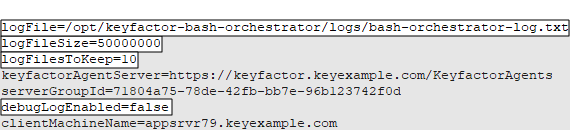
Figure 596: Configure Logging for the Keyfactor Bash Orchestrator