
The Certificate Count by Template A certificate template defines the policies and rules that a CA uses when a request for a certificate is received. report includes bar graphs showing the number of certificates issued, failed and revoked by template in the selected date range for the selected CA A certificate authority (CA) is an entity that issues digital certificates. Within Keyfactor Command, a CA may be a Microsoft CA or a Keyfactor gateway to a cloud-based or remote CA.(s). Separate graphs are generated for issued and revoked certificates and for each selected CA. Each graph contains all the templates that have had certificates issued or revoked for the period.
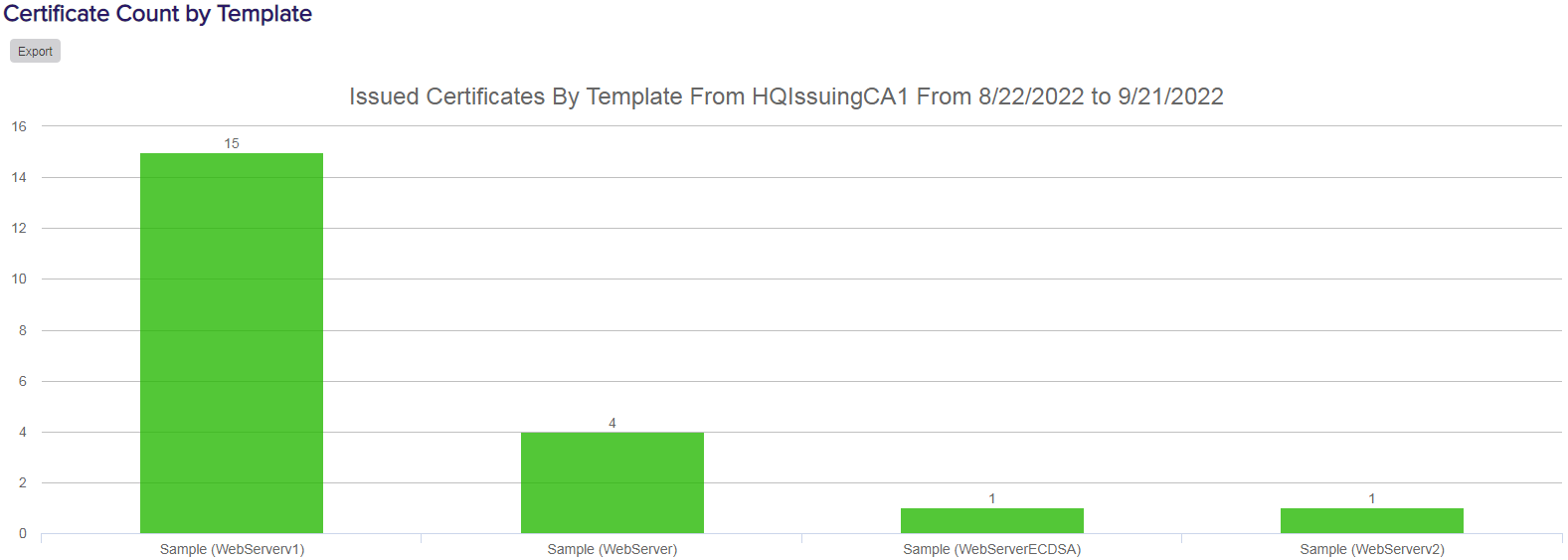
Figure 68: Certificate Count by Template: Issued Certificates
The export options for the Certificate Count by Template report are Excel and PDF.
The input parameters for this report are:
- The start date and end date for the report date range. The default date range is 30 days prior through the current date, meaning only certificates issued and revoked in that date range will be included in the report.
- The CA(s) to include in the report. Templates that are available for issuance from more than one CA are reported separately by CA.