
Once you have generated an SSH The SSH (secure shell) protocol provides for secure connections between computers. It provides several options for authentication, including public key, and protects the communications with strong encryption. key pair In asymmetric cryptography, public keys are used together in a key pair with a private key. The private key is retained by the key's creator while the public key is widely distributed to any user or target needing to interact with the holder of the private key., most things about the key pair are fixed and cannot be changed. However, two pieces of key information can be changed for an existing key pair—the email address to which alerts about the key should be directed and the comment associated with the public key In asymmetric cryptography, public keys are used together in a key pair with a private key. The private key is retained by the key's creator while the public key is widely distributed to any user or target needing to interact with the holder of the private key..
To modify the email address or key comment:
- In the Management Portal, browse to SSH > Service Account Keys.
- On the Service Account Keys page, double-click the key for the desired service account in the grid, highlight the row in the grid and click Edit at the top of the grid, or right-click the key in the grid and choose Edit from the right-click menu.
-
In the Edit Key dialog, update the Email and Comment fields as needed and click Save.
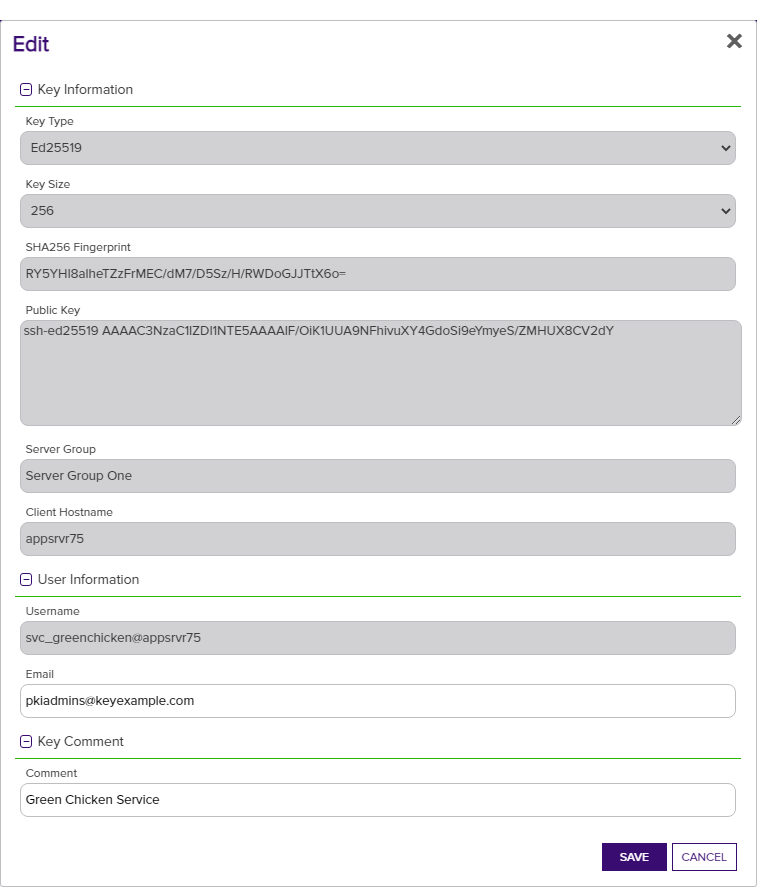
Figure 304: Edit SSH Service Account Key Information
Changes made to the key comment will be published to any mapped logons on associated servers during the next synchronization cycle.