
The workflow A workflow is a series of steps necessary to complete a process. In Keyfactor Command, it refers to the workflow builder, which allows you to automate event-driven tasks such as when a certificate is requested, revoked or found in a certificate store. builder in Keyfactor Command provides a flexible framework for automating and coordinating certificate-related operations. Workflows are triggered by defined events and guide processing through a series of configurable steps that determine how an action is handled from start to completion.
Workflows can respond to user-initiated actions, automated system activity, or scheduled evaluations. Depending on how a workflow is configured, steps can incorporate approvals, notifications, scripts, integrations, and conditional logic to support end-to-end automation across the environment.
Workflow definitions determine when a workflow runs and how it is scoped, while workflow steps define the actions performed as the workflow executes. Together, these components allow workflows to adapt to a wide range of operational scenarios without requiring custom development.
Workflow → Definitions
See Certificate Collection Management for more information about creating certificate collections.
Workflow Types
The following types of workflow triggering events are supported:
-
Certificate Entered Collection
Initiates a workflow instance when a certificate is identified that newly meets the query criteria of a certificate collection. For example, when a certificate discovered on an SSL
TLS (Transport Layer Security) and its predecessor SSL (Secure Sockets Layer) are protocols for establishing authenticated and encrypted links between networked computers. scan becomes part of the Weak Keys collection, an email message can be generated notifying the PKI A public key infrastructure (PKI) is a set of roles, policies, and procedures needed to create, manage, distribute, use, store and revoke digital certificates and manage public-key encryption. administrators that a new certificate with a weak key has been discovered.The workflow is initiated by two automated tasks that Keyfactor Command runs periodically. The first runs against your collections to identify certificates that newly meet the query criteria of each certificate collection. Certificates are added to a temporary table from which workflows of this type draw. Certificates are added for all collections regardless of whether they have active workflows. The second reads the temporary table and generates workflow instances for any active workflows of this type. The temporary table is cleared each time the first task runs.
Each of these tasks runs every 10 minutes by default and the schedules for them are not end-user configurable.
If the task has run to create the temporary table of certificates that newly meet the query criteria of the specified certificate collection but a workflow has not yet run for the given collection—perhaps it is disabled or has not yet been created—there is a window of time (until the temporary table is cleared) during which if a workflow is created or enabled for the certificate collection, the user creating or enabling the workflow will receive a warning message indicating that the workflow will run multiple times and asking the user for confirmation to continue. The user must enter RUN followed by the number of workflow instances that will be initiated to continue.
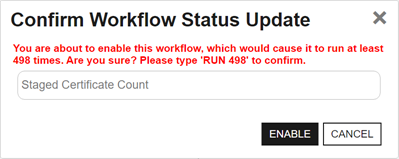
Figure 198: Warning on Save for Certificate Entered or Left Collection Workflow
-
Certificate Left Collection
Initiates a workflow instance when a certificate is identified that no longer meet the query criteria of the specified certificate collection. For example, when a certificate in the Web Server Certificates collection disappears, a REST request can be made to open a support ticket request to investigate the removal of a web server certificate.
The workflow is initiated by two automated tasks that Keyfactor Command runs periodically. The first runs against your collections to identify certificates that no longer meet the query criteria of each certificate collection. Certificates are added to a temporary table from which workflows of this type draw. Certificates are added for all collections regardless of whether they have active workflows. The second reads the temporary table and generates workflow instances for any active workflows of this type. The temporary table is cleared each time the first task runs.
Each of these tasks runs every 10 minutes by default and the schedules for them are not end-user configurable.
If the task has run to create the temporary table of certificates that no longer meet the query criteria of the specified certificate collection but a workflow has not yet run for the given collection—perhaps it is disabled or has not yet been created—there is a window of time (until the temporary table is cleared) during which if a workflow is created or enabled for the certificate collection, the user creating or enabling the workflow will receive a warning message indicating that the workflow will run multiple times and asking the user for confirmation to continue. The user must enter RUN followed by the number of workflow instances that will be initiated to continue.
-
Certificate Entered Store
Initiates a workflow instance when a certificate has been added to or has entered a certificate store for the specified certificate store type. For example, when a certificate appears in a trusted certificate store, a REST request can be made to check the support ticketing system for a change request, and the workflow can then generate an email message notifying the PKI administrators that a new certificate has appeared in a trusted store if a change request is not found.
The workflow is initiated by two automated tasks that Keyfactor Command runs periodically. The first runs against your certificate store types to identify certificates that have been added to or have entered a certificate store for the specified certificate store type. Certificates are added to a temporary table from which workflows of this type draw. The second reads the temporary table and generates workflow instances for any active workflows of this type. The temporary table is cleared each time the first task runs. Included in the workflow information are the certificate ID, certificate store ID, and certificate store container ID. If the certificate store is not associated with an application, the value will be -1.
Each of these tasks runs every 10 minutes by default and the schedules for them are not end-user configurable.
-
Certificate Left Store
Initiates a workflow instance when a certificate has been removed from or has left a certificate store for the specified certificate store type. For example, when a certificate on your F5 device disappears, a REST request can be made to open a support ticket request to investigate the removal of a certificate from the device.
The workflow is initiated by two automated tasks that Keyfactor Command runs periodically. The first runs against your certificate store types to identify certificates that have been removed from or have left a certificate store for the specified certificate store type. Certificates are added to a temporary table from which workflows of this type draw. The second reads the temporary table and generates workflow instances for any active workflows of this type. The temporary table is cleared each time the first task runs. Included in the workflow information are the certificate ID, certificate store ID, and certificate store container ID. If the certificate store is not associated with an application, the value will be -1.
Each of these tasks runs every 10 minutes by default and the schedules for them are not end-user configurable.
-
Enrollment (Including Renewals)
The workflow is initiated by enrollment
Certificate enrollment refers to the process by which a user requests a digital certificate. The user must submit the request to a certificate authority (CA). for a new or renewed certificate. Steps during the workflow can be used to do things such as require manager approval for the enrollment or manipulate the subject and/or SANs for the certificate request.Note: An enrollment workflow is considered complete when the certificate reaches a state of Active (issued), Failed (denied approval in workflow or error at the CA A certificate authority (CA) is an entity that issues digital certificates. Within Keyfactor Command, a CA may be a Microsoft CA or a Keyfactor gateway to a cloud-based or remote CA. level), Pending, or Waiting for External Validation. The workflow does not wait for external approvals before completing. -
Expiration
The workflow is initiated by an expiration alert. Steps during the workflow can be used to do things such as send an email notification regarding expiring certificates, run a PowerShell script to write notifications to the event log, or automate renewal of certificates.
-
Key Rotation
The workflow is initiated by an SSH
The SSH (secure shell) protocol provides for secure connections between computers. It provides several options for authentication, including public key, and protects the communications with strong encryption. key rotation alert. Steps during the workflow can be used to do things such as send an email notification regarding SSH keys that are approaching their stale date or run a PowerShell script to write notifications to the event log. -
Revocation
The workflow is initiated by revoking a certificate. Steps during the workflow can be configured to do things such as modify the revocation comment entered when the certificate is revoked, append an additional comment, and store the resulting extended comment in a metadata
Metadata provides information about a piece of data. It is used to summarize basic information about data, which can make working with the data easier. In Keyfactor Command, the certificate metadata feature allows you to create custom metadata fields that allow you to tag certificates with tracking information about certificates. field. -
Revocation Monitoring
The workflow is initiated by a revocation monitoring alert. Steps during the workflow can be used to do things such as send an email notification regarding CRLs that are expiring or OCSP endpoints that are unreachable or run a PowerShell script to write notifications to the event log.
Workflow Steps
The following built-in workflow steps are available within the workflows:
-
Invoke AWS Lambda Function
Invoke an AWS Lambda function using IAM credentials or an assumed role. You can call the function directly using an AWS access key and secret, or optionally assume an IAM role using a Role ARN. The Lambda response is saved to a specified property for use in later workflow steps.
-
Invoke Azure Function
Run a REST (API
An API is a set of functions to allow creation of applications. Keyfactor offers the Keyfactor API, which allows third-party software to integrate with the advanced certificate enrollment and management features of Keyfactor Command.) request against an Azure Function supporting either anonymous or function key authentication. The REST request contents are embedded within the step and do not reference an external file. The function can be accessed anonymously if no key is provided or secured by supplying a function access key. -
Invoke Azure Function with OAuth
Run a REST (API) request against an Azure Function protected by OAuth authentication. The request includes OAuth tokens to authenticate the caller. The REST request contents are embedded within the step and do not reference an external file. A function access key is required. The key serves as a shared secret to verify that the request comes from a trusted system, adding an extra layer of security.
-
Invoke REST Request
Run a REST (API) request using Active Directory as an identity provider and Basic or Windows authentication. The REST request contents are embedded within the step and do not reference an external file.
-
Invoke REST Request with OAuth
Run a REST (API) request using an OAuth identity provider and Token authentication. The REST request contents are embedded within the step and do not reference an external file.
-
Keyfactor-Enroll (Enrollment Only)
Enroll for a certificate through Keyfactor Command. The enroll step may occur at any point during the workflow, but only one enroll step may be included in a given workflow. Conditions are not supported on an enroll step. If an enroll step is not added to an Enrollment workflow, one will be included automatically at the end of the workflow. No configuration parameters are required for this step type.
-
Renew Expired Certificates (Expiration Only)
Renew an expired certificate through Keyfactor Command as part of an expiration alert workflow. A separate enrollment workflow is automatically initiated to enroll for the renewed certificate, and the renewal workflow will only be considered complete and successful if that enrollment step completes successfully.
Note: The Keyfactor Command Service (timer service) needs permissions to enroll on the CA and template A certificate template defines the policies and rules that a CA uses when a request for a certificate is received. used for renewal when this step is used.Tip: To renew certificates against an EJBCA CA, the Enforce unique DN A distinguished name (DN) uniquely identifies an entry in an LDAP/X.500 directory by specifying a sequence of relative distinguished names (attribute=value pairs) from the entry up to the directory root. It’s written as a comma-separated string—for example: cn=Alice,ou=People,dc=keyexample,dc=com—with the specific attributes defined by the directory’s schema. setting needs to be turned off in the CA configuration both on the EJBCA instance and in Keyfactor Command (see The Basic Tab). -
Keyfactor-Revoke (Revocation Only)
Revoke a certificate through Keyfactor Command. The revoke step may occur at any point during the workflow, but only one revoke step may be included in a given workflow. Conditions are not supported on a revoke step. If a revoke step is not added to a Revocation workflow, one will be included automatically at the end of the workflow. No configuration parameters are required for this step type.
-
Require Approval
Require approval for a workflow step before the step can be completed. The Require Approval step can require approval from a single approver or from multiple approvers. Approvers are determined by security roles specified directly in the step configuration or by tokens that resolve to security roles at runtime.
When this step runs, workflow execution pauses until the required number of approvals is received from users who are permitted to submit approval decisions, or until a single denial is received. After the approval decision is made, the workflow continues to the next step.
As part of this step, an email message is sent indicating whether the step was approved or denied, typically to the requester. This step does not include logic to send an email initiating the approval process. Use
When requiring approval for enrollment using workflow definitions in Keyfactor Command, templates should not be configured to require manager approval at the CA level in the certificate template. This is because the approval handling is fully controlled within Keyfactor Command. Configuring templates to require CA manager approval at the CA level when using a Keyfactor Command workflow require approval step would require approval both at the Keyfactor Command level and at the CA level, which can lead to unexpected behavior.
Important: Workflows that include approval steps are not supported with CA delegation. For more information, see Delegation Section.Note: Users who receive email notifications requesting approval must belong to a security role, or be resolved through a token, that is permitted to submit approval decisions for the workflow. -
Send an email message. This is a separate email message from those typically sent as part of a Require Approval step. You might send an email message as part of an enrollment request to notify approvers that a new request needs approval. The email messages can be customized to provide detailed information about, for example, the certificate request.
-
Set Variable Data
Run PowerShell commands within the confines of the workflow to populate variables with information to pass back to the workflow. The PowerShell script contents are embedded within the step. This step does not call out to an external script stored in the database. This provides a high level of security by limiting the number of standard PowerShell cmdlets that can be executed by the workflow step. A small number of PowerShell cmdlets have been made available in workflow steps of this type, including:
- ConvertFrom-Csv
- ConvertFrom-Json
- ConvertFrom-Markdown
- ConvertFrom-SddlString
- ConvertFrom-StringData
- ConvertTo-Csv
- ConvertTo-Html
- ConvertTo-Json
- ConvertTo-Xml
- ForEach-Object
- Get-Command
- Group-Object
- Select-Object
- Where-Object
- Write-Error
- Write-Host
- Write-Information
-
Write-Verbose
Note: By default, PowerShell suppresses Verbose messages. Add the following to your script to allow verbose messages:$VerbosePreference = 'Continue' - Write-Warning
Note: Output from PowerShell Write-* cmdlets is written to the Keyfactor Command API log.Important: This step uses PowerShell 7 to run. -
Update Certificate Request Subject\SANS for MSFT CAs (Enrollment Only)
On an enrollment (either CSR
A CSR or certificate signing request is a block of encoded text that is submitted to a CA when enrolling for a certificate. When you generate a CSR within Keyfactor Command, the matching private key for it is stored in Keyfactor Command in encrypted format and will be married with the certificate once returned from the CA. or PFX A PFX file (personal information exchange format), also known as a PKCS #12 archive, is a single, password-protected certificate archive that contains both the public and matching private key and, optionally, the certificate chain. It is a common format for Windows servers.), create a resigned CSR to prepare an updated enrollment request for delivery to a Microsoft CA after a previous step in the workflow has been used to update either the SANs in the initial request, subject (DN) in the initial request or both. This step must be placed later in the workflow any steps to modify the SANs and/or subject. The SANs and subject may be modified with either of the PowerShell step types or a custom step type. The step creates a new CSR using the same public key In asymmetric cryptography, public keys are used together in a key pair with a private key. The private key is retained by the key's creator while the public key is widely distributed to any user or target needing to interact with the holder of the private key. as the original CSR using the updated SAN The subject alternative name (SAN) is an extension to the X.509 specification that allows you to specify additional values when enrolling for a digital certificate. A variety of SAN formats are supported, with DNS name being the most common. and/or subject values. It signs the new CSR with the certificate provided in the step's configuration.For this type of step you will need an enrollment agent certificate available as a PKCS #12
A PFX file (personal information exchange format), also known as a PKCS #12 archive, is a single, password-protected certificate archive that contains both the public and matching private key and, optionally, the certificate chain. It is a common format for Windows servers. (.PFX) file with included private key Private keys are used in cryptography (symmetric and asymmetric) to encrypt or sign content. In asymmetric cryptography, they are used together in a key pair with a public key. The private or secret key is retained by the key's creator, making it highly secure. to import into Keyfactor Command. This can be a user certificate or a computer certificate (for example, generated from a copy of the Enrollment Agent template or the Enrollment Agent (Computer) template) and must have a Certificate Request Agent EKU.Note: The built-in Enrollment Agent and Enrollment Agent (Computer) templates do not allow private keys to be exported by default. To create a PKCS #12 (.PFX) file, you must use a template that allows private key export or manually override the private key export setting.Important: This step applies to Microsoft CAs only. If this step is added to workflow for requests directed to an EJBCA CA, it will fail on enrollment. Note that EJBCA supports submission of updated SAN or subject details as part of standard functionality. -
Update Metadata
Update a metadata field in Keyfactor Command with either a static value or a value from a token from the worklow (see Substitutable Text Tokens for Workflow). If you use a token, it needs to be populated before the Update Metadata step runs.
-
Use Custom PowerShell
Run a PowerShell script that has been imported into the Keyfactor Command database. All scripts in the database that have been configured with the workflow category will be available for use.
Important: This step uses PowerShell 7 to run by default. Some cmdlets that run in earlier versions of PowerShell are not compatible with PowerShell 7. If you need to use a PowerShell cmdlet that is not compatible with PowerShell 7, you may need to activate the PowerShell 5.1 option. PowerShell 5.1 is not supported on Keyfactor Command servers running in a non-Windows environment.Important: This step type is not supported when running Keyfactor Command in containers under Kubernetes. Use step type Set Variable Data instead. -
Windows Enrollment Gateway - Populate from AD (Enrollment Only)
When an enrollment is performed through the Keyfactor Windows Enrollment Gateway using a client-side template configured with Build from this Active Directory information, this workflow step formats the incoming subject, SANs, and/or SID so that the certificate request is accepted by the target CA and the mapped Keyfactor Command template, which is not configured to build from Active Directory.
Any client-side template used by the Keyfactor Windows Enrollment Gateway that builds the subject from Active Directory must have a workflow step of this type configured on the corresponding Keyfactor Command template mapped in the gateway.
This workflow step has no configuration parameters
Important: The template in Keyfactor Command that is mapped to the client-side template configured to build the subject from Active Directory also needs to be configured with three enrollment fields to support handling the incoming subject, SANs, and/or SID. For more information, see Templates Configured to Build the Subject from the Local Active Directory.
There are also built-in step that you won't see unless you're using the Keyfactor API to view or edit the workflows (see Workflow Definitions). These NOOP steps indicate the start and end of the workflow for housekeeping purposes.
Workflow also supports the addition of fully custom steps that can be created if the built-in steps do not meet your needs. For more information, check with your Keyfactor Customer Success Manager or visit the Keyfactor Support Portal(opens page in a new tab) to open a support ticket.
Global and Custom Workflow Definitions
There are two categories of workflow definition:
-
Global
The global workflow definitions are built into the product and cannot be deleted, though they can be modified to add workflow steps, if desired. Global workflow definitions do not have a specific associated key and apply to all requests of the workflow's type (for example, enrollment) that are not otherwise handled by a custom workflow specifying a key.
-
Custom
Custom workflow definitions are any additional workflow definitions you define beyond the built-in ones. Custom workflows are associated with a specific key and each workflow only applies to requests made using that key. The key varies depending on the type of workflow. For example:
- Enrollment workflows use the certificate template as the key with an optional second level key of the enrollment pattern.
- Certificate entered and left collection workflows use the certificate collection as the key.
- Certificate entered or left certificate store workflows use the certificate store type as the first level key with an optional second level key of the certificate store container.
How Workflow Definition Changes Affect Requests
Workflow instances are created using the version of the workflow definition that is active at the time the request is initiated. Changes made to a workflow definition after a request has started do not automatically apply to that request.
This behavior ensures consistency and auditability by guaranteeing that a request completes using the workflow logic that was in effect when it began.
A user submits an enrollment request while version 3 is active. Before the request is approved, an administrator updates the workflow and publishes version 4.
The existing request continues using version 3 of the workflow definition.
A request will use the current version of the workflow definition only if the workflow instance is restarted. This can occur in the following situations:
- If the administrator observed the version 3 workflow (suspended because it is awaiting approvals), knew there was a new version of the workflow, and pro-actively restarted the workflow instance. A workflow instance restarted from a suspended state will always restart (from the beginning) with the currently active version of the workflow definition.
- If the administrator observed the version 3 workflow, stopped the workflow knowing it should not be allowed to complete with the workflow definition it was submitted with, made a further update to the workflow definition, and then restarted the workflow with the newly updated version of the workflow definition. One common reason to stop and restart rather than just restarting would be to allow time to make changes to the workflow.
- If the original request failed for some reason (for example, the CA was not responding when the final approval was received and the request was submitted to the CA) and the administrator chose to restart the failed request with the currently active version of the workflow definition (the default) rather than the original version of the workflow after resolving the reason for the failure.
 ) next to the
 You can also find Help in the Navigator The Navigator is the Keyfactor Command left-hand (newer versions) or top (older versions) navigation menu. Certificate collections and reports can be configured to be added to the menu using user-defined Show in Navigator settings.. From here you can choose to open either the Keyfactor Software & Documentation Portal at the home page or the Keyfactor API Endpoint Utility.
Keyfactor provides two sets of documentation: the On-Premises Documentation Suite and the Managed Services Documentation Suite. Which documentation set is accessed is determined by the Application Settings: On-Prem Documentation setting (see Application Settings: Console Tab).