
You can open Endpoint Details—which shows the scan history for the SSL TLS (Transport Layer Security) and its predecessor SSL (Secure Sockets Layer) are protocols for establishing authenticated and encrypted links between networked computers. job along with all certificates discovered and their metadata Metadata provides information about a piece of data. It is used to summarize basic information about data, which can make working with the data easier. In Keyfactor Command, the certificate metadata feature allows you to create custom metadata fields that allow you to tag certificates with tracking information about certificates.—by double-clicking a result in the SSL discovery grid, selecting View Endpoint Details from the right-click menu, or choosing View Endpoint Details from the toolbar after highlighting a row.
Locations → SSL Discovery → Results Tab
The endpoint An endpoint is a URL that enables the API to gain access to resources on a server. history dialog includes this information:
- The SSL/TLS Endpoint Details section of the dialog includes details of the selected certificate including the IP address, port, DNS The Domain Name System is a service that translates names into IP addresses. name, SNI Server name indication (SNI) is an extension to TLS that provides for including the hostname of the target server in the initial handshake request to allow the server to respond with the correct SSL certificate or allow a proxy to forward the request to the appropriate target. (if available), endpoint network name, orchestrator Keyfactor orchestrators perform a variety of functions, including managing certificate stores and SSH key stores. pool name that contained the orchestrator which performed the scan, and monitoring status of the certificate (true/false).
- The Chain Level dropdown allows you to view details of certificates chained to the selected certificate. The default is the end entity certificate.
- The Certificate Details section provides details of the certificate selected in the chain level dropdown.
- The Endpoint History section on the right side of the endpoint history dialog details each individual scan including the date of the scan, source (monitoring or discovery), the IP address and the certificate status.
The details menu can also provide information on why a certificate was not found if one was expected.
Endpoint history records on the endpoint details page older than 30 days, by default, are automatically purged daily. You can change the length of time for which records are retained by updating the Retain SSL Endpoint History (days) in the application settings.
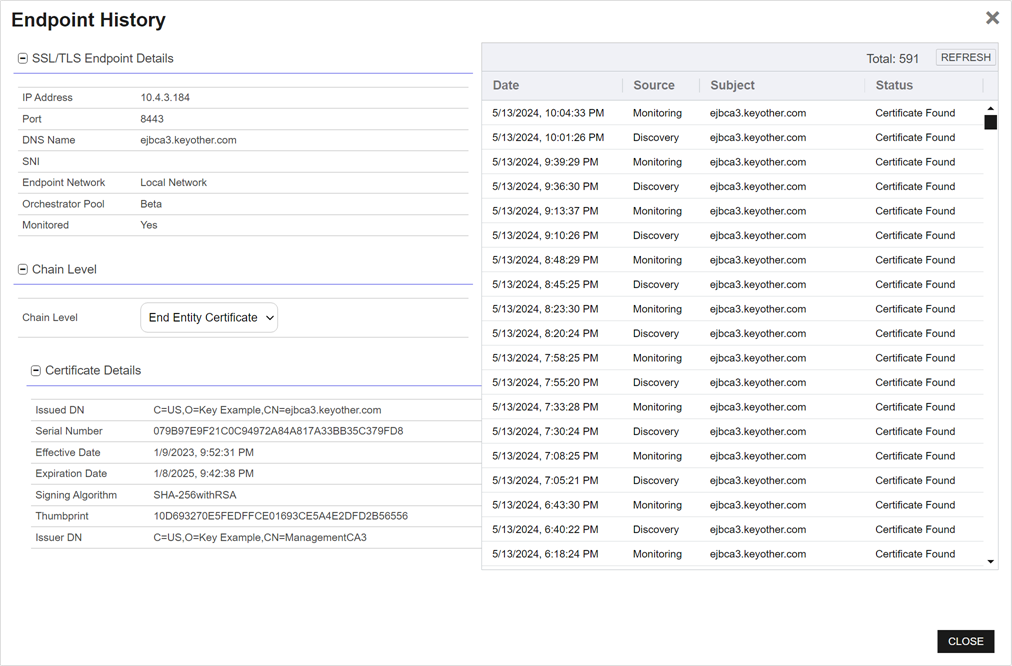
Figure 342: SSL Discovery and Monitoring Result Details
Was this page helpful? Provide Feedback