
On the Users tab of the Server Manager page you can view all the SSH The SSH (secure shell) protocol provides for secure connections between computers. It provides several options for authentication, including public key, and protects the communications with strong encryption. users defined in Keyfactor Command. Both users and service accounts are included. See SSH for more information on the difference between users and service accounts. Active Directory groups may also be included if they have previously been used to create Linux logon to Keyfactor user mappings (see Edit Access to an SSH Server). Groups appear without associated keys (since keys are associated with the member users, not the groups). Users may appear here without associated keys if the user account has been used to grant ownership on a server group but the user has not requested an SSH key pair In asymmetric cryptography, public keys are used together in a key pair with a private key. The private key is retained by the key's creator while the public key is widely distributed to any user or target needing to interact with the holder of the private key..
SSH → Server Manager → Users Tab
On this tab you can see the keys associated with each user and create mappings between the users and Linux logons to allow the orchestrator Keyfactor orchestrators perform a variety of functions, including managing certificate stores and SSH key stores. to publish new SSH keys for those users to the SSH servers associated with the selected Linux logons (see SSH).
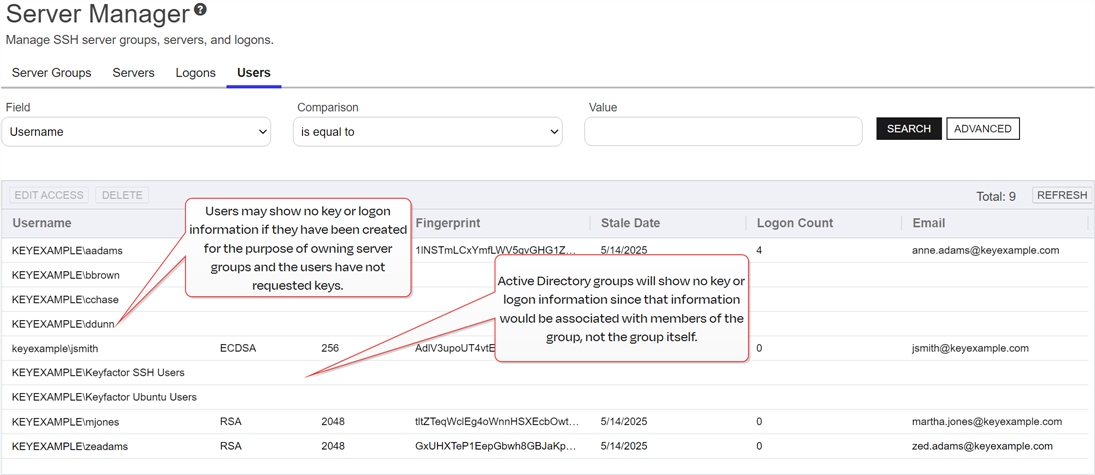
Figure 407: SSH Users Grid
Searching SSH Users
This page supports the standard query format described in Using Search in the Management Portal and includes its own set of query parsers specific to this operation. Use the following parsers to filter and refine results for this page.
-
Username
Complete or partial matches with the username of the user. Keyfactor users (based on Active Directory users), Active Directory groups, and service accounts are included in the grid. For Active Directory users and groups, the username is in the form DOMAIN\username. For service accounts, the username is made up of the username and client host name
The unique identifier that serves as name of a computer. It is sometimes presented as a fully qualified domain name (for example servername.keyexample.com) and sometimes just as a short name (for example servername). entered when the service account key was created (for example, testapp@appsrvr75). Supports the %ME% token (see Advanced Search). -
KeyType
A number of cryptographic algorithms can be used to generate SSH keys. Keyfactor Command supports RSA
A widely used public-key cryptosystem, RSA is commonly used for encryption and digital signatures. It is based on the mathematical difficulty of factoring large integers., Ed25519 A member of the EdDSA family, Ed25519 is designed for high security and speed. It is widely used in modern cryptography and provides robust protection with a 256-bit key size., and ECDSA ECDSA (Elliptic Curve Digital Signature Algorithm) is used for digital signatures in public-key cryptography. It offers strong security with smaller key sizes compared to RSA, making it ideal for resource-constrained environments.. RSA keys are more universally supported, and this is the default key type The key type identifies the type of key to create when creating a symmetric or asymmetric key. It references the signing algorithm and often key size (for example AES-256, RSA-2048, Ed25519). when generating a new key. -
KeyLength
The key size
The key size or key length is the number of bits in a key used by a cryptographic algorithm. available when generating a new key depends on the key type selected. Keyfactor Command supports 256 bits for Ed25519 and ECDSA and 2048 or 4096 bits for RSA. The default key length The key size or key length is the number of bits in a key used by a cryptographic algorithm. is 2048.
-
Fingerprint
The fingerprint of the public key
In asymmetric cryptography, public keys are used together in a key pair with a private key. The private key is retained by the key's creator while the public key is widely distributed to any user or target needing to interact with the holder of the private key.. Each SSH public key has a single cryptographic fingerprint that can be used to uniquely identify the key. -
Email
The email address of the user requesting the key. This email address is used to alert the user when the key pair is approaching the end of its lifetime (see Key Rotation Alerts).
-
The date on which the SSH key pair is considered to have reached the end of its lifetime. By default, the lifetime of an SSH key pair is 365 days (see Application Settings: SSH Tab). Supports the %TODAY% token (see Advanced Search).
-
The number of Linux logons associated with the user.
Edit Access for an SSH User
On the Details tab of the Edit User dialog, you can view details about the user and associated key. On the Access Management tab of the Edit User dialog, you can map Keyfactor user accounts to Linux logon account to cause the SSH keys in Keyfactor Command associated with those Keyfactor users to be published to the authorized_keys file of the Linux user (see SSH).
To map an Keyfactor user to a Linux logon:
- Double-click the user whose key you wish to publish to one or more Linux logons or select the user and choose Edit Access from the toolbar or right-click menu.
-
On the Access Management tab in the Login Access dropdown, select a logon to associate the user or service account with. A logon will appear more than once if it exists on more than one server. Be sure to select the logon on the correct server. Click Add.
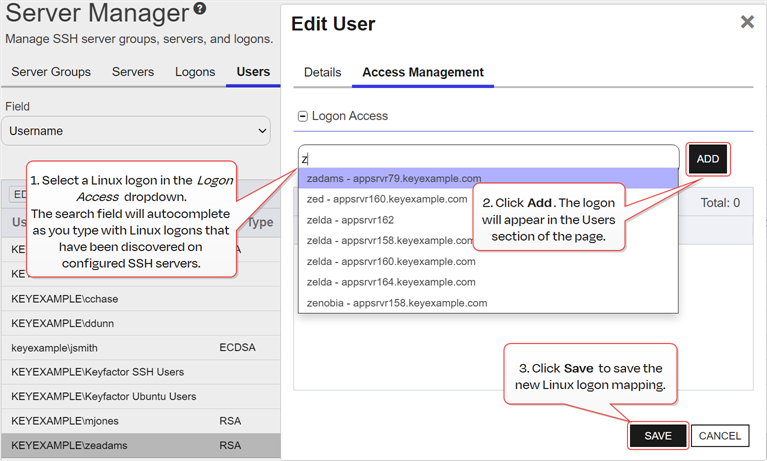
Figure 408: Edit Access for a Keyfactor User
- Click Save to save the access management settings.
Delete an SSH User
To delete a user, select the user and choose Delete from the toolbar or right-click menu.
Was this page helpful? Provide Feedback