
The Certificate Count Grouped by Single Metadata Metadata provides information about a piece of data. It is used to summarize basic information about data, which can make working with the data easier. In Keyfactor Command, the certificate metadata feature allows you to create custom metadata fields that allow you to tag certificates with tracking information about certificates. Field report summarizes how many certificates were issued within a selected date range for each distinct value of a chosen metadata field. It displays the results in a simple two-column table that lists each populated metadata value and the number of certificates that share that value.
Reports → Report Manager or Reports → Certificate Count Grouped by Single Metadata Field (if it has been added to the Navigator)
For example, selecting an email metadata field (e.g., AppOwnerEmailAddress) produces one row per unique email address found on certificates issued during the selected period, along with a count of how many certificates use that address.
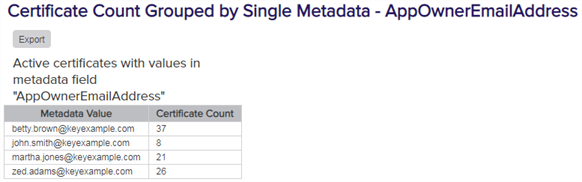
Figure 85: Certificate Count Grouped by Single Metadata Field
The export options for the Certificate Count Grouped by Single Metadata Field report are CSV, Excel, and PDF.
The input parameters for this report are:
- Metadata field to report on (Boolean, integer, multiple choice, email, and string fields only).
- Start date and end date defining the date range. The default is the past month ending today. Only certificates issued within this range are included..
Was this page helpful? Provide Feedback