
By default, EJBCA supports a wide variety of SAN The subject alternative name (SAN) is an extension to the X.509 specification that allows you to specify additional values when enrolling for a digital certificate. A variety of SAN formats are supported, with DNS name being the most common. types and a total SAN length of 2000 characters.
If you need to enroll certificates through Keyfactor Command against an EJBCA CA A certificate authority (CA) is an entity that issues digital certificates. Within Keyfactor Command, a CA may be a Microsoft CA or a Keyfactor gateway to a cloud-based or remote CA. that either:
-
Use a custom SAN type, or
-
Include enough SAN entries to exceed the 2000-character limit,
additional configuration in EJBCA is required.
To support large or custom SANs, add a custom certificate extension in EJBCA and update the certificate and end entity profiles associated with enrollment Certificate enrollment refers to the process by which a user requests a digital certificate. The user must submit the request to a certificate authority (CA). through Keyfactor Command.
Create a Custom Extension
To add a custom extension to support enrolling with large or custom SANs:
- In the EJBCA administration portal, browse to System Configuration > System Configuration > Custom Certificate Extensions.
-
On the Custom Certificate Extensions page, create a new custom extension with the following values:
-
Label: A name of your choice. This appears in certificate profiles when configuring custom extensions. For example, Override SAN.
-
Critical: No
-
Required: No
-
Encoding: DEROBJECT
Click Edit to open the extension for editing to change the required value to No and the encoding value to DEROBJECT.
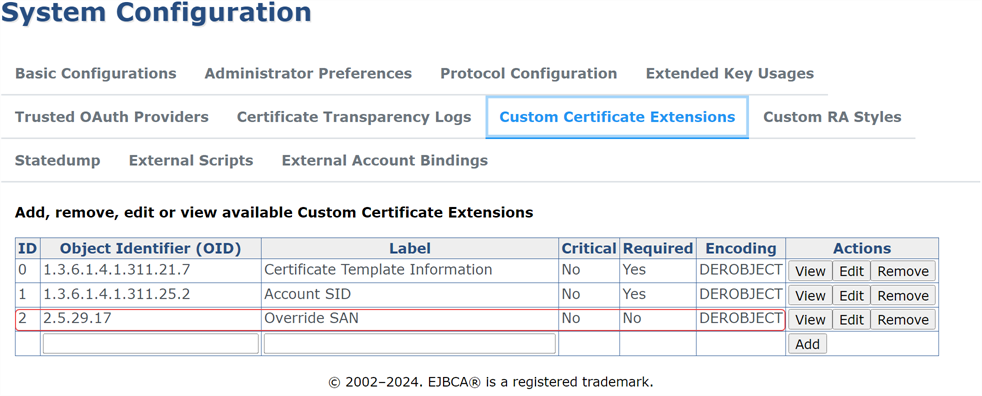
Figure 513: Create a Custom Certificate Extension for Large or Custom SANs
Configure a Certificate Profile to Support Large or Custom SANs
To configure a certificate profile:
- In the EJBCA administration portal, browse to CA Functions > Certificate Profiles.
- On the Manage Certificate Profiles page, open the certificate profile you will using for enrollment from Keyfactor Command for editing.
-
Large SANs: On the profile editing page, scroll down to locate the X509v3 extensions: Subject Alternative Name section and the Search enabled setting. Uncheck Search enabled.
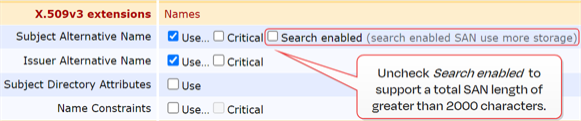
Figure 514: Uncheck Search Enabled for Large SAN Support
-
Large and Custom SANs: Scroll down to locate the Other Extensions: Used Custom Certificate Extensions section and select the custom certificate extension you created in the previous step.
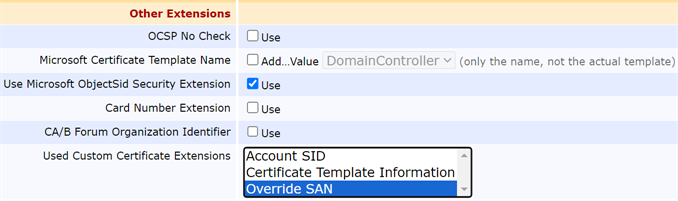
Figure 515: Turn on the Override SAN Custom Certificate Extension for Custom SAN Support
- Save your changes to the certificate profile.
Configure an End Entity Profile to Support Large or Custom SANs
When enrolling for certificates that include large or custom SANs, the associated end entity profile must not have Required or Use entity <field> field (for example, Use entity CN field) turned on for any SAN elements.
If existing end entity profiles use either of these options, create a new end entity profile to support large or custom SAN enrollment.
To configure an end entity profile:
- In the EJBCA administration portal, browse to RA Functions > End Entity Profiles.
- On the Manage End Entity Profiles page, open the end entity profile you will using for enrollment from Keyfactor Command for editing.
- Scroll down to locate the Subject Alternate Name elements in the Other Subject Attributes section.
-
Uncheck Required and Use entity <field> field for all Subject Alternate Name elements.
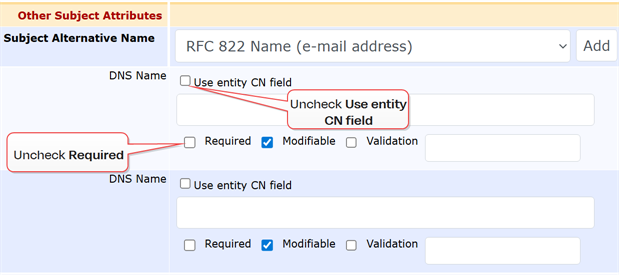
Figure 516: Turn Off Required and Use entity <field> field for Custom SAN Support
- Save your changes to the end entity profile.