
The PUT /Templates operation updates selected information about a certificate template A certificate template defines the policies and rules that a CA uses when a request for a certificate is received.. On success, the operation returns HTTP 200 OK with details about the specified template.
To avoid unintended data loss, first perform a GET to retrieve the existing record, update only the required fields, and then submit the full set of values in the PUT request.
Table 975: PUT Templates Input Parameters
| Name | In | Description |
|---|---|---|
| Allow One Click Renewals | Body | A Boolean indicating whether One-Click Renewal will be allowed for certificate renewals requested with this template (True or False). To use One-Click Renewal for certificates, the Allow One-Click Renewals option must be turned on in both the certificate templates and CAs to which you want one-click renewal to apply (see Certificate Templates |
| Allowed Enrollment Types | Body |
An integer indicating the type of enrollment allowed for the certificate template. Note: This parameter is considered deprecated and may be removed in a future release.
These values are populated based on configurations made for the default enrollment policy. |
| Allowed Requesters | Body |
An array of strings containing the list of Keyfactor Command security roles—as strings—that have been granted enroll permission on the template. The Allowed Requesters list at the template level has been replaced by the Associated Roles list at the enrollment pattern level (see POST Enrollment Patterns) and are populated based on configurations made for the default enrollment policy. Note: This parameter is considered deprecated and may be removed in a future release.
|
| CertificateCleanupEnabled | Body |
A Boolean indicating whether the certificate cleanup job is turned on for the template (True or False). The default is True. Important: If a certificate with a stored private key is deleted and later restored, the stored private key will not be restored.
The certificate cleanup task runs daily at 1:00 UTC and removes expired certificates from the database. Once removed, these certificates are not re-imported during a standard CA synchronization unless certificate cleanup is later turned off. CA synchronization tasks use the certificate cleanup settings to determine whether a certificate is eligible for cleanup and whether to exclude such certificates from import. For more information, see Certificate Cleanup. Certificate cleanup settings can be configured at three levels:
Note: The system-wide settings for certificate cleanup are configured in application settings (see Application Settings: Console Tab).
|
| DeleteWithArchiveKey | Body | A Boolean that sets whether certificates with a private key stored in the system are eligible for removal by the certificate cleanup task. |
| Enrollment Fields | Body |
An array of objects containing custom enrollment fields. This data is configured at the enrollment pattern level (see POST Enrollment Patterns). Note: This parameter is considered deprecated and may be removed in a future release.
|
| Friendly Name | Body |
A string indicating the Keyfactor Command friendly name of the template. Note: This parameter is considered deprecated and may be removed in a future release.
|
| Id | Body | Required. An integer indicating the ID of the template in Keyfactor Command. |
| IsEphemeral | Body | A Boolean that sets whether the template is ephemeral. If set to True, during a CA synchronization, certificates associated with an ephemeral template will be skipped. The default is False. See Templates:Details Tab. |
| Key Archival | Body |
A Boolean indicating whether the template has been configured with the key archival setting in Active Directory (True or False). This is a reference field and is not configurable. |
| Key Retention | Body |
A string indicating the key retention type used to store private keys in Keyfactor Command for certificates enrolled with this template. |
| Key Retention Days | Body |
An integer indicating the number of days a certificate’s private key will be retained in Keyfactor Command before being scheduled for deletion, if private key retention is turned on. |
| Key Usage | Body |
An integer indicating the total key usage of the certificate. Key usage is stored in Keyfactor Command as a single value made up of a combination of values. For example, a value of 160 would represent a key usage of digital signature with key encipherment. A value of 224 would add nonrepudiation to those. |
| Manageability | Body |
New enum field in the templates DB table, Manageability, which displays the manageability setting on a template, which are determined algorithmically based on the situation when the template is imported.
|
| Metadata Fields | Body |
An array of objects containing template-level metadata field settings. For most use cases, this data is configured at the enrollment pattern level (see POST Enrollment Patterns). Metadata fields are returned only when a template-level value is set that overrides the system-wide setting. Note: The order of precedence for evaluating metadata settings during enrollment is as follows:
|
| Requires Approval | Body |
A Boolean indicating whether the template has been configured with the Microsoft CA certificate manager approval option active (True or False). Important: Any templates that are configured on the Microsoft CA Issuance Requirements tab for CA certificate manager approval cannot be used for enrollment and associated alerting in Keyfactor Command without configuring private key retention. Any of the active private key retention settings (settings other than none as described for KeyRetention) will allow a template requiring manager approval to work with Keyfactor Command PFX and CSR enrollment.
Figure 508: Microsoft Issuance Requirements on a Template for Manager Approval |
| Template Defaults | Body |
An array of objects containing individual template-level template default settings. This data is configured at the enrollment pattern level (see POST Enrollment Patterns) and will be populated based on the default enrollment pattern. Any data submitted in this parameter will be updated to the enrollment pattern marked as the TemplateDefault for the specified template. Note: This parameter is considered deprecated and may be removed in a future release.
|
| Template Policy | Body |
An object containing the individual template-level template policy settings. This data is configured at the enrollment pattern level (see POST Enrollment Patterns) and will be populated based on the default enrollment pattern. Metadata fields are returned by this parameter Note: This parameter is considered deprecated and may be removed in a future release.
|
| Template Regexes | Body |
An array of objects containing individual template-level regular expressions against which to validate the subject data. This data is configured at the enrollment pattern level (see POST Enrollment Patterns) and will be populated based on the default enrollment pattern. Any data submitted in this parameter will be updated to the enrollment pattern marked as the TemplateDefault for the specified template. Note: This parameter is considered deprecated and may be removed in a future release.
|
| TimeAfterExpiration | Body | The amount of time after certificate expiration to wait until the certificate is eligible for removal by the certificate cleanup task. |
| TimeAfterExpirationUnits | Body | The time unit to apply to the certificate expiration time (TimeAfterExpiration). Options are days, weeks, or months. |
| Use Allowed Requesters | Body |
A Boolean that indicates whether the Restrict Allowed Requesters option should be turned on (True) or not (False). The Restrict Allowed Requesters option at the template level has been replaced by the Use AD Permissions option at the enrollment pattern level (see POST Enrollment Patterns). Note: This parameter is considered deprecated and may be removed in a future release.
|
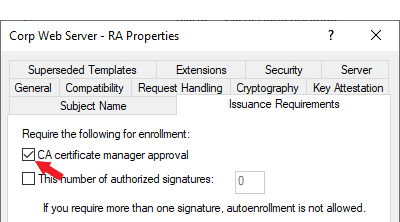
Table 976: PUT Templates Response Body
| Name | Description |
|---|---|
| Allow One Click Renewals | A Boolean indicating whether One-Click Renewal will be allowed for certificate renewals requested with this template (True or False). To use One-Click Renewal for certificates, the Allow One-Click Renewals option must be turned on in both the certificate templates and CAs to which you want one-click renewal to apply (see Certificate Templates |
| Allowed Enrollment Types |
An integer indicating the type of enrollment allowed for the certificate template. Note: This parameter is considered deprecated and may be removed in a future release.
These values are populated based on configurations made for the default enrollment policy. |
| Allowed Requesters |
An array of strings containing the list of Keyfactor Command security roles—as strings—that have been granted enroll permission on the template. The Allowed Requesters list at the template level has been replaced by the Associated Roles list at the enrollment pattern level (see POST Enrollment Patterns) and are populated based on configurations made for the default enrollment policy. Note: This parameter is considered deprecated and may be removed in a future release.
|
| CertificateCleanupEnabled |
A Boolean indicating whether the certificate cleanup job is turned on for the template (True or False). The default is True. Important: If a certificate with a stored private key is deleted and later restored, the stored private key will not be restored.
The certificate cleanup task runs daily at 1:00 UTC and removes expired certificates from the database. Once removed, these certificates are not re-imported during a standard CA synchronization unless certificate cleanup is later turned off. CA synchronization tasks use the certificate cleanup settings to determine whether a certificate is eligible for cleanup and whether to exclude such certificates from import. For more information, see Certificate Cleanup. Certificate cleanup settings can be configured at three levels:
Note: The system-wide settings for certificate cleanup are configured in application settings (see Application Settings: Console Tab).
|
| Common Name |
A string representing the short name (common name) of the certificate template. For a template created using a Microsoft management tool, this will be the Microsoft template name, which typically does not contain spaces. For templates associated with an EJBCA CA, the name is usually constructed using the format end entity profile name_certificate profile name. If the end entity profile and certificate profile share the same name, only the end entity profile name is used. This field is populated based on information retrieved from the CA and is not configurable. |
| Configuration Tenant |
A string indicating the configuration tenant of the template. For Microsoft templates, this field is populated from Active Directory. For EJBCA templates, this field is populated from the Keyfactor Command CA record. The field is not configurable. |
| Curve |
A string indicating the friendly name of the elliptic curve algorithm configured for the template returned from the CA, for ECC templates. Possible values include:
If the template supports more than one curve, this field contains the minimum curve value. |
| DeleteWithArchiveKey | A Boolean that sets whether certificates with a private key stored in the system are eligible for removal by the certificate cleanup task. |
| Display Name | A string indicating the Keyfactor Command display name of the template. If a template friendly name is configured, this is used as the display name. If not, the template name is used. The display name appears in the dropdowns for PFX enrollment, CSR enrollment, and CSR generation. The display name is a generated field and is not directly configurable. |
| Enrollment Fields |
An array of objects containing custom enrollment fields. This data is configured at the enrollment pattern level (see POST Enrollment Patterns). Note: This parameter is considered deprecated and may be removed in a future release.
|
| Extended Key Usages |
An array of objects containing the extended key usage information for the template. This field is populated from the CA and is not configurable. |
| Forest Root |
A string indicating the forest root of the template. For Microsoft templates, this field is populated from Active Directory and is not configurable. Note: The ForestRoot has been replaced by the ConfigurationTenant but is retained for backwards compatibility.
|
| Friendly Name |
A string indicating the Keyfactor Command friendly name of the template. Note: This parameter is considered deprecated and may be removed in a future release.
|
| Id | An integer indicating the ID of the template in Keyfactor Command. |
| IsEphemeral | A Boolean that sets whether the template is ephemeral. If set to True, during a CA synchronization, certificates associated with an ephemeral template will be skipped. The default is False. See Templates:Details Tab. |
| Key Algorithms |
An object containing the primary key algorithms defined for the template as reported by the CA, limited to the key types supported by Keyfactor Command. This information indicates all the algorithms that could possibly be supported when the template is used for enrollment. Enrollment policy within Keyfactor Command might limit this. This is a reference field and is not configurable. |
| Key Archival |
A Boolean indicating whether the template has been configured with the key archival setting in Active Directory (True or False). This is a reference field and is not configurable. |
| Key Retention |
A string indicating the key retention type used to store private keys in Keyfactor Command for certificates enrolled with this template. |
| Key Retention Days |
An integer indicating the number of days a certificate’s private key will be retained in Keyfactor Command before being scheduled for deletion, if private key retention is turned on. |
| KeySize | A string indicating the minimum supported key size of the template as returned by the CA. This value is calculated based on the algorithms provided in the template from the CA (see KeyAlgorithms). The algorithm key types and sizes are evaluated in order (RSA, ECC, Ed448, and Ed25519) and from these, the minimum type and size is determined. For example, if the template supports RSA, Ed448, and Ed25519, the minimum key type will be evaluated to RSA. Then for that algorithm, the minimum key size returned by the CA will be selected (for example, 2048 if 2048 and 4096 are returned for RSA). See the KeyAlgorithms field for the complete list of supported key sizes and types. The field is not configurable. |
| KeyType | A string indicating the key type of the template as returned by the CA. See details under KeySize. See the KeyAlgorithms field for the complete list of supported key sizes and types. The field is not configurable. |
| KeyTypes | A string containing a comma-delimited list of the key sizes and types supported for the template returned from the CA as they are displayed in the Management Portal templates grid. Possible values include RSA 2048, ECC P-384, Ed25519, and Ed448. |
| Key Usage |
An integer indicating the total key usage of the certificate. Key usage is stored in Keyfactor Command as a single value made up of a combination of values. For example, a value of 160 would represent a key usage of digital signature with key encipherment. A value of 224 would add nonrepudiation to those. |
| Manageability |
New enum field in the templates DB table, Manageability, which displays the manageability setting on a template, which are determined algorithmically based on the situation when the template is imported.
|
| Metadata Fields |
An array of objects containing template-level metadata field settings. For most use cases, this data is configured at the enrollment pattern level (see POST Enrollment Patterns). Metadata fields are returned only when a template-level value is set that overrides the system-wide setting. Note: The order of precedence for evaluating metadata settings during enrollment is as follows:
|
| Oid | A string containing the object ID of the template. For Microsoft templates, this field is populated from Active Directory. For EJBCA templates, this field is generated within Keyfactor Command as an object identifier, but does not follow official OID conventions. The field is not configurable. |
| Requires Approval |
A Boolean indicating whether the template has been configured with the Microsoft CA certificate manager approval option active (True or False). Important: Any templates that are configured on the Microsoft CA Issuance Requirements tab for CA certificate manager approval cannot be used for enrollment and associated alerting in Keyfactor Command without configuring private key retention. Any of the active private key retention settings (settings other than none as described for KeyRetention) will allow a template requiring manager approval to work with Keyfactor Command PFX and CSR enrollment.
Figure 509: Microsoft Issuance Requirements on a Template for Manager Approval |
| RFC Enforcement |
A Boolean indicating whether RFC 2818 compliance enforcement is active (True or False). This setting is configured at the enrollment pattern level (see POST Enrollment Patterns) and will be populated based on the default enrollment pattern. Note: This parameter is considered deprecated and may be removed in a future release.
|
| Template Defaults |
An array of objects containing individual template-level template default settings. This data is configured at the enrollment pattern level (see POST Enrollment Patterns) and will be populated based on the default enrollment pattern. Note: This parameter is considered deprecated and may be removed in a future release.
|
| Template Name |
A string containing the name of the template. For a template created using a Microsoft management tool, this will be the Microsoft template display name. For a template generated for an EJBCA CA, this will be built using a naming scheme of end entity profile name (certificate profile name). This field is populated based on information retrieved from the CA and is not configurable. |
| Template Policy |
An object containing the individual template-level template policy settings. This data is configured at the enrollment pattern level (see POST Enrollment Patterns) and will be populated based on the default enrollment pattern. Metadata fields are returned by this parameter Note: This parameter is considered deprecated and may be removed in a future release.
|
| Template Regexes |
An array of objects containing individual template-level regular expressions against which to validate the subject data. This data is configured at the enrollment pattern level (see POST Enrollment Patterns) and will be populated based on the default enrollment pattern. Note: This parameter is considered deprecated and may be removed in a future release.
|
| TimeAfterExpiration | The amount of time after certificate expiration to wait until the certificate is eligible for removal by the certificate cleanup task. |
| TimeAfterExpirationUnits | The time unit to apply to the certificate expiration time (TimeAfterExpiration). Options are days, weeks, or months. |
| Use Allowed Requesters |
A Boolean that indicates whether the Restrict Allowed Requesters option should be turned on (True) or not (False). The Restrict Allowed Requesters option at the template level has been replaced by the Use AD Permissions option at the enrollment pattern level (see POST Enrollment Patterns). Note: This parameter is considered deprecated and may be removed in a future release.
|
An API is a set of functions to allow creation of applications. Keyfactor offers the Keyfactor API, which allows third-party software to integrate with the advanced certificate enrollment and management features of Keyfactor Command. Reference and Utility, which allows you to call API operations and view results. It is primarily intended for validation, testing, and workflow A workflow is a series of steps necessary to complete a process. In Keyfactor Command, it refers to the workflow builder, which allows you to automate event-driven tasks such as when a certificate is requested, revoked or found in a certificate store. development, and also serves as an interactive supplement to this API documentation. You can access it from the help menu ( ) in the Management Portal.