
The Results tab displays the endpoints discovered by SSL TLS (Transport Layer Security) and its predecessor SSL (Secure Sockets Layer) are protocols for establishing authenticated and encrypted links between networked computers. network discovery and monitoring scans. Each row represents a discovered endpoint An endpoint is a URL that enables the API to gain access to resources on a server. and shows its current monitoring and review status, along with certificate and network details.
From this page, you can filter and search discovery results, view endpoint details, and manage monitoring and review status for individual endpoints or in bulk.
Locations → SSL Discovery → Results Tab
Results Overview
The Results tab lists endpoints discovered during discovery and monitoring scans. Endpoints that respond but do not present a certificate can also be included.
The following columns provide additional information that may not be obvious:
- DNS Name: The host name The unique identifier that serves as name of a computer. It is sometimes presented as a fully qualified domain name (for example servername.keyexample.com) and sometimes just as a short name (for example servername). resolved by the orchestrator Keyfactor orchestrators perform a variety of functions, including managing certificate stores and SSH key stores. or, if no host name is available, the scanned IP address. Name resolution uses the DNS The Domain Name System is a service that translates names into IP addresses. configuration of the orchestrator host.
- SNI: The Server Name Indication (SNI Server name indication (SNI) is an extension to TLS that provides for including the hostname of the target server in the initial handshake request to allow the server to respond with the correct SSL certificate or allow a proxy to forward the request to the appropriate target.) presented during the TLS TLS (Transport Layer Security) and its predecessor SSL (Secure Sockets Layer) are protocols for establishing authenticated and encrypted links between networked computers. handshake, if applicable.
- Certificate Found: Indicates whether the endpoint presented a certificate during the most recent scan.
-
Monitored: Indicates whether the endpoint is configured for monitoring. You can change the monitoring status by selecting Monitor or Do Not Monitor for the endpoint.
Setting a result to Monitor includes that endpoint in subsequent SSL monitoring scans, which check certificate availability, expiration status, and endpoint responsiveness. Setting a result to Do Not Monitor removes it from monitoring scans and monitoring notifications. The endpoint remains visible in discovery results but is not checked again by monitoring.
Because monitored endpoints are the only endpoints monitoring scans evaluate, they're also the only endpoints that can appear in a monitoring notification email. They are included only if the certificate's expiration date falls within the network definition's Expiration Alerts (in days) threshold and at least one recipient is configured for that network.
-
Reviewed: Indicates whether the endpoint has been marked as reviewed. Newly discovered endpoints are marked as New (not reviewed) by default. You can change the reviewed status by selecting Mark As New or Mark As Reviewed for the endpoint.
The Reviewed status is for user reference and does not affect functionality.
The following actions are available for managing endpoints listed in the Results table.
Searching SSL Results
This page supports the standard query format described in Using Search in the Management Portal and includes its own set of query parsers specific to this operation. Use the following parsers to filter and refine results for this page.
-
Complete or partial matches with the Keyfactor Command reference GUID of the SSL pool that contains orchestrators used to discover and monitor the results.
-
Complete or partial matches with the SSL pool that contains orchestrators used to discover and monitor the results.
-
Complete or partial matches with the certificate common name
A common name (CN) is the component of a distinguished name (DN) that represents the primary name of the object. The value varies depending on the type of object. For a user object, this would be the user's name (for example CN=John Smith). For SSL certificates, the CN is typically the fully qualified domain name (FQDN) of the host where the SSL certificate will reside (for example servername.keyexample.com or www.keyexample.com).. -
CertificateFound
Certificate was found at the endpoint on the most recent scan (True or False).
-
ExpirationDate
Complete or partial matches with the date the certificate found at the endpoint expires.
-
IPAddress
Complete or partial matches with the IP address.
-
IsMonitored
Endpoint has been marked as monitored (true/false). By default, only endpoints that are marked as monitored equals true are displayed.
-
Complete or partial matches with the issuer distinguished name.
-
LastSeen
Matches all or part of the date when the endpoint last connected.
-
NetworkName
Complete or partial matches with the network name.
-
Port
Numeric matches with the port number for the discovered endpoint.
-
Complete or partial matches with the DNS name resolved based on the discovered IP address. If a host name could not be resolved, this will be the IP address.
-
Reviewed
Whether it is true or false that the scan has been reviewed.
-
SelfSigned
Certificate is self-signed (True or False).
-
SNIName
-
Status
The status of the scan. Options include:
-
Certificate Found
-
Timed Out Connecting
-
Exception Connecting
-
Timed Out Downloading
-
Exception Downloading
-
Not SSL
-
Exception in Sql
-
Invalid or Unreachable Host
-
Connection Refused
-
Bad SSL Handshake
-
Client Authentication Failed
-
No Certificate
-
SSL Refused
-
Not Probed
-
Unknown
-
Include Endpoints Without Certificates
Includes endpoints that did not return a certificate in the results. These endpoints may represent services that are unreachable, misconfigured, or not running TLS. By default, endpoints without certificates are excluded from the results.
To include endpoints without certificates, check the Include Endpoints without Certificates box above the toolbar.
View Endpoint Details
The Endpoint History dialog shows the scan history for a discovered SSL endpoint and displays certificate and connection details collected during discovery and monitoring scans.
To view details, double-click a result or select a result and choose View Endpoint Details from the toolbar or right-click menu.
The dialog includes the following sections:
-
SSL/TLS Endpoint Details
Displays information about the selected endpoint, including the IP address, port, DNS name, SNI (if available), network name, SSL pool used for the scan, and current monitoring status.
-
Chain Level
Allows you to select which certificate in the chain to view. By default, the end entity certificate is selected.
-
Certificate Details
Displays metadata
Metadata provides information about a piece of data. It is used to summarize basic information about data, which can make working with the data easier. In Keyfactor Command, the certificate metadata feature allows you to create custom metadata fields that allow you to tag certificates with tracking information about certificates. for the certificate selected in the Chain Level list, including issuer and subject information, validity dates, signing algorithm, and thumbprint. -
Endpoint History
Lists individual discovery and monitoring scan results for the endpoint. Each entry includes the scan date and time, scan source (discovery or monitoring), certificate subject, and scan status.
If a certificate was expected but not found during a scan, the status provides additional information describing the failure.
Endpoint history records older than 30 days are purged automatically by default. You can change the retention period by updating the Retain SSL Endpoint History (days) application setting (see Application Settings: Agents Tab).
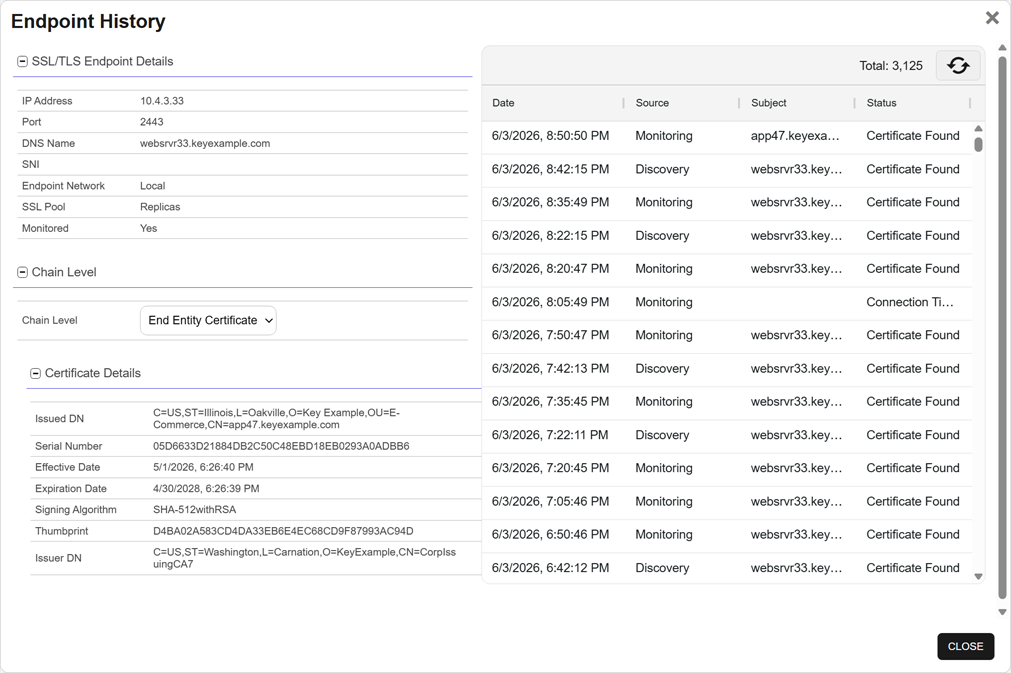
Figure 342: SSL Endpoint History Details
Monitor
Adds the selected endpoint to SSL monitoring. Endpoints added to monitoring are included in subsequent monitoring scans, where the system checks for certificate availability, expiration status, and endpoint responsiveness.
To add a discovered endpoint to monitoring, select a result and choose Monitor from the toolbar or right-click menu.
Do Not Monitor
Removes the selected endpoint from SSL monitoring. The endpoint remains listed in discovery results, but it is no longer included in monitoring scans or monitoring notifications.
To remove a discovered endpoint from monitoring, select a result and choose Do Not Monitor from the toolbar or right-click menu.
Mark as Reviewed
Marks the selected endpoint as reviewed. Review status helps track which newly discovered endpoints have been examined and acknowledged. It is for reference only and does not affect scan or notification behavior.
Newly discovered endpoints are marked as not reviewed by default.
To mark an endpoint as reviewed, select a result and choose Mark as Reviewed from the toolbar or right-click menu.
Mark as New
Marks the selected endpoint as not reviewed. This can be used to re-flag endpoints that require further attention or review.
To change reviewed endpoints to not reviewed, select a result and choose Mark as New from the toolbar or right-click menu.
Monitor All
Adds all endpoints currently listed in the results grid to SSL monitoring. This action is useful when setting endpoints to monitoring for an entire network after an initial discovery scan.
To set all discovered endpoints to monitoring, select a result and choose Monitor All from the toolbar or right-click menu.
Mark All as Reviewed
Marks all endpoints currently listed in the results grid as reviewed.
To set all discovered endpoints to reviewed, select a result and choose Mark All as Reviewed from the toolbar or right-click menu.