
Pending certificate request alerts send email notifications to certificate approvers when a certificate request requiring approval (based on CA A certificate authority (CA) is an entity that issues digital certificates. Within Keyfactor Command, a CA may be a Microsoft CA or a Keyfactor gateway to a cloud-based or remote CA. policy) is received. Notifications can also be sent to the original requester to indicate that their request is pending approval. Alerts can be customized to include detailed information about the certificate request.
Alerts → Pending Request
A workflow is a series of steps necessary to complete a process. In Keyfactor Command, it refers to the workflow builder, which allows you to automate event-driven tasks such as when a certificate is requested, revoked or found in a certificate store. are configured within the workflow (see Add, Copy, or Modify a Workflow Definition).Pending requests are typically generated from certificate templates configured to require manager approval at the CA level.
The functionality of pending request alerts for certificates requested within Keyfactor Command has largely been replaced by Keyfactor Command workflow (see Workflow), which manages approval processes internally. When using workflow, templates generally should not be configured to require manager approval, as this can result in duplicate approval requirements at both the CA and Keyfactor Command levels.
Pending request alerts are retained for use in the following scenarios:
-
Environments not using Keyfactor Command workflow
-
Environments transitioning from CA-based approval to Keyfactor Command workflow
-
Certificates requested outside of Keyfactor Command using templates that require manager approval
A PFX file (personal information exchange format), also known as a PKCS #12 archive, is a single, password-protected certificate archive that contains both the public and matching private key and, optionally, the certificate chain. It is a common format for Windows servers. enrollment Certificate enrollment refers to the process by which a user requests a digital certificate. The user must submit the request to a certificate authority (CA)., templates that require manager approval at the CA level must be configured with private key Private keys are used in cryptography (symmetric and asymmetric) to encrypt or sign content. In asymmetric cryptography, they are used together in a key pair with a public key. The private or secret key is retained by the key's creator, making it highly secure. retention to allow the private key to be downloaded after approval (see Certificate Templates).Adding or Modifying a Pending Request Alert
- On the Pending Certificate Request Alerts page, click Add from the toolbar to create a new alert, or Edit from either the toolbar or right click menu, to modify an existing one.
-
In the Pending Request Alert Settings dialog, select your Certificate Template (or select All Templates) in the first dropdown.
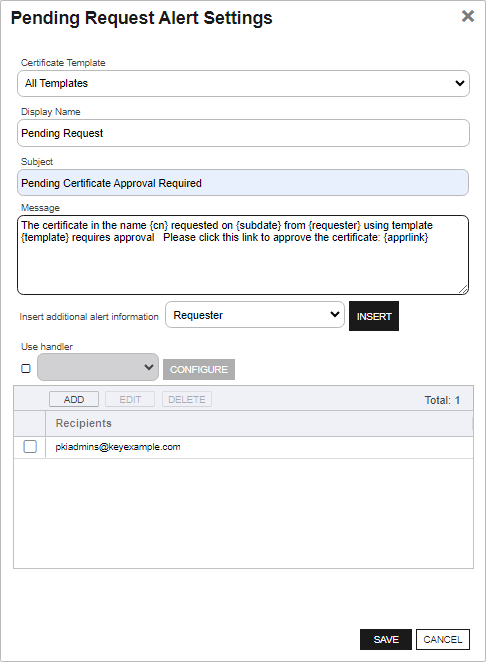
Figure 175: Create a New Pending Request Alert
- In the Display Name field, enter a name for the alert. This name appears in the pending request alerts grid in the Management Portal.
-
In the Subject field, enter a subject line for the email message that will be delivered when the alert is triggered. You can use substitutable special text in the subject line. Substitutable special text uses a variable in the alert definition that is replaced by data from the certificate or certificate metadata
Metadata provides information about a piece of data. It is used to summarize basic information about data, which can make working with the data easier. In Keyfactor Command, the certificate metadata feature allows you to create custom metadata fields that allow you to tag certificates with tracking information about certificates. at processing time. For example, you can enter {rcn} in the alert definition and each alert generated at processing time will contain the specific requested common name A common name (CN) is the component of a distinguished name (DN) that represents the primary name of the object. The value varies depending on the type of object. For a user object, this would be the user's name (for example CN=John Smith). For SSL certificates, the CN is typically the fully qualified domain name (FQDN) of the host where the SSL certificate will reside (for example servername.keyexample.com or www.keyexample.com). of the given certificate request instead of the variable {rcn}.To add substitutable special text to the subject line, place your cursor where you would like the text to appear on the subject line, select the appropriate variable from the Insert special text dropdown, and click Insert. Alternately, type the special text variable enclosed in curly braces (for example, {rdn}).
-
In the Message box, enter the body of the email message that will be delivered when the alert is triggered. You can use the Insert special text dropdown below the message window to add substitutable special text to the message. The metadata that appears in the dropdown will depend on the custom metadata you have defined (see Certificate Metadata). Place your cursor where you would like the text to appear, select the appropriate variable from the dropdown, and click Insert. Alternately, you can type the special text variable enclosed in curly braces directly.
CopyCN: {rcn}
DN: {rdn}
SANs: {san}With this HTML code:
Copy<table>
<tr><td>CN:</td><td>{rcn}</td></tr>
<tr><td>DN:</td><td>{rdn}</td></tr>
<tr><td>SAN:</td><td>{san}</td></tr>
</table>Note: When using HTML to format an email sent from Keyfactor Command, use inline styles and avoid linked stylesheets or embedded <style> rules. Many email clients do not fully support external or embedded CSS.Line breaks are not inserted automatically when HTML formatting is used. Define line breaks explicitly using tags such as <br>, <br/>, or <p></p>.
Recommended:
<p style="font-size:14px; color:#333; margin:0 0 12px;">Hello</p>Not Recommended:
<link rel="stylesheet" href="https://cdn.keyexample.com/styles.css">or
<style>p { color:#333; }</style> - The Approval Link substitutable special text field is an important one to include in your alert intended for the administrator responsible for approving or denying the certificate request. This provides a link in the email message that the administrator can click to be taken to an approve/deny page for the certificate in the Management Portal to either approve or deny the request. This certificate-specific approval page cannot be directly accessed within the Management Portal (though you can approve certificate requests in the Management Portal from the Certificate Requests page (see Certificate Requests).
- Check the Use handler box if you would like the alert to trigger an event handler at processing time, select the appropriate handler in the dropdown, and click the Configure button to configure the event handler. See Adding Logging Handlers to Alerts for information on using event logging handlers.
-
In the Recipients table, click Add to create a new recipient entry. You can add multiple recipients to each
-
You can enter specific email addresses (for example, user@keyexample.com) or use substitutable special text variables (for example, {certemail}) that are replaced with actual email addresses when the
-
To include multiple recipients on the same email, where all recipients of the email will be able to see who the other recipients are, add them in a single row, separated by commas or semicolons (for example, user1@keyexample.com, user2@keyexample.com).
-
To send to multiple recipients in separate emails, where all recipients will receive separate email messages appearing as though there were no other recipients, add them on separate rows.
To use substitutable special text, click the Use a variable from the certificate checkbox to select a built-in variable and choose a value from the dropdown. Each selected variable is added to the alert on its own row and sends a separate email to the respective recipient. You cannot add variables to a line that contains email addresses.
Edit or delete a recipient by selecting it and using the action buttons on the toolbar.
Tip: Keyfactor Command sends SMS (text) messages by leveraging the email to text gateways that many major mobile carriers provide. Check with your carrier for specific instructions. Keyfactor has tested that AT&T can be addressed using 10-digit-number@txt.att.net (for example, 4155551212@txt.att.net) and Verizon can be addressed using 10-digit-number@vtext.com (for example, 2125551212@vtext.com). T-Mobile can be addressed using 10-digit-number@tmomail.net (for example, 2065551212@tmomail.net), but functionality can be spotty. Reliability of alerting via this method depends on the reliability of the carrier’s gateways.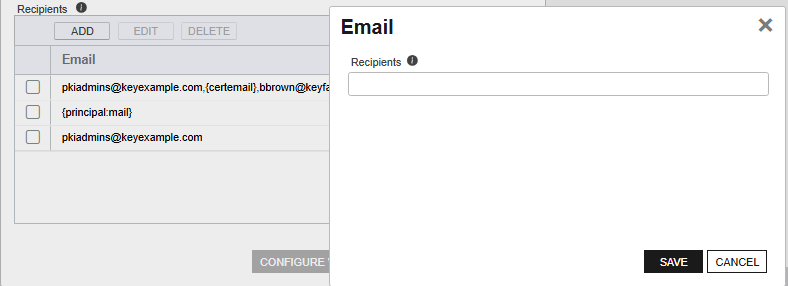
Figure 176: Pending Request Alerts Recipients
-
- Click Save to save your pending request alert.
Copying a Pending Request Alert
You may use the copy operation to create multiple similar alerts—for example, one to the requester of the certificate and one to the administrators responsible for approving it.
- On the Pending Certificate Request Alerts page, highlight a row in the alerts grid, and click Copy from the toolbar or right-click menu.
- The Pending Request Alert Settings dialog will pop-up with the details from the selected alert. The display name field will have - Copy tagged to the end of it to indicate it is a new alert. You may modify the alert as needed and click Save to add the new alert, or Cancel to cancel the operation.
Deleting a Pending Request Alert
- On the Pending Certificate Request Alerts page, highlight a row in the alerts grid, and click Delete from the toolbar or right-click menu.
- On the Confirm Operation alert, click OK to confirm or Cancel to cancel the operation.
Configuring a Pending Request Alert Schedule
After adding your desired pending request alerts, you may configure a schedule to send the alerts.
- On the Pending Certificate Request Alerts page, click Configure at the top of the Pending Certificate Request Alerts page to open the Pending Certificate Request Alert Schedule dialog and configure a monitoring execution schedule. This defines the frequency with which alerts are sent. You can choose to schedule the alerts for:
-
Daily delivery at a specified time
-
An Interval of anywhere from every 1 minute to every 12 hours
-
Turn Off a previously configured schedule
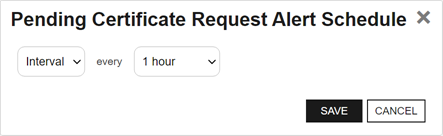
Figure 177: Pending Request Alert Schedule
Testing Pending Request Alerts
Once the alerts are configured, you may run a test of all or selected alerts to see if they are configured correctly.
- On the Pending Certificate Request Alerts page, highlight a row in the alerts grid, and click Test from the toolbar or right-click menu.
-
In the Pending Request Alert Test: Select Targets dialog, select one or more pending requests for testing. Turn on Send Emails if you would like to deliver email messages as part of the test.
Tip: If no pending requests appear in the grid for testing, this indicates no pending requests were found matching the criteria of the alert selected for testing. - Click the Start Tests button to begin generating alerts. Depending on the number of certificate requests to process, this may take a few seconds.
- In the Pending Request Alert Test: Results dialog, review the generated certificate request alerts to confirm that the substitutable special text is being replaced as expected and the recipients are as expected. Scroll the First, Previous, Next, and Last buttons at the bottom of the dialog. The number of alerts generated will display between the navigation buttons.
If you're using an event handler, the event handler is run and the handler actions taken (PowerShell script run, event log message) when the test is run. This is true regardless of the Send Emails setting.
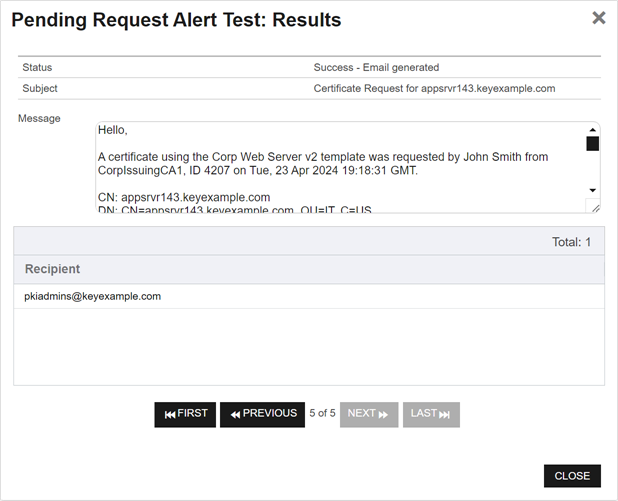
Figure 178: Pending Alert Test
Refer to the following table for a complete list of the substitutable special text that can be used to customize alert messages.
Table 19: Substitutable Special Text for Pending Request Alerts
|
Variable |
Name |
Description |
|---|---|---|
|
{apprlink} |
Approval Link |
Link pointing to the certificate-specific approval page in the Management Portal where the person responsible for approving the request can go to approve or deny the request. |
|
{reqid} |
CMS Request Id |
The request ID for the certificate as stored in the Keyfactor Command database. This is not the same as the request ID issued by the CA. |
|
{rcn} |
Requested Common Name |
Common name contained in the certificate request. |
|
{rdn} |
Requested Distinguished Name |
Distinguished name contained in the certificate request. |
|
{requester} |
Requester |
The user account that requested the certificate from the CA, in the form DOMAIN\username for Active Directory users. |
|
{requester:mail} |
Requester’s Email |
Email address retrieved from Active Directory of the user account that requested the certificate from the CA, if present. Note: This substitutable special text token appears in the dropdown only in environments that use Active Directory as the identity provider.
|
|
{requester:givenname} |
Requester’s First Name |
First name retrieved from Active Directory of the user account that requested the certificate from the CA, if present. Note: This substitutable special text token appears in the dropdown only in environments that use Active Directory as the identity provider.
|
|
{requester:sn} |
Requester’s Last Name |
Last name retrieved from Active Directory of the user account that requested the certificate from the CA, if present. Note: This substitutable special text token appears in the dropdown only in environments that use Active Directory as the identity provider.
|
|
{requester:displayname} |
Requester's Display Name |
Display name retrieved from Active Directory of the user account that requested the certificate from the CA, if present. Note: This substitutable special text token appears in the dropdown only in environments that use Active Directory as the identity provider.
|
|
{careqid} |
Issuing CA / Request ID |
A string containing the Issuing CA name and the certificate’s Request ID from the CA. |
|
{san} |
Subject Alternative Name |
Subject alternative names contained in the certificate request. There are four possible sources for the SANs that appear here:
|
|
{subdate} |
Submission Date |
Date the certificate request was submitted. |
|
{template} |
Template Name |
Name of the certificate template used to create the certificate request. |
|
{templateshortname} |
Template Short Name |
Short name (often the name with no spaces) of the certificate template used to create the certificate request. |
|
{metadata: Email-Contact} |
Email-Contact |
Example of a custom metadata field. |