
Before you install the Keyfactor Windows Enrollment Certificate enrollment refers to the process by which a user requests a digital certificate. The user must submit the request to a certificate authority (CA). Gateway, you need to make sure certain configuration steps have been completed in your managed instance of Keyfactor Command to support using the gateway with Keyfactor Command.
To configure your Keyfactor Command instance to work with your gateway, in the Keyfactor Command Management Portal:
-
Browse to System Settings → Security Roles and Claims and either create or review the security claim and role created for the Keyfactor API
An API is a set of functions to allow creation of applications. Keyfactor offers the Keyfactor API, which allows third-party software to integrate with the advanced certificate enrollment and management features of Keyfactor Command. connection from the gateway (see Review Service Accounts for the Gateway).The service account that holds the API role and communicates with the managed instance of Keyfactor Command needs to be granted the following security role permissions in Keyfactor Command (see Security Role Operations):
- Certificates > Enrollment > CSR
- Certificate Authorities > Read
- Certificate Templates> Read
- Enrollment Patterns > Read
- Security > Read
- Workflows > Definitions > Read
-
Workflows > Instances > Read
If you will be using workflows with manager approval required in Keyfactor Command.
-
Certificates > Collections > Read
If you will be using workflows with manager approval required in Keyfactor Command.
The service account that holds the API role needs to be added in Associated Roles on the enrollment pattern or patterns that will be used for enrollment in Keyfactor Command (see below).
-
Browse to Locations → Certificate Authorities and create a certificate authority
A certificate authority (CA) is an entity that issues digital certificates. Within Keyfactor Command, a CA may be a Microsoft CA or a Keyfactor gateway to a cloud-based or remote CA. record for each EJBCA CA A certificate authority (CA) is an entity that issues digital certificates. Within Keyfactor Command, a CA may be a Microsoft CA or a Keyfactor gateway to a cloud-based or remote CA. that you will access via the gateway (see Add or Modify an HTTPS CA). In the configuration, be aware:- To support the gateway, turn on Use for Enrollment.
- If your EJBCA CA has been configured to Enforce unique DN, your CA record in Keyfactor Command must be configured to Enforce Unique DN as well. Contact your Keyfactor Customer Success Manager or support if you aren’t sure of the value of this setting in your EJBCA CA.
- You will need either a client authentication certificate issued by the EJBCA CA in PKCS #12 A PFX file (personal information exchange format), also known as a PKCS #12 archive, is a single, password-protected certificate archive that contains both the public and matching private key and, optionally, the certificate chain. It is a common format for Windows servers. format to upload into Keyfactor Command or OAuth token information to provide authentication between Keyfactor Command and EJBCA. Contact your Keyfactor Customer Success Manager or support if you don’t have this certificate or OAuth token information.
- On the Certificate Authorities page, configure the EJBCA CA for certificate synchronization and wait for the synchronization to complete (see Add or Modify an HTTPS CA).
-
Browse to Locations → Certificate Templates and search for your EJBCA templates. If they don’t appear, you may need to use the Import Templates option (see Import Templates). Templates auto import periodically but may not have imported before you visit the page.
Note: When EJBCA templates are imported, their names follow this convention:- Short Name: <end entity profile name>_<certificate profile name>
- Display Name: <end entity profile name> (<certificate profile name>)
If the end entity profile name and certificate profile name are the same, only the end entity profile name is used.
For example, if both names are Development Web Server, the Short Name and Display Name will both be Development Web Server.
Only certificate profiles configured as available in a given end entity profile will be imported as templates associated with the given end entity profile name.
- On the Certificate Templates page, open the configuration for each EJBCA template A certificate template defines the policies and rules that a CA uses when a request for a certificate is received. that you will using for mapping in the gateway (see Create or Identify Templates and Enrollment Patterns), and configure the settings (see Edit). Do not turn on Private Key Retention.
-
On the Enrollment Patterns page, create at least one enrollment pattern for each template you wish to use for enrollment and configure the settings (see Add or Modify an Enrollment Pattern). In the configuration, be aware:
-
To support the gateway, turn on CSR Enrollment. You do not need to turn on PFX Enrollment or CSR Generation.
-
Enrollments done through the Keyfactor Windows Enrollment Gateway send the local Active Directory certificate template information to Keyfactor Command as extension data. To support this feature, two configurations need to be done:
-
All enrollment patterns in Keyfactor Command that will be mapped to local templates in the gateway configuration need to be configured with an enrollment field in Keyfactor Command on the Enrollment Fields tab of the enrollment pattern configuration. The enrollment field should be of type String with the following Name:
ExtensionData-1.3.6.1.4.1.311.21.7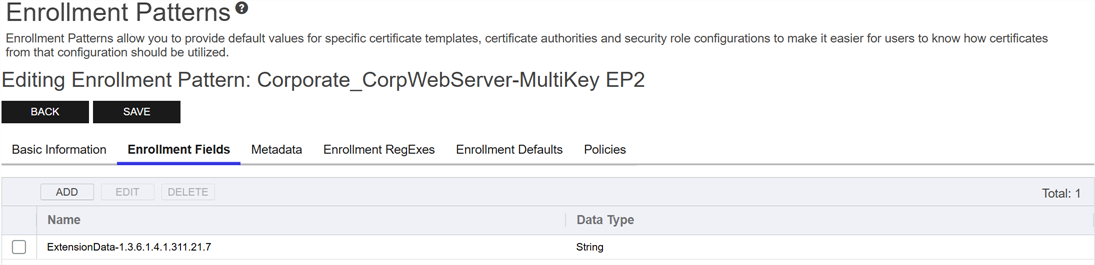
Figure 605: Configure an Extension Data Enrollment Field for Each Mapped Enrollment Pattern
This configuration needs to be completed before a Keyfactor Command template will appear in the gateway configuration mapping tool.
Important: This setting makes it impossible to use the enrollment pattern directly in Keyfactor Command rather than through the gateway, since the enrollment would be expecting you to be able to provide this extension data. If you wish to do direct enrollments in Keyfactor Command for your EJBCA CA as well as through the gateway, you will need a separate set of enrollment patterns and templates on the local side and a separate set of certificate profiles in EJBCA that are not configured to submit extension data with the request. -
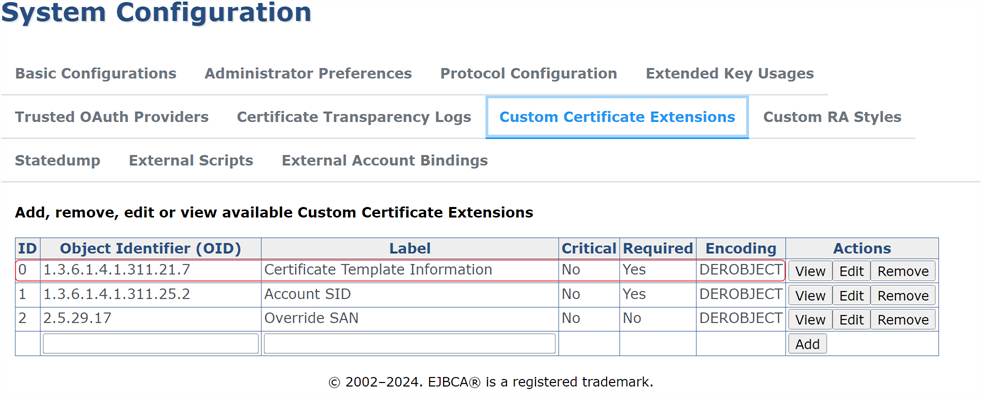
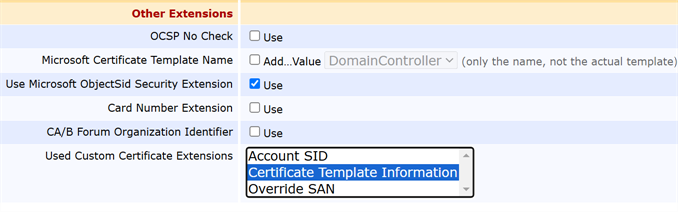
A Custom Certificate Extension for certificate template information must be enabled in EJBCA and then configured on each EJBCA certificate profile you will be using in the gateway. For a Keyfactor-managed instance of EJBCA, this may be configured for you.
Show EJBCA custom extension configuration information.Note: If this configuration is not completed, you will see a warning in the gateway log on certificate enrollment of:The certificate was issued without template extension data.The gateway passes either the template name (for a version 1 template) or the template OID
Object identifiers or OIDs are a standardized system for identifying any object, concept, or "thing" with a globally unambiguous persistent name. and version information (for version 2 and later templates) to Keyfactor Command using this extension data field.
-
-
On the Basic Information tab of each enrollment pattern, turn off the Use AD Permissions option and add the security role created for the Keyfactor API to the Associated Roles.
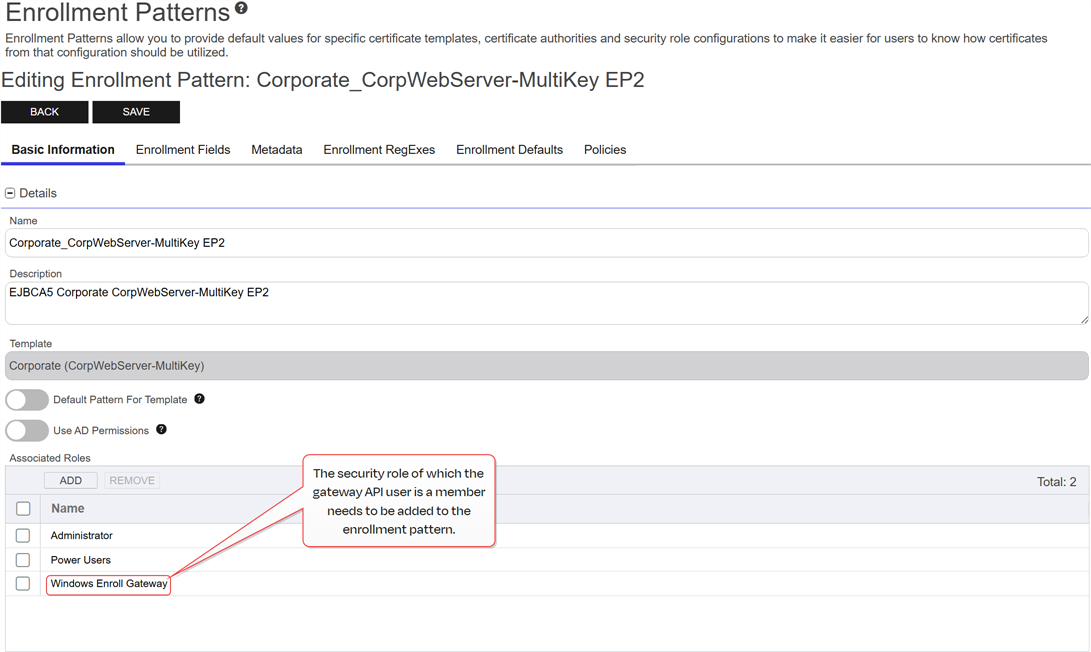
Figure 608: Add the Service Account's Security Roles
-
Optional Configuration
You may need to make further configurations if you use either of the following special features in your environment:
Templates Configured to Build the Subject from the Local Active Directory
The following additional configuration must be completed to allow enrollments done through the Keyfactor Windows Enrollment Gateway using certificate templates in the local environment that have been configured with the Build from this Active Directory information option to be successful:
-
Any enrollment patterns in Keyfactor Command that will be mapped in the gateway configuration to local templates configured with the Build from this Active Directory information option need to be configured with three additional enrollment fields in Keyfactor Command on the Enrollment Fields tab. The enrollment fields should be of type String with the following Names:
EnrollmentGateway-Subject
EnrollmentGateway-SAN
EnrollmentGateway-SID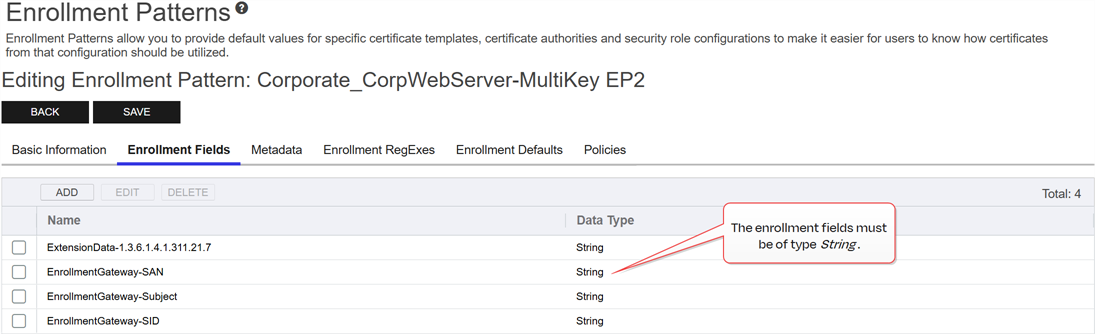
Figure 609: Configure Enrollment Fields on the Enrollment Pattern for Each Template Set to Build the Subject from AD
-
Any enrollment patterns in Keyfactor Command that will be mapped in the gateway configuration to local templates configured with the Build from this Active Directory information option need to be configured without any regular expressions on the subject fields. This includes the CN
A common name (CN) is the component of a distinguished name (DN) that represents the primary name of the object. The value varies depending on the type of object. For a user object, this would be the user's name (for example CN=John Smith). For SSL certificates, the CN is typically the fully qualified domain name (FQDN) of the host where the SSL certificate will reside (for example servername.keyexample.com or www.keyexample.com)., which has a default RegEx A regular expression--RegEx--is a pattern used to validate data by ensuring it meets specific criteria. Several fields on the CSR enrollment, CSR generation, and PFX enrollment pages support RegEx validation, including certificate subject and metadata fields. of .+ at the system-wide level to require that a value be provided in the CN on enrollment. In the enrollment pattern configuration, update the CN regular expression A regular expression--RegEx--is a pattern used to validate data by ensuring it meets specific criteria. Several fields on the CSR enrollment, CSR generation, and PFX enrollment pages support RegEx validation, including certificate subject and metadata fields. to override the system-wide default and set the RegEx to a blank value. If you have configured any other system-wide RegEx settings, override these to blank values as well.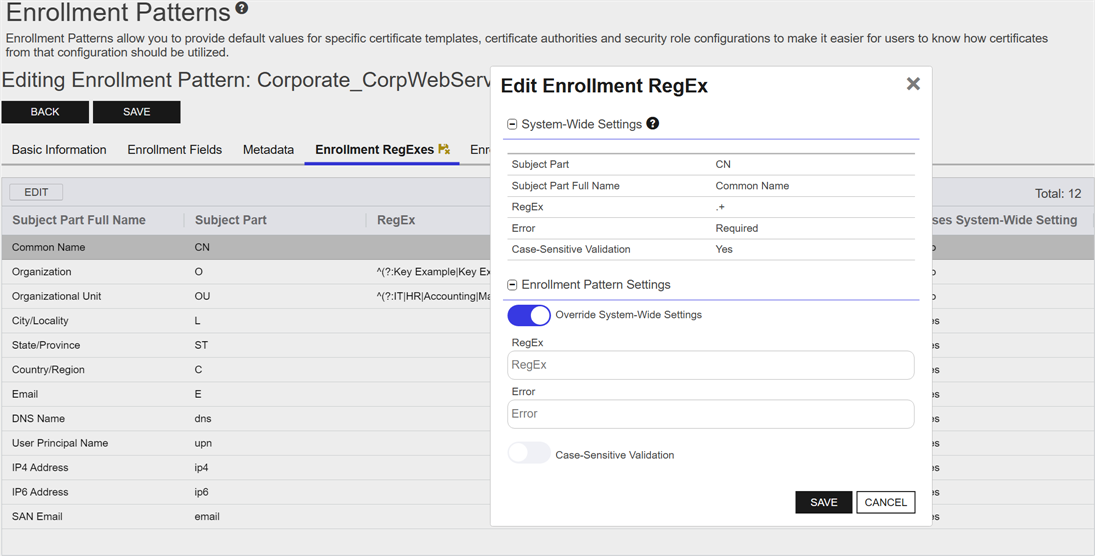
Figure 610: Configure the Enrollment Pattern for Each Build from AD Template with No Regular Expressions
-
An enrollment workflow
A workflow is a series of steps necessary to complete a process. In Keyfactor Command, it refers to the workflow builder, which allows you to automate event-driven tasks such as when a certificate is requested, revoked or found in a certificate store. with a step of type Windows Enrollment Gateway - Populate from AD needs to be created in Keyfactor Command for each template and enrollment pattern with the Build from this Active Directory information option to manage formatting the incoming subject, SANs, and/or SID in the certificate request. This workflow step type has no configuration parameters. See Workflow Definition Operations for information on creating this workflow. -
Certificate profiles and related components need to be configured in EJBCA to support building the subject from AD. For a Keyfactor-managed instance of EJBCA, this may be configured for you.
Show EJBCA custom extension configuration information for build from AD requests.
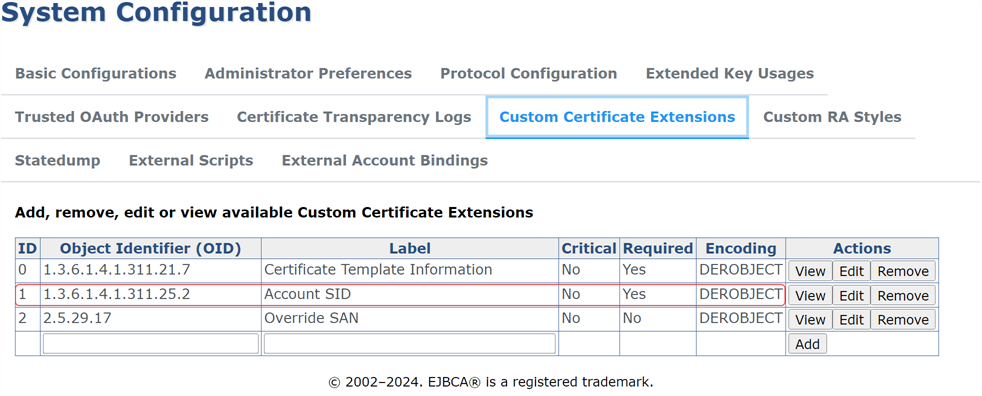
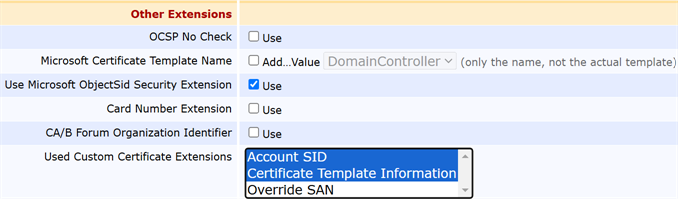
These steps need to be completed before template mapping can be done with this template in the gateway configuration wizard.
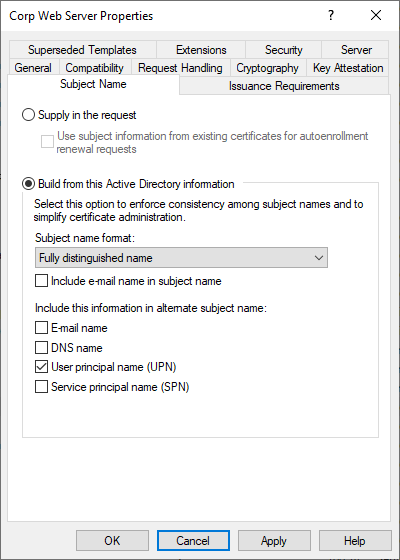
Figure 613: Template Configured to Build the Subject from Active Directory
When a machine or user certificate is issued with a template that has either the User principal name (UPN) or Service principal name (SPN) SAN The subject alternative name (SAN) is an extension to the X.509 specification that allows you to specify additional values when enrolling for a digital certificate. A variety of SAN formats are supported, with DNS name being the most common. boxes checked, and the subject's account does not have a value for userPrincipalName:
-
If the account enrolling is a machine, the PrincipalName SAN will be set to samAccountName$@domain.fqdn.
-
If the account enrolling is a user, the PrincipalName SAN will be set to samAccountName@domain.fqdn.
Templates Configured for Auto-enrollment in the Local Active Directory
The following additional configuration must be completed to allow auto-enrollment through the Keyfactor Windows Enrollment Gateway to be successful:
-
For each template in Keyfactor Command that will be mapped to a local template that will be used for auto-enrollment, follow the configuration steps outlined for Templates Configured to Build the Subject from the Local Active Directory.
-
Certificate profiles and related components need to be configured in EJBCA to support auto-enrollment. For a Keyfactor-managed instance of EJBCA, this may be configured for you.
Show EJBCA configuration steps for auto-enrollment.