
Keyfactor offers several orchestrators (a.k.a. agents) that may be used to interact with and enhance the functionality of the Keyfactor Command Server.
This guide covers installation of the following orchestrators:
-
The Keyfactor Universal Orchestrator
 Keyfactor orchestrators perform a variety of functions, including managing certificate stores and SSH key stores. version runs on Windows Servers, Linux servers, and in Linux containers. It can be used to:
-
Run SSL
TLS (Transport Layer Security) and its predecessor SSL (Secure Sockets Layer) are protocols for establishing authenticated and encrypted links between networked computers. discovery and monitoring tasks. -
Manage synchronization of certificate authorities in remote forests (installations on Windows only).
-
Collect logs from the orchestrator for central review (full server installations only).
-
Run custom jobs to provide certificate management capabilities on a variety of platforms and devices.
-
Run custom jobs to execute tasks outside the standard list of certificate management functions. This powerful feature can execute just about any job that requires processing on the orchestrator and submitting data back to Keyfactor Command.
As of this release, the following functions, some of which were part of the Keyfactor Windows Orchestrator, are now included among the custom extensions supported for the Keyfactor Universal Orchestrator:
-
Interact with Amazon Web Services (AWS) resources for certificate management.
-
Interact with Citrix NetScaler devices for certificate management.
-
Interact with F5 devices for certificate management.
-
Interact with Windows servers (a.k.a. IIS certificate stores), create new bindings for IIS web sites and manage certificates in both the Web Hosting certificate store and the Personal certificate store.
-
Remote Java keystore certificate management.
-
Remote PKCS12 store certificate management.
These custom extensions and more are publicly available at:
The final release of the Keyfactor Windows Orchestrator was version 8.7. This version of the Keyfactor Windows Orchestrator is not compatible with Keyfactor Command version 11.0 or greater. Customers should migrate to the Keyfactor Universal Orchestrator with custom extensions as needed.
-
-
Keyfactor Bash Orchestrator
The Bash Orchestrator, one of Keyfactor's suite of orchestrators, is used to discover and manage SSH keys across an enterprise. version 2.0.0The Keyfactor Bash Orchestrator runs on Linux servers and is used to perform discovery and management of SSH
The SSH (secure shell) protocol provides for secure connections between computers. It provides several options for authentication, including public key, and protects the communications with strong encryption. public keys, including installation of new keys and automated removal of unauthorized keys. -
Important: The Keyfactor Java Agent was deprecated in version 12.0 of Keyfactor Command. Customers must migrate to the Keyfactor Universal Orchestrator with the Remote File custom extension publicly available at:
For more information, see Installing Certificate Store Management Extensions.
Keyfactor also offers a variety of tools to allow users to develop custom orchestrators and extensions, including:
-
Keyfactor AnyAgent Framework
The AnyAgent capability of the Keyfactor Universal Orchestrator and Java Agent allows management of certificates regardless of source or location by allowing customers to implement custom agent functionality.
-
Keyfactor Integration SDK
The Keyfactor Integration SDK (software development kit) includes a variety of tools for building a custom orchestrator, including the Keyfactor Native Agent, which is a reference implementation intended for customers wanting to include Keyfactor Command certificate store management functionality in embedded or other platforms.
-
Keyfactor Orchestrator NuGet Package
The Keyfactor Orchestrator NuGet package is designed to allow customers to build custom extensions for the Keyfactor Universal Orchestrator.
-
Keyfactor GitHub Site
Keyfactor offers several publicly available integrations and plugins for the Keyfactor platform in the Keyfactor GitHub. Find all the latest developer tools and resources to integrate the Keyfactor platform with your PKI
A public key infrastructure (PKI) is a set of roles, policies, and procedures needed to create, manage, distribute, use, store and revoke digital certificates and manage public-key encryption., Cloud, and DevOps infrastructure.
These tools for developing custom orchestrators and extensions are not documented in this guide. For more information about these and other custom orchestrator solutions, contact your Keyfactor representative.
Orchestrator Job Overview
Keyfactor orchestrators can be used to perform a wide variety of jobs. Out of the box, orchestrators can manage certificate stores, manage SSH keys, perform SSL scanning, fetch system logs, and synchronize certificates from CAs in remote forests. Orchestrator jobs fall into these broad types:
-
Certificate Store Jobs
This type of job includes the built-in jobs for managing certificate stores, based on the type(s) of certificate stores supported by the orchestrator, and custom-built certificate store jobs that can be added with an extension (see Installing Certificate Store Management Extensions).
Certificate store jobs (built-in or custom-built), are managed in Keyfactor Command with certificate store types. If you're adding a custom-built certificate store job, you'll need to add a user-defined certificate store type to go with it (see Certificate Store Types and Certificate Store Types).
-
Custom Jobs
This type of job is intended to implement just about anything else you need an orchestrator to do other than manage certificate stores. The built-in fetch logs job is an example of a custom job.
Custom jobs are managed in Keyfactor Command with custom job types. If you're adding a custom job, you'll need to add a custom job type to go with it (see Custom Job Types).
Custom jobs are supported only by the KeyfactorUniversal Orchestrator.
-
Other Jobs
This type of job includes the built-in jobs for SSL scanning and certificate synchronization from remote CAs.
Orchestrator Job Flow
An orchestrator job begins when an orchestrator queries Keyfactor Command to ask for jobs and the Keyfactor Command orchestrator API An API is a set of functions to allow creation of applications. Keyfactor offers the Keyfactor API, which allows third-party software to integrate with the advanced certificate enrollment and management features of Keyfactor Command. returns a list of the jobs the orchestrator needs to run. The flow continues as shown in the following chart.
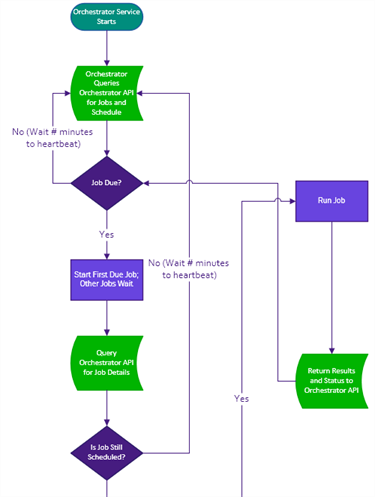
Figure 522: Orchestrator Job Flow
Was this page helpful? Provide Feedback