
September 2025
Keyfactor is pleased to announce the release of Keyfactor Command 25.3, featuring major new enhancements—including a fully customizable, user-specific dashboard.
Please refer to Keyfactor Command Upgrading for important information about the upgrade process. For a complete list of the items included in this release, see Release Note Details v25.3. For gateway and CA Connector Client release notes, see:
- CA Connector Client Release Notes
- Keyfactor Cloud Gateway Release Notes
- Keyfactor Windows Enrollment Gateway Release Notes
- Keyfactor AnyCAGateway DCOM Release Notes
- Keyfactor AnyCA Gateway REST Release Notes
Highlights
-
New Dashboard
A new, customizable dashboard has been introduced, allowing each user to configure their own layout and widgets. In the now-legacy dashboard, all users shared the same layout, and customization was limited to hiding the risk header through permissions.
The new dashboard supports:
-
Adding and positioning widgets as desired
-
Editing widget titles and descriptions
-
Setting critical thresholds to highlight widgets in red
Related API
 An API is a set of functions to allow creation of applications. Keyfactor offers the Keyfactor API, which allows third-party software to integrate with the advanced certificate enrollment and management features of Keyfactor Command. endpoints have been added to support populating dashboard widgets (see Analytics).
Upon upgrading to version 25.3, users will start with a blank dashboard. From there, they can build a custom dashboard or choose to return to the legacy dashboard, which will be removed in a future release. See Dashboard for details.
-
-
Change Owner for Multiple Certificates
The Change Owner operation now supports multiple certificates, making it easier to manage ownership across larger sets of certificates.
-
Multi-Select Support: Users can select multiple certificates in the grid and change their owner in a single action.
-
Permission Validation: If the user lacks sufficient permissions for any selected certificates, a warning is displayed. When this warning appears, none of the selected certificates are modified—even those the user would normally have access to.
-
Detailed Feedback: The warning includes the thumbprints of all certificates the user cannot modify.
-
-
Individually Schedule Expiration Alerts
Expiration alerts can now be scheduled independently, giving administrators more flexibility in how and when alerts are run.
-
Per-Alert Scheduling: Each expiration alert can be assigned its own schedule.
-
Staggered Execution: Expiration alerts are no longer required to run at the same time.
-
Audited Changes: All modifications to an expiration alert, including schedule changes, are fully audited.
-
Upgrade Behavior: During upgrade, each expiration alert’s schedule is set to the value of the last defined Monitoring Execution Schedule.
-
Changes & Improvements
-
Application Settings
-
The File Extension application setting in the PFX
A PFX file (personal information exchange format), also known as a PKCS#12 archive, is a single, password-protected certificate archive that contains both the public and matching private key and, optionally, the certificate chain. It is a common format for Windows servers. section on the Enrollment Certificate enrollment refers to the process by which a user requests a digital certificate. The user must submit the request to a certificate authority (CA). tab has been removed. On certificate download, users can now select a file extension. The default extension varies depending on the download interface. -
A new application setting, DCOM Sync Page Size, has been added to limit the number of records at a time that are read from a DCOM CA
A certificate authority (CA) is an entity that issues digital certificates. Within Keyfactor Command, a CA may be a Microsoft CA or a Keyfactor gateway to a cloud-based or remote CA. during a CA synchronization job. -
The CA Sync Page Size application setting, which limits the number of records at a time that are read from an HTTPS CA during a CA synchronization job, has been renamed to HTTPS Sync Page Size.
-
For the Certificate Cleanup application settings, certificates that are saved in the Keyfactor Command database will not be removed if they are part of a certificate store or have been imported as the result of an SSL
TLS (Transport Layer Security) and its predecessor SSL (Secure Sockets Layer) are protocols for establishing authenticated and encrypted links between networked computers. scan. -
A new application setting, Default ODKG Subject Input to Freeform, controls whether the Freeform subject entry form is shown by default on the On-Device Key Generation (ODKG) page. The setting is disabled by default, but users can manually enable the Freeform input on a case-by-case basis using a toggle.
-
The Delete Certificates with Archived Keys application setting, which identifies whether certificates with a private key
Private keys are used in cryptography (symmetric and asymmetric) to encrypt or sign content. In asymmetric cryptography, they are used together in a key pair with a public key. The private or secret key is retained by the key's creator, making it highly secure. stored in the system are eligible for removal by the Certificate Cleanup task (see Application Settings: Console Tab), has been renamed to Include Certificates with Archived Key in Cleanup.
-
-
Auditing, Logging, Certificate Cleanup, and Certificate History
-
To ensure that granular permission changes are audited, when permission changes for security roles have occurred, the permissions object format has been changed to include both area and permissions.
-
The File Extension is now included in audit log and certificate history records for certificate downloads made from Certificate Download and the POST /Certificates/Recover and POST /Certificates/Download Keyfactor API endpoints.
-
On certificate synchronization, certificates that have removed from Keyfactor Command using the Certificate Cleanup task are skipped and now indicate the reason for skipping in the log with a message similar to:
Import of certificate with thumbprint '<thumbprint>' is being skipped because of its expiration date.Audit logs are no longer created for skipped expired certificates.
-
When the Certificate Cleanup task runs, certificates that are found in a certificate store or have been imported as the result of an SSL scan will not be removed. On subsequent certificate synchronizations and imports, these certificates will not be skipped.
-
Log messages associated with a workflow
A workflow is a series of steps necessary to complete a process. In Keyfactor Command, it refers to the workflow builder, which allows you to automate event-driven tasks such as when a certificate is requested, revoked or found in a certificate store. task now contain the workflow ID of the workflow initiating the task. This GUID follows the correlation ID and remains consistent across all messages from the same workflow instance.
-
-
Certificate Authorities
-
When connecting to a certificate authority
A certificate authority (CA) is an entity that issues digital certificates. Within Keyfactor Command, a CA may be a Microsoft CA or a Keyfactor gateway to a cloud-based or remote CA. use a Keyfactor Universal Orchestrator The Keyfactor Universal Orchestrator, one of Keyfactor's suite of orchestrators, is used to interact with servers and devices for certificate management, run SSL discovery and management tasks, and manage synchronization of certificate authorities in remote forests. With the addition of custom extensions, it can provide certificate management capabilities on a variety of platforms and devices (e.g. Amazon Web Services (AWS) resources, Citrix\NetScaler devices, F5 devices, IIS stores, JKS keystores, PEM stores, and PKCS#12 stores) and execute tasks outside the standard list of certificate management functions. It runs on either Windows or Linux servers or Linux containers., the save button will be labeled simply Save, and the Test Connection button will be disabled. This is because testing the CA connection is not supported through the orchestrator Keyfactor orchestrators perform a variety of functions, including managing certificate stores and SSH key stores.. -
The Delete Certificates with Archived Keys for CA setting, which identifies whether certificates with a private key stored in the system are eligible for removal by the Certificate Cleanup task (see Advanced Tab), has been renamed to Include Certificates with Archived Key in Cleanup.
-
-
Certificate Operations
-
A new File Extension dropdown is available in Certificate Download. The file extension is selected before selecting the File Format and the file formats are limited by the selection made in the file extension dropdown. Previously available file formats of CER
A CER or CRT format certificate file as downloaded from Keyfactor Command is a base64-encoded certificate. Since it's presented in ASCII, you can open it in any text editor. CER/CRT certificates always begin and end with entries like ---- BEGIN CERTIFICATE---- and ----END CERTIFICATE----. CER/CRT certificates contain a single certificate and do not include a subject header. and CRT A CER or CRT format certificate file as downloaded from Keyfactor Command is a base64-encoded certificate. Since it's presented in ASCII, you can open it in any text editor. CER/CRT certificates always begin and end with entries like ---- BEGIN CERTIFICATE---- and ----END CERTIFICATE----. CER/CRT certificates contain a single certificate and do not include a subject header. are no longer options in the File Format dropdown. These are now found in the File Extension dropdown. These are still file extension options in the Keyfactor API to support backwards compatibility.
-
-
Certificate Store Operations & On-Device Key Generation
-
A new Apply Fields to All Stores option has been added to the Add to Certificate Stores dialog for PFX enrollment and certificate search. Toggle this option to enter alias and custom field data once for all stores on the current tab, or enter it individually using each store’s edit dialog.
-
The on-device key generation (ODKG) page now offers an optional Freeform subject entry form instead of the standard subject-specific fields. The Freeform subject entry form can be used to enter certificate subjects that contain fields not supported by the Strict form. Data should be entered in the Freeform subject field in X.500 format.
-
On-device key generation supports overwriting an existing certificate in a certificate store. This functionality requires version 25.3 of the Keyfactor Universal Orchestrator.
-
The View Inventory option now includes a Renew button, allowing the certificate to be renewed from this interface if the user has sufficient permissions.
-
-
Certificate Templates
-
The Delete Certificates with Archived Keys for Template setting, which identifies whether certificates with a private key stored in the system are eligible for removal by the Certificate Cleanup task (see Details Tab), has been renamed to Include Certificates with Archived Key in Cleanup.
-
-
Enrollment
-
A new File Extension dropdown is available in PFX Enrollment and CSR Enrollment. The file extension is selected before selecting the File Format and the file formats are limited by the selection made in the file extension dropdown.
-
The Use Legacy Encryption toggle on the PFX Enrollment page and the Certificate Search download dialog (for certificates with a stored private key) now appears when a file extension is selected that, by default, includes the private key—such as .pem, .p12, .pfx, or .zip.
-
-
Identity Providers
-
Two new parameters—Request Headers and Request URL Parameters—can now be configured in an identity provider record. These are used to send custom data to the OAuth server when Keyfactor Command makes its OIDC request.
-
-
Key Algorithms
-
Keyfactor Command has been updated to allow PFX and CSR
A CSR or certificate signing request is a block of encoded text that is submitted to a CA when enrolling for a certificate. When you generate a CSR within Keyfactor Command, the matching private key for it is stored in Keyfactor Command in encrypted format and will be married with the certificate once returned from the CA. enrollment, and CSR generation with SLH-DSA primary and alternative keys. Templates, Enrollment Patterns (including policy settings) and enrollment pages have been updated as such. -
The Management Portal has been updated to use the same select input for ML-DSA key algorithm input that RSA
A widely used public-key cryptosystem, RSA is commonly used for encryption and digital signatures. It is based on the mathematical difficulty of factoring large integers. and ECC Elliptical curve cryptography (ECC) is a public key encryption technique based on elliptic curve theory that can be used to create faster, smaller, and more efficient cryptographic keys. ECC generates keys through the properties of the elliptic curve equation instead of the traditional method of generation as the product of very large prime numbers. policy inputs use. The ML-DSA policies have been updated to ensure that all of the ML-DSA policy global setting overrides are in sync upon upgrading.
-
-
Security
-
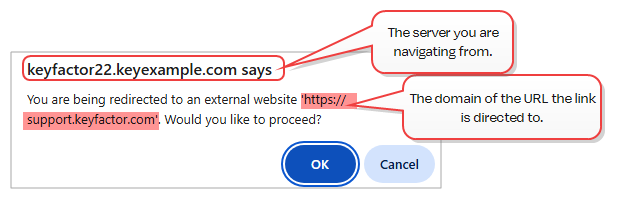
If a script on the page in the Management Portal attempts a full-page redirect, or if a link inside the application is clicked that navigates to another domain, the user will receive a warning they will need to acknowledge to proceed. For visibility, the warning will display the domain the link is directed to. The message will be similar to this:
-
Security roles are now signed using HMACSHA256 or stronger, replacing the previous HMACSHA1-based custom implementation. The new signing utility uses the XML Digital Signature (XmlDSig) standard and explicitly includes the signature algorithm, supporting crypto-agility and compliance with modern security expectations.
Upgrade Considerations:
-
During upgrade, existing security roles signed with the legacy HMACSHA1 method are automatically re-signed using the new standard. Resigned roles remain valid post-upgrade.
-
Resigning all security roles may increase upgrade time, especially in environments with a large number of roles. This is a one-time update and will not recur in future upgrades.
-
Any roles that were invalid prior to upgrade will not be resigned.
-
-
-
Keyfactor Universal Orchestrator
-
A new PowerShell script (Upgrade.ps1) has been added to facilitate upgrading Windows installations of the Keyfactor Universal Orchestrator (see Upgrading or Migrating the Keyfactor Universal Orchestrator).
-
-
Workflow
-
Three new workflow step types have been added:
- Invoke AWS Lambda Function
Invoke an AWS Lambda function using IAM credentials or an assumed role. You can call the function directly using an AWS access key and secret, or optionally assume an IAM role using a Role ARN. The Lambda response is saved to a specified property for use in later workflow steps.
-
Invoke Azure Function
Run a REST (API) request against an Azure Function supporting either anonymous or function key authentication. The REST request contents are embedded within the step and do not reference an external file. The function can be accessed anonymously if no key is provided or secured by supplying a function access key.
-
Invoke Azure Function with OAuth
Run a REST (API) request against an Azure Function protected by OAuth authentication. The request includes OAuth tokens to authenticate the caller. The REST request contents are embedded within the step and do not reference an external file. A function access key is required. The key serves as a shared secret to verify that the request comes from a trusted system, adding an extra layer of security.
- Invoke AWS Lambda Function
-
A new workflow substitutable token, Restarted Workflow Instance Id—$(RestartedWorkflowInstanceId)—has been added. For restarted workflows, this is the reference GUID of the failed or suspended workflow instance that was restarted.
-
Fixes
-
CA threshold monitoring now correctly reports the timeframe for reporting and the certificate issuance count.
-
Disabling the Allow Deprecated API Calls application setting no longer causes an error when loading the Certificate Templates page.
-
Certificate chains can now correctly be built using a CA certificate that contains an empty subject.
-
Requests to the database during Keyfactor Universal Orchestrator system register requests have been reduced to streamline functionality. This will be most noticible when using orchestrators that handle more than 1000 jobs per orchestrator.
Deprecation & Removals
- The license for the Logi Analytics Platform, used by the Keyfactor Command dashboard and reports, will expire on November 28, 2027 and will not be renewed. Customers who have not upgraded to Keyfactor Command 26.1, when the new reports and dashboards will be available, or later by that date will no longer be able to use the dashboard or reports.
Known Issues
-
Searches for workflow instances using the InitiatingUserName query parser fail with an “invalid column name” error. This will be corrected in a future release.
-
Enrollment from the Windows MMC through the Keyfactor Windows Enrollment Gateway fails and generates the following error in the Keyfactor API log:
The supplied certificate format was not recognized. Valid formats are , 'DER' or 'PEM'.This will be corrected in a future release.
API Endpoint Change Log
Please review the information in the API Change Log for this release carefully if you have implemented any integration using these endpoints: API Change Log v25.3.
Was this page helpful? Provide Feedback